Goodbye Limits, Hello Microsoft Foundry
Recently I stumbled into an issue with my GitHub Copilot coding agent. Yes, correctly — I reached the premium request limit in my Visual Studio Code. And everybody knows, a throttling to an old LLM feels like driving an old timer.
I’d been deep in spec-driven development using GitHub’s Spec Kit. This toolkit lets AI agents generate implementations from specifications. It helps you build high-quality software faster. Powerful. Efficient. Game-changing.
But when you hit that limit? Everything changes.
GitHub Copilot throttles you back to GPT-4.1. Suddenly, responses slow down. Accuracy drops. Your workflow stumbles. If you rely on premium models like Claude Opus 4.5, this isn’t just an inconvenience — it’s a productivity killer.
Here’s the good news: there’s an escape hatch. You can configure Microsoft Foundry as an alternative model provider. This breaks you free from the limits. No monthly caps. No throttling. Just uninterrupted access to Claude Opus 4.5 and other powerful models.
In this post, I’ll show you how to set up Microsoft Foundry. You’ll learn to deploy Claude Opus 4.5 and configure VS Code to use it. In addition, you’ll see exactly how it solves my throttling problem. Finally, you’ll imaging what performance gains you can expect.
Let’s dive in.
The Problem
There it was. Right in the middle of my workflow. That message nobody wants to see:
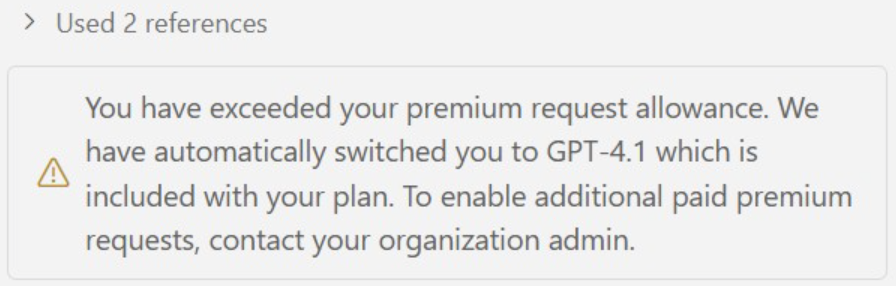
I was deep into building a project spec with GitHub’s new Spec Kit. You know that flow when everything just clicks? I had it. Claude Opus 4.5 was analyzing my entire codebase. Understanding dependencies. Generating specifications that actually made sense. The kind of output that saves you hours of manual documentation and improves the implementation quality later.
Then the limit hit.
Suddenly I’m back on GPT-4.1. Responses get slower. Quality drops dramatically. But here’s what really hurts — Opus isn’t just faster. It’s fundamentally better at understanding large projects. When you’re working with existing code that needs careful integration, Opus reads context across multiple files. It catches dependencies and it understands architectural patterns. Furthermore, it generates changes that actually fit your codebase.
GPT-4.1? It tries. But it misses the nuances. The refactoring suggestions feel generic. The integration logic needs more hand-holding. You spend more time reviewing and correcting. Your flow state? Gone.
I realized something: this isn’t sustainable. If I’m going to use AI agents for serious development work, I need consistent access to the best models. No monthly caps, no surprise throttling, no falling back to inferior performance right when I need it most.
That’s when I started looking for alternatives. And that’s when I discovered Microsoft Foundry could solve exactly my problem.
Discovering Microsoft Foundry
I did what any frustrated developer does. I googled for alternatives.
Turns out, GitHub Copilot supports external model providers. I hadn’t known that. Then I saw Microsoft Foundry listed as a supported source.
Wait. I knew Microsoft Foundry. Microsoft’s platform for deploying AI models. It supports multiple providers — including Anthropic’s Claude.
The pieces clicked. If Copilot accepts external models, and Microsoft Foundry provides Claude Opus 4.5, I could connect them. No GitHub limits. No throttling. Just pay-per-use access to the model I needed.
The idea was too good not to try.
Setting It Up
Here’s how I made it work. The setup took less than 10 minutes. Three main steps: configure Microsoft Foundry in Azure, install the extension, connect to Copilot.
Microsoft Foundry Setup
First, I needed a Microsoft Foundry project with deployed models.
I logged into the Azure portal and created a new Foundry hub and created a new Microsoft Foundry resource:
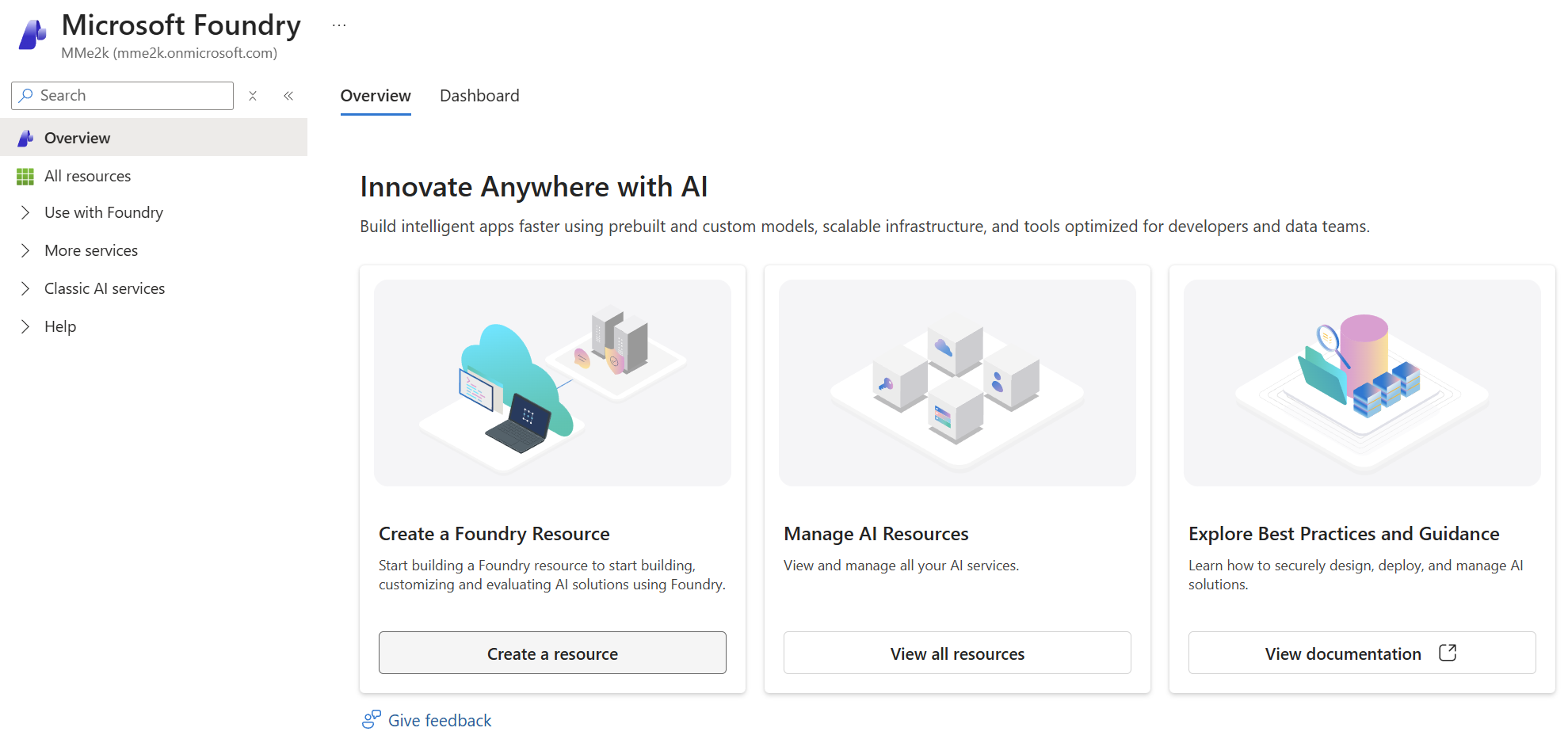
Once the hub was ready, I headed to the model catalog. This is where Microsoft Foundry shines. You get access to thousands of models from multiple providers — OpenAI, Anthropic, Meta, Mistral, and more.
I deployed three Claude models:
- Claude Opus 4.5 — The powerhouse for complex work
- Claude Sonnet — Fast and efficient for everyday tasks
- Claude Haiku — Lightning quick for simple requests
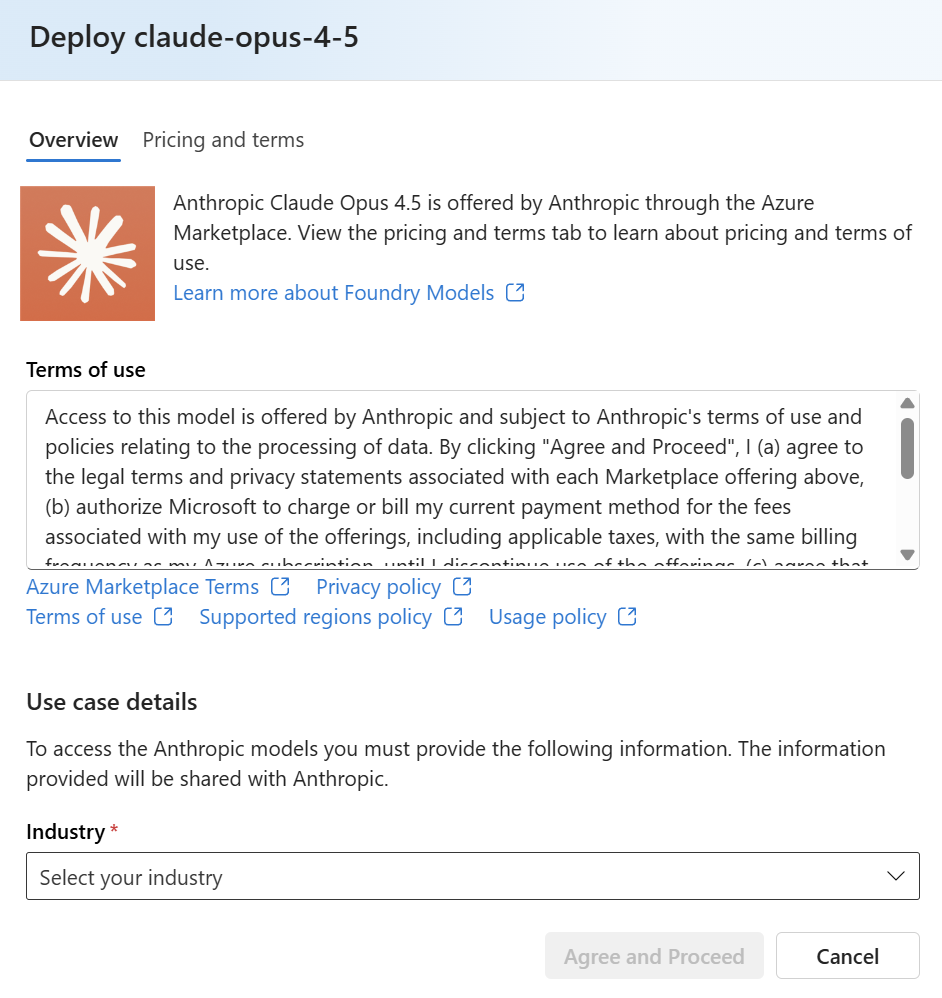
That’s it for Azure. The models are deployed and Microsoft Foundry is ready.
VS Code Extension
Next, I installed the Microsoft Foundry extension for VS Code.

After installation, I signed in with my Azure account. In my extension, I selected my created Microsoft Foundry project as the default project. Then the extension automatically discovered my three Claude models I’d just deployed. No manual configuration needed — it just worked.
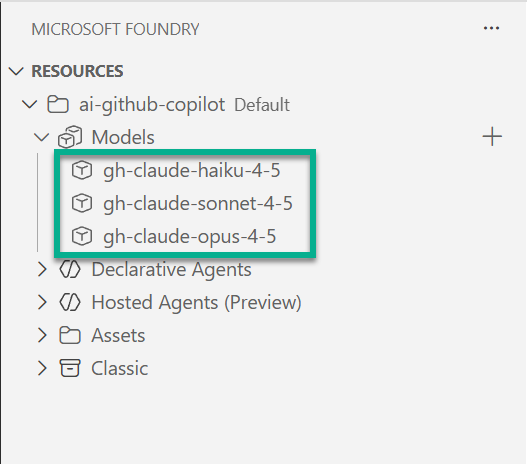
This connection is important. This is because GitHub Copilot uses the Foundry extension’s authentication in the background. In other words, as long as the extension sees your models, Copilot can use them.
Connecting to GitHub Copilot
This is where the magic happens. GitHub Copilot lets you add custom model providers.
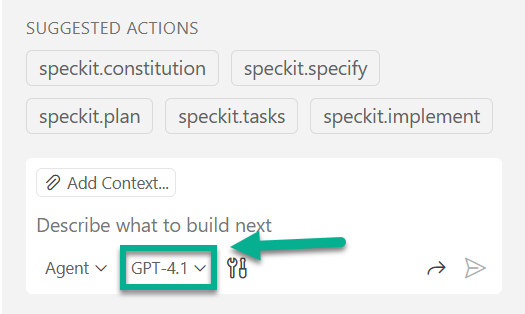
I opened the in VS Code Copilot chat the model selection:
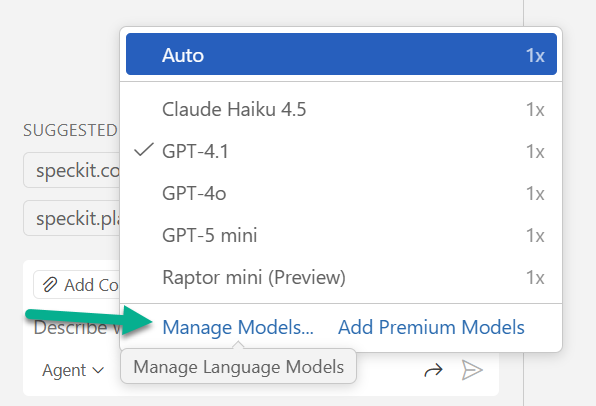
Next, I clicked on Manage models:
Then I toggled on my Microsoft Foundry hosted models from the provider list. Afterwards, I clicked “Add models”:
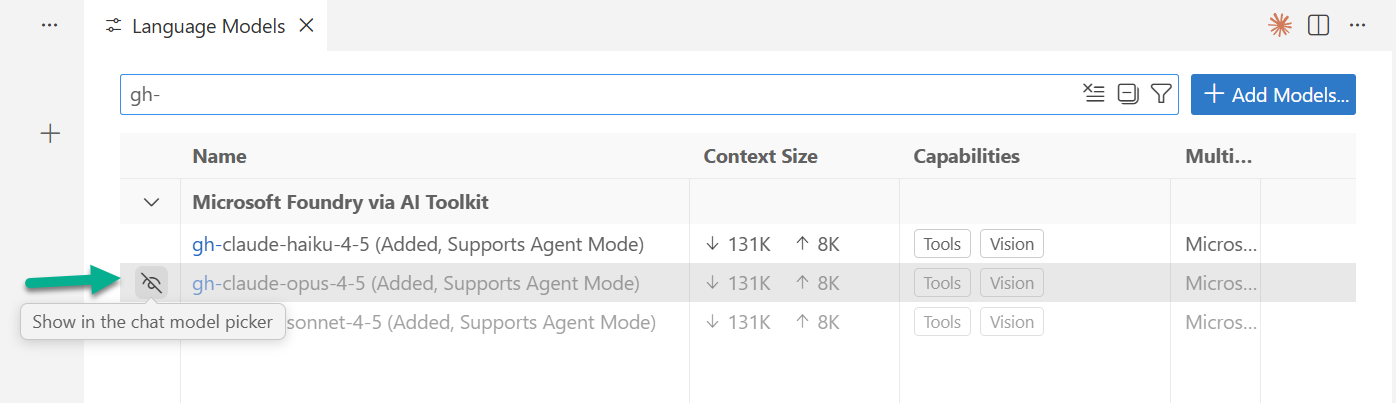
As result, Copilot automatically adds now my Microsoft Foundry models to the model selection. In consequence, all three Claude variants appeared in the model selector:
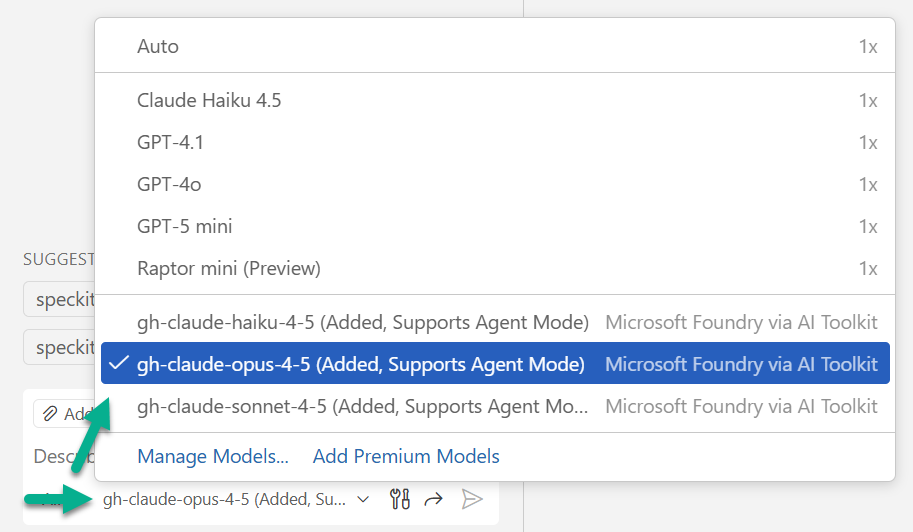
I selected Claude Opus 4.5. That was it. No more limits. No more throttling.
The setup was done. Time to test it.
Back on Track
The moment I switched to Claude Opus through Microsoft Foundry, I felt the difference. No more “old timer” feeling. The responses came back precise, detailed and, more importantly, the quality of the results has improved significantly. It’s like going from a budget sedan back to the modern car with all the gadgets you’re used to.
I jumped right back into my spec-driven development workflow — the one that got me throttled in the first place. GitHub’s spec-kit with agent mode pushing requests hard. This time, no throttling. No downgrade to GPT-4.1. Just Claude Opus delivering exactly what I needed, every single time.
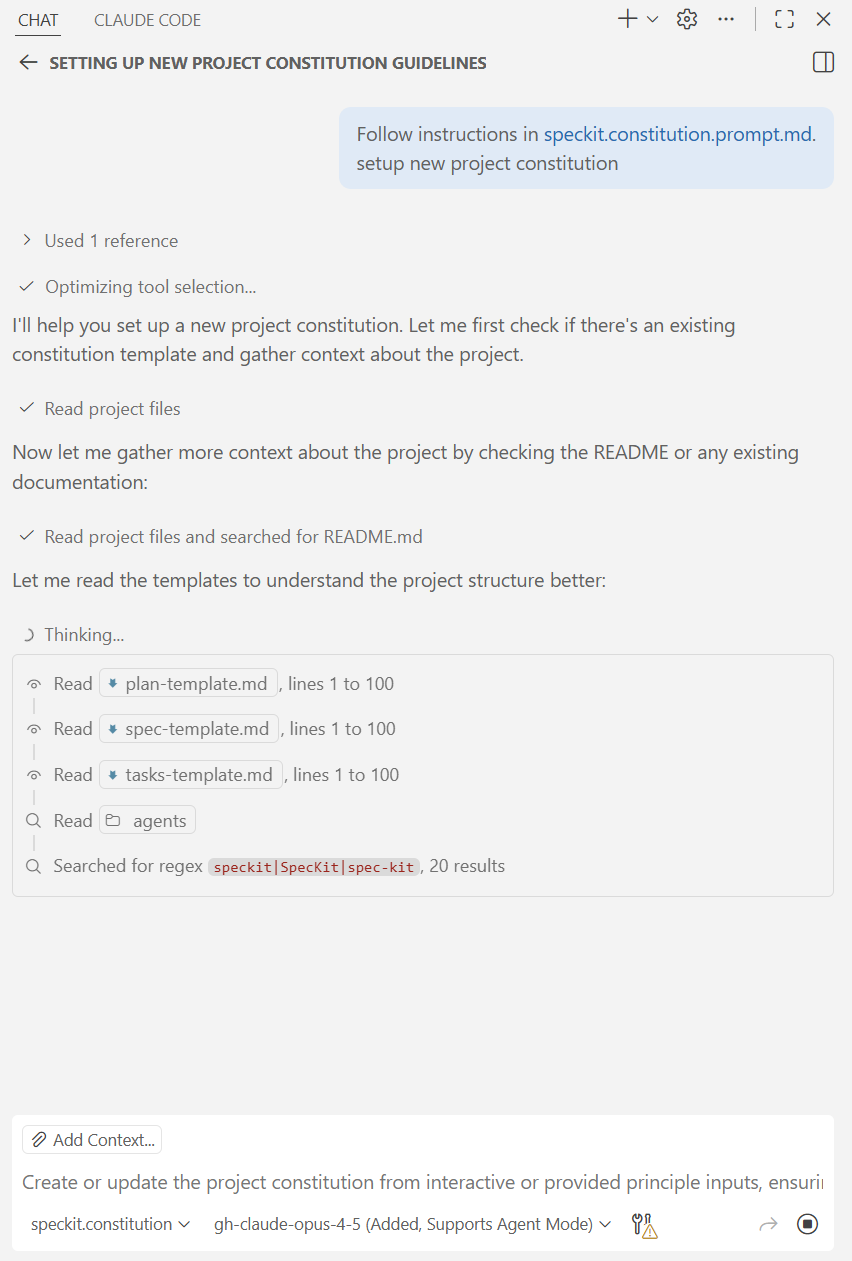
The difference isn’t just speed. It’s the quality of responses. Claude Opus understands context better. It writes cleaner code. It catches edge cases I didn’t even think to mention. When you’re working with a powerful model, you stop fighting the tool and start flowing with it.
Agent mode works like it should again. Complex refactors that used to take multiple back-and-forth rounds now happen in one smooth conversation. My productivity is back where it belongs.
Summary
Is it worth it? I say: absolutely.
GitHub Copilot’s premium request limits are real. If you push AI hard — agent mode, spec-driven development, heavy refactoring — you’ll hit those limits. When you do, you get throttled down to older models. Your productivity drops. Your workflow breaks.
Microsoft Foundry gives you an escape hatch. Deploy Claude Opus, Sonnet, GPT-4o, or any model from the catalog. No monthly caps. Pay-as-you-go. The setup takes maybe ten minutes, and you’re back to full power.
Yes, Model selection matters. I’m using right now Claude Opus for heavy lifting — complex refactors in agent mode, or AI supported architectural decisions. I’m switching to Sonnet for everyday tasks — code reviews, quick edits, documentation. Under the bottom line, you control the cost by choosing the right tool for each job.
Here’s the bonus: Microsoft Foundry isn’t just about catalog models. You know, you can deploy your own pre-trained models. Custom fine-tuned models. Domain-specific models. Whatever fits or supports your workflow. You’re not locked into what GitHub offers — you bring your own AI to Copilot.
If you’re tired of hitting limits, try it. Set up Microsoft Foundry. Deploy a model. Configure VS Code. Get back to building with models of your choice. Without throttling and slowing you down.
Your productivity is worth ten minutes of setup and the pay-as-you-go cost. The performance and quality improvements are extreme.