Dataverse First as Center of Gravity
I ended my last post “Spec-Driven Development: When the Spec Is Too Big” with a promise: “My next post covers what happens when I restart with Dataverse-first.”
Here it is.
But Dataverse-first is harder to put into a spec than it sounds. I wanted AI to develop my optimal data model and not to dictate it upfront. The trick was giving GitHub 🌱 SpecKit the right bigger picture first. Describe the full problem. Steer toward the data layer. Then strengthen that direction through planning.
That approach produced a completely different kind of spec: Here I focus on the principles of Dataverse-first design on Power Platform. But let me explain, what I changed.
Two Prompts, Two different Specs
I started into my first specification with a prompt that opened like this:
/speckit.specify
As a business traveler, I want to store my expense-related documents
in OneDrive and have them automatically reviewed by AI, so that relevant
information is extracted and made available in a structured way.
You see, this was a classic user story format. But notice what it leads with: AI reviewing documents. Not my yearly headache of hunting receipts, renaming files, and preparing a clean handover for my accountant. The AI.
In conclusion, that framing told SpecKit what to build first. And it built accordingly.
What I changed was not so totally different to my first approach. Again, I started with a prompt to use GitHub 🌱 SpecKit in an empty repository. As you see, my restart prompt opened sightly differently:
/speckit.specify
I want to build a Power Platform solution that helps me manage my yearly
business expenses and prepare everything my accountant needs.

My real problem is simple: over a year I collect many digital receipts,
invoices, flight tickets, hotel bills...
Here I described the same problem, but gave it different angle. The second prompt starts with my pain, not the AI’s job. It describes the data I need to store, the file naming I care about, the duplicate handling that would save me embarrassment. And crucially, I added a detailed human review workflow. Written in plain language, step by step. In other words, my second prompt focused much more on me, as the human in the loop.
That detail made all the difference.
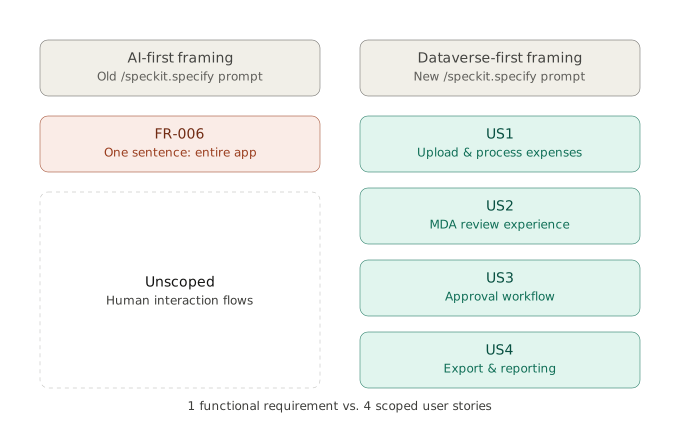
Remember, my old framing produced a functional requirement with one sentence covering the entire model-driven app experience. My new framing produced instead four scoped user stories. Each is independently testable and each describing how I work with my data.
Per example, now US1 covers the upload and processing flow. Five acceptance scenarios, all starting from one action: dropping a file into a folder.
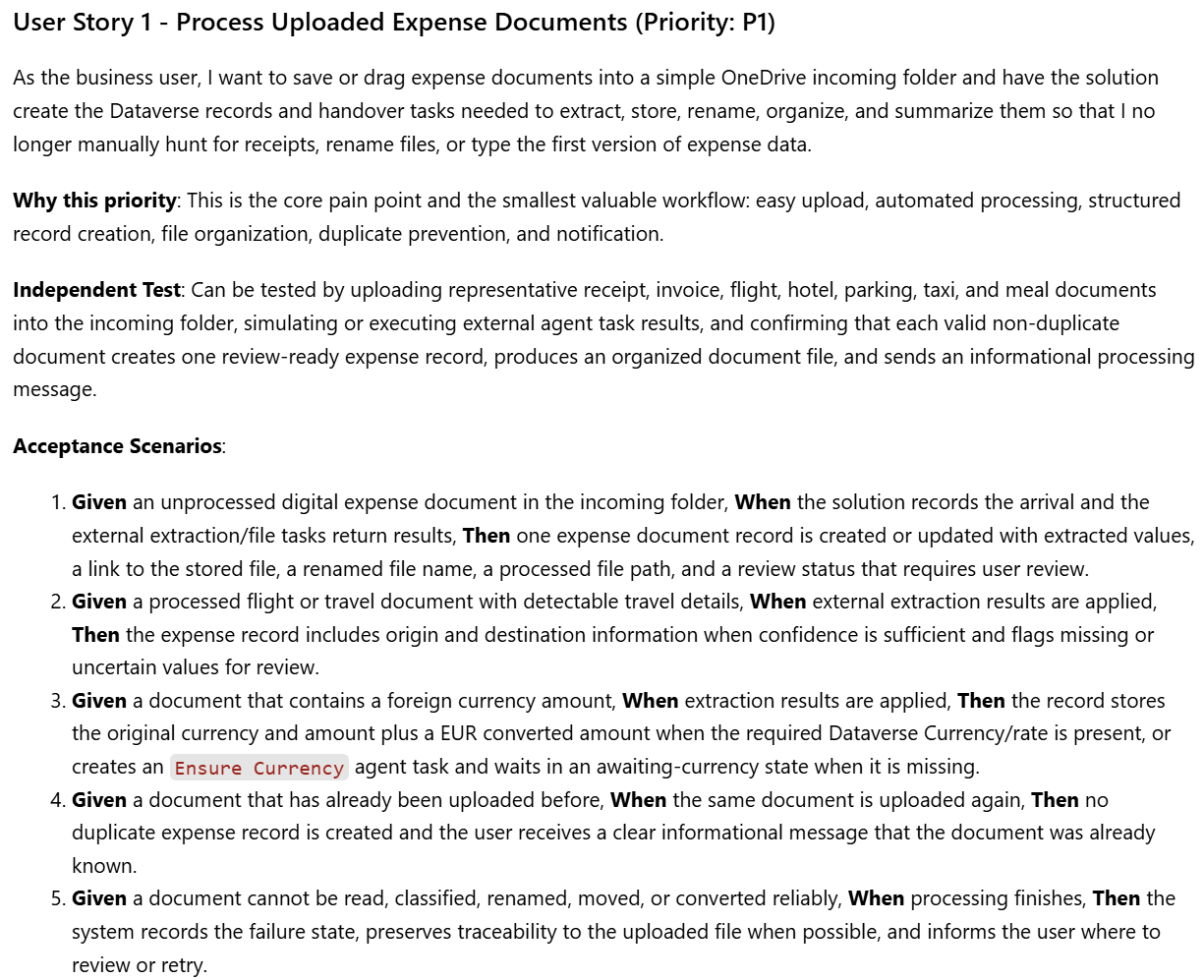
More interesting, US2 has shifted to the human side. Not AI extracting data. Me reviewing what it found.
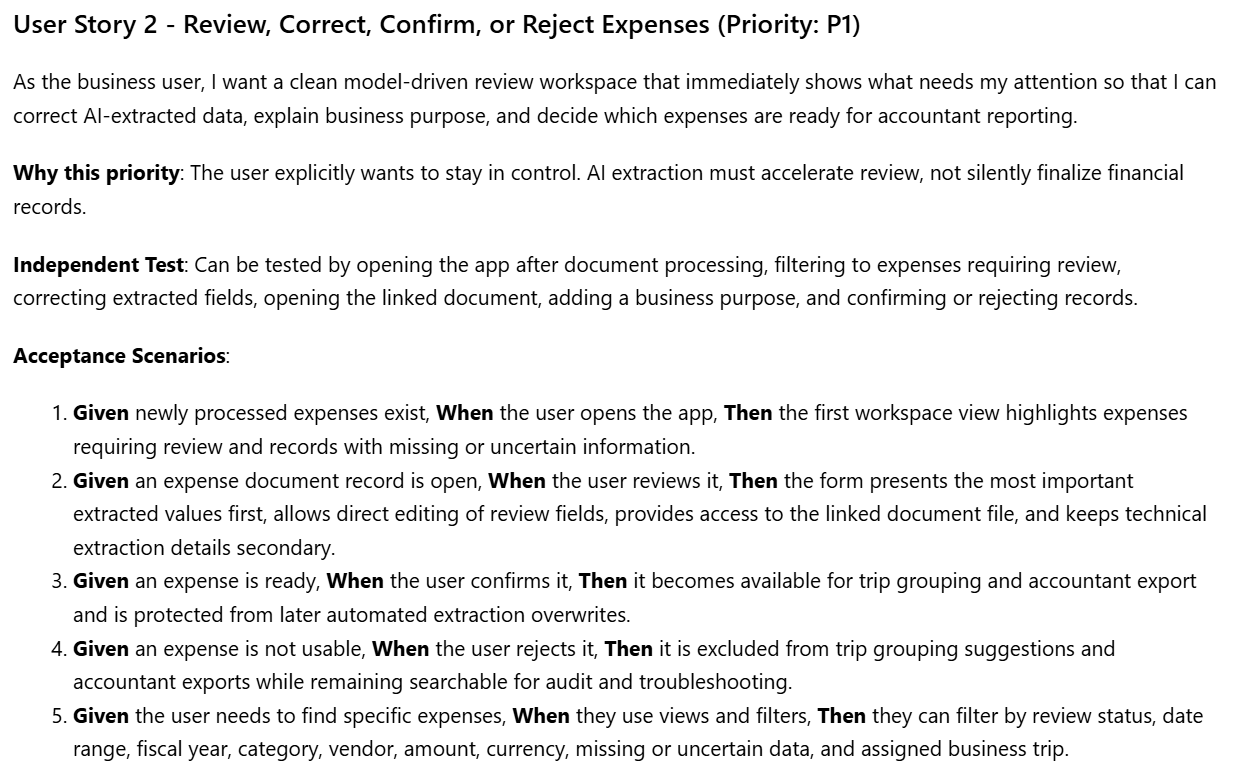
But even the second prompt left gaps. SpecKit found them.
Pulling Out What the Spec Left Unsaid
The second prompt was better. But it wasn’t complete.
In the SpecKit workflow, /speckit.clarify is the recommended next step after specify. Run it, answer the questions, and the spec gets sharper before any planning starts. Usually you answer up to five questions with each session and prepared answers. Each one helps to fill gaps the prompt left open.
The clarify question focused on edge cases, exceptions, and details that the prompt couldn’t cover. For example: “What should the system do when a user tries to export data for accountants, but there are still incomplete or unreviewed items?”
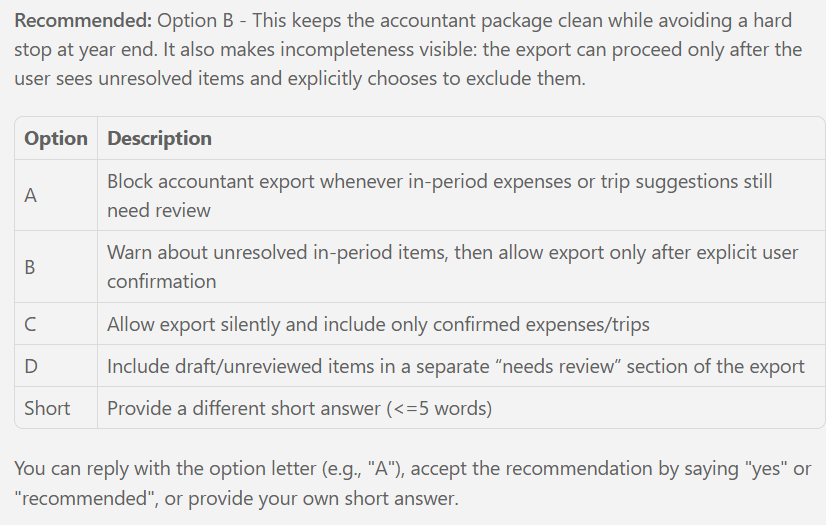
I followed the recommended answer and typed “B”.
Secondly, the SpecKit focused on how the system should handle uploaded files that may contain multiple receipts.
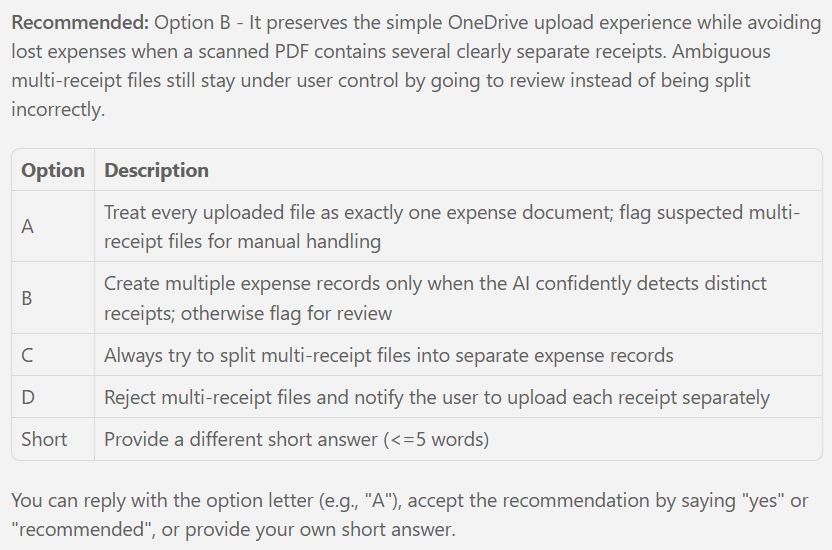
For me, option B was the right choice again.
Then SpecKit asked me about foreign currency handling. Correctly, in my prompt I hadn’t thought through the details.
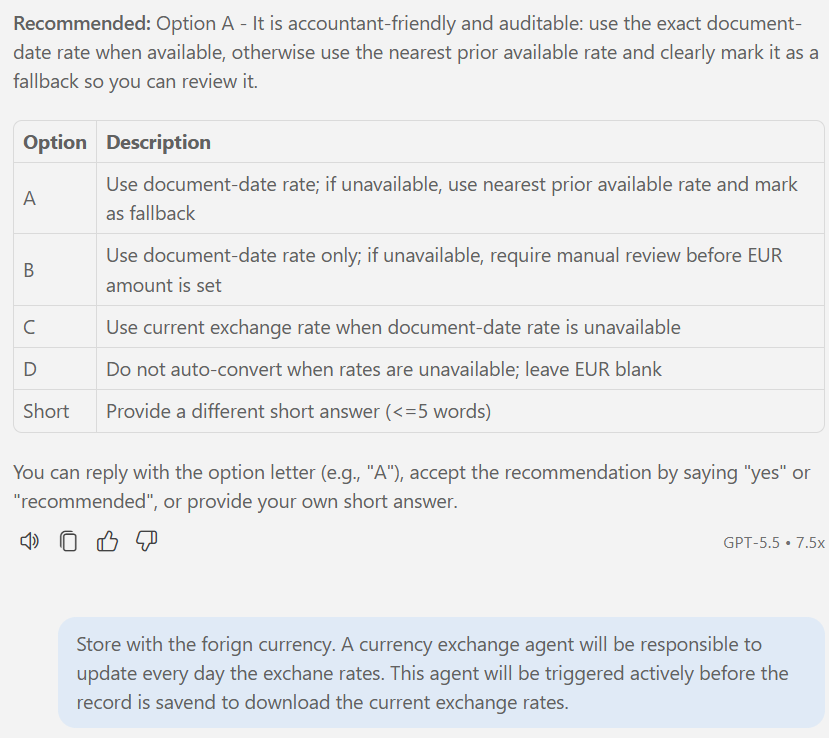
AI directly pointed its fingers into the problem: How should foreign-currency records and exchange rates be handled?
You see, my answer was more detailed because here no prepared option fit for my situation. In conclusion, it forced as result a design decision that later shaped the architecture.
My idea was to use Dataverse standard currencies for my expense exchange rates. Moreover, I will utilize an agent to maintain these exchange rates and keep them up to date. You find some details about how my Exchange Rate Agent works in my previous post Agents, Agents, Agents.
Sometimes, /speckit.clarify surfaces angles you hadn’t considered. It pulls out the details the prompt left open. And in doing so, it triggers design decisions that shape the architecture later.
That’s what the 🌱 SpecKit clarification is for. Not to second-guess the spec. It helps you to finish it.
Building a Solid Plan
A spec tells you what. A plan tells you how.
After /speckit.clarify, I had the what: four user stories, a currency strategy, duplicate rules, and file handling decisions. What I still needed was the concrete shape. Tables, navigation, forms, and the diagrams that connect them.
That’s what /speckit.plan produces.
The Plan Step in Action
The opening prompt was short:
/speckit.plan Create a plan for the spec. I am building with Dataverse.
Define e.g., the tables, the model-driven-app, and the forms.
SpecKit produced a plan quickly. But reading through it, I found things that didn’t fit.
A custom exchange rate table appeared that I never wanted to own. Power Automate flows were written out in detail. Azure Content Understanding was treated as functionality belonging to this solution.
The first plan optimized for completeness, not boundaries.
So I pushed back with a second, more focused prompt. Three corrections mattered most: exchange rates should use standard Dataverse Currency, Azure Content Understanding belongs in a separate project, and agent handovers need one generic table. I also asked for end-user navigation without solution prefixes and Mermaid diagrams in place of flow definitions.
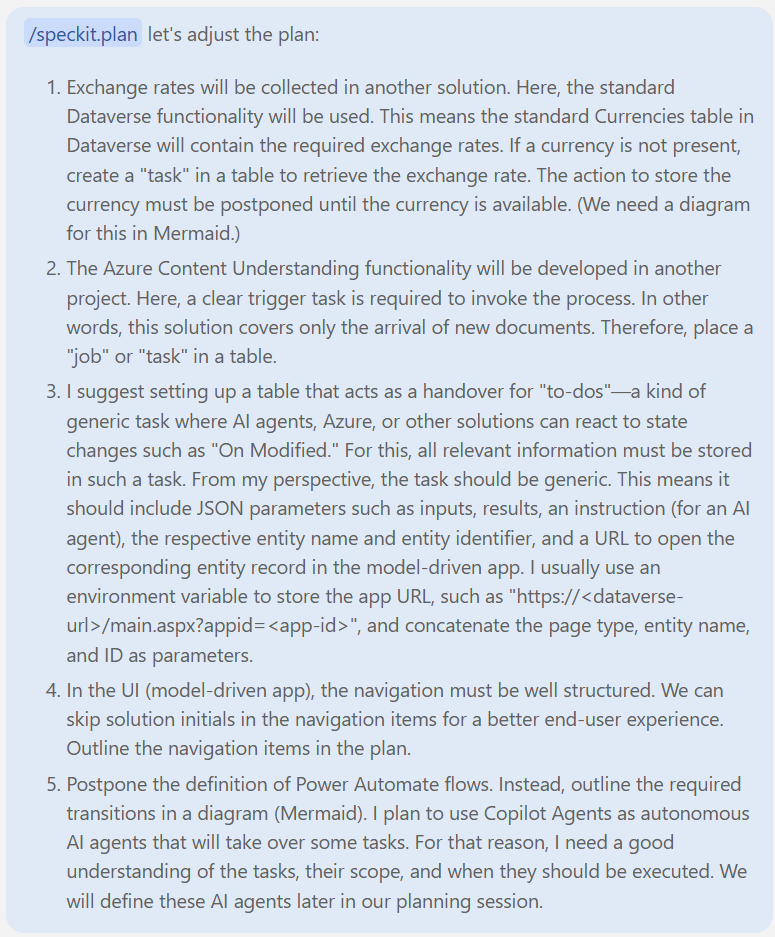
This time it fit. Exchange rates via standard Dataverse Currency. A generic Agent Task table as the integration handover. Navigation designed for the user. Mermaid diagrams instead of flow specs. All before a single Dataverse table existed.
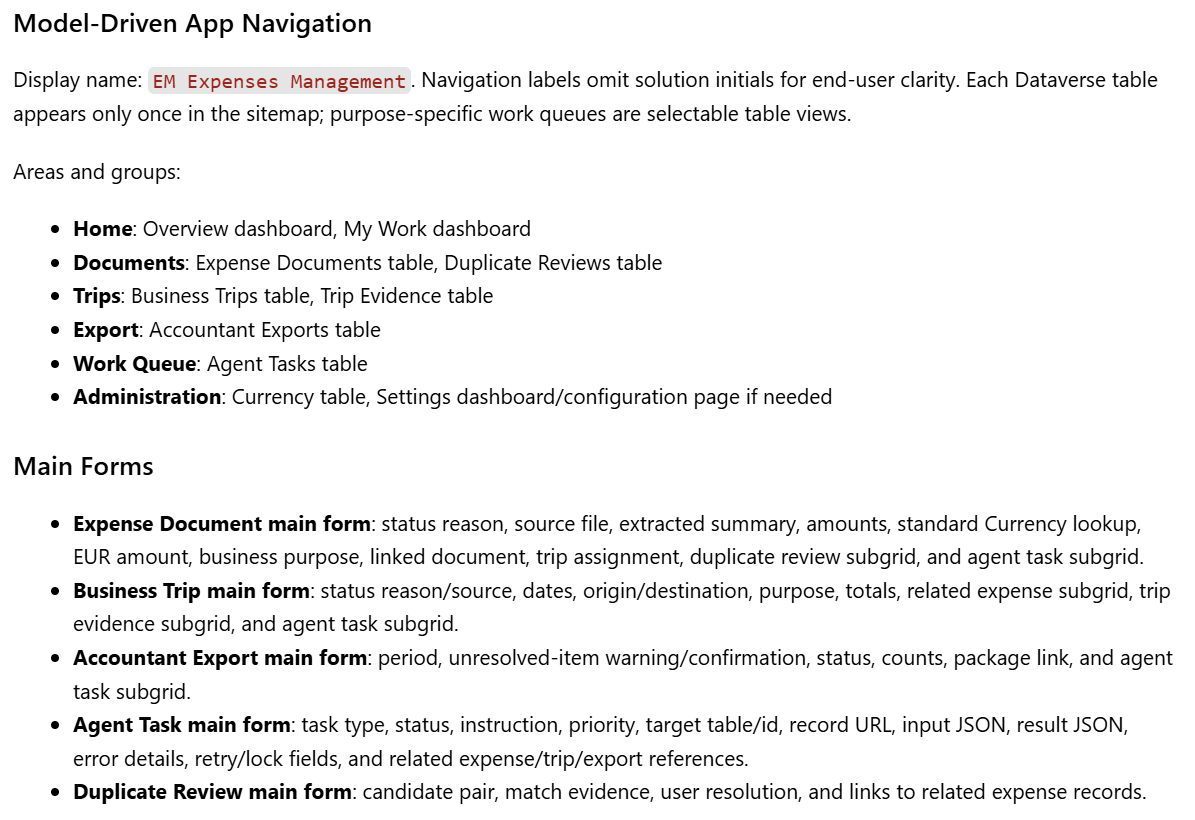
Planned MDA Navigation
The plan produced a complete model-driven app navigation. Six areas, each with a clear purpose:
Home            → Overview + My Work dashboards
Documents       → Expense Documents, Duplicate Reviews
Trips           → Business Trips, Trip Evidence
Export          → Accountant Exports
Work Queue      → Agent Tasks
Administration  → Currencies
But this wasn’t just a list. Each section traces back directly to the spec. Documents covers processing and reviewing expense records. Per example, Trips handles business trip suggestions. In addition, Export prepares the accountant package. Finally, Work Queue holds the agent task handovers.
The plan is grounded in the spec. Not invented. That’s the traceability the plan step is supposed to produce.
Here you can see the plan for the model-driven app:
Sketching the Forms Before Building Them
Navigation was clear. But how do you picture what a form will actually look like before you build it? A list of field names doesn’t tell you much.
I’m a visual person. So I asked SpecKit to include ASCII sketches of the expected form layouts. Here is my prompt:
Can you include the expected layout of the forms? ASCII or anything visual works.What came back was surprisingly useful. Here’s per example the Expense Document form:
+--------------------------------------------------------------------------------+
| Expense Document: {Name}                                      [Command bar...] |
|--------------------------------------------------------------------------------|
| Status Reason        | Expense Category     | Document Date | EUR Amount       |
|--------------------------------------------------------------------------------|
| Tabs: Review | Travel | File | AI Result | Work Queue                          |
|--------------------------------------------------------------------------------|
| Review tab                                                                     |
| +-------------------------------+ +------------------------------------------+ |
| | Document                      | | Amount                                   | |
| | Name                          | | Original Amount                          | |
| | Vendor                        | | Currency                                 | |
| | Document Number               | | EUR Amount                               | |
| | Document Date                 | | Extracted Currency Code                  | |
| | Expense Category              | |                                          | |
| +-------------------------------+ +------------------------------------------+ |
| +-------------------------------+ +------------------------------------------+ |
| | Review                        | | File Link                                | |
| | Business Purpose              | | Processed File Link                      | |
| | Business Trip                 | | Renamed File Name                        | |
| | Missing/Uncertain flags       | |                                          | |
| | Notes                         | |                                          | |
| +-------------------------------+ +------------------------------------------+ |
+--------------------------------------------------------------------------------+
A few things stand out. The header shows exactly four fields. Status Reason comes first. The Review tab is front and center. Technical details like AI results and file paths are available, but on secondary tabs. Two-column sections keep the business fields readable without scrolling.
These aren’t styling preferences. They’re design decisions. Having them in the plan means every form built later starts from the same baseline.
Diagrams as Planning Artifacts
The plan also produced Mermaid diagrams of the key workflows. Having AI visualize the transitions before any table existed gave me additional confidence the architecture actually held together. Here’s the currency handover flow, the design decision that came directly out of the clarify session:
flowchart TD
    A[AI result contains currency code] --> B{Currency exists in Dataverse Currency?}
    B -- Yes --> C[Set Currency lookup and EUR amount]
    C --> D[Expense ready for review]
    B -- No --> E[Create Ensure Currency agent task]
    E --> F[Expense waits in Awaiting Currency]
    F --> G[External currency solution handles task]
    G --> H{Currency/rate added?}
    H -- Yes --> C
    H -- No --> I[Task failed]
    I --> J{Retry requested?}
    J -- Yes --> E
    J -- No --> K[Expense remains Needs Attention]
You see, the states are named and transitions are defined. In other words, the architecture is decided before a single table existed.
Diagrams in spec and plan docs are not documentation. They are the spec itself.
The plan was solid. Navigation, form rules, diagrams. All before a single table existed.
Time to have a look at the Data Model itself.
The Center of Gravity
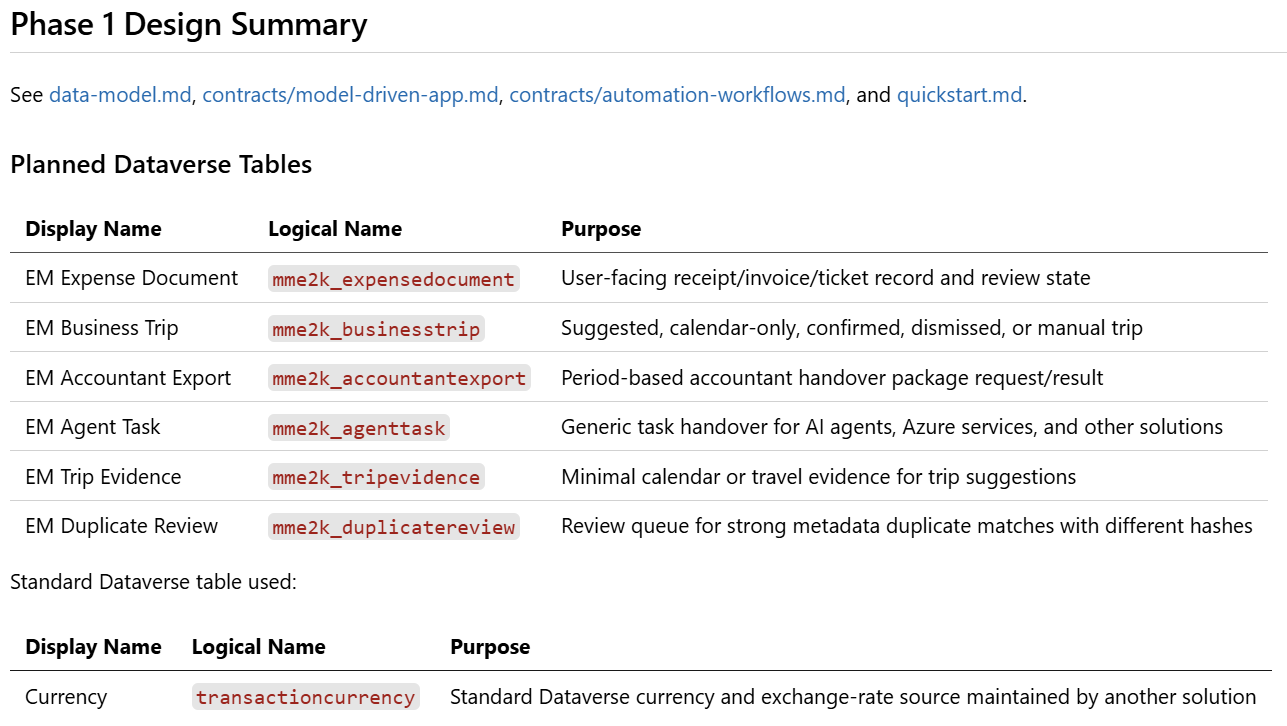
The plan didn’t just produce navigation and wireframes. It also generated the full Dataverse data model. Tables, relationships, fields, and choice columns. Here you can see the table overview:
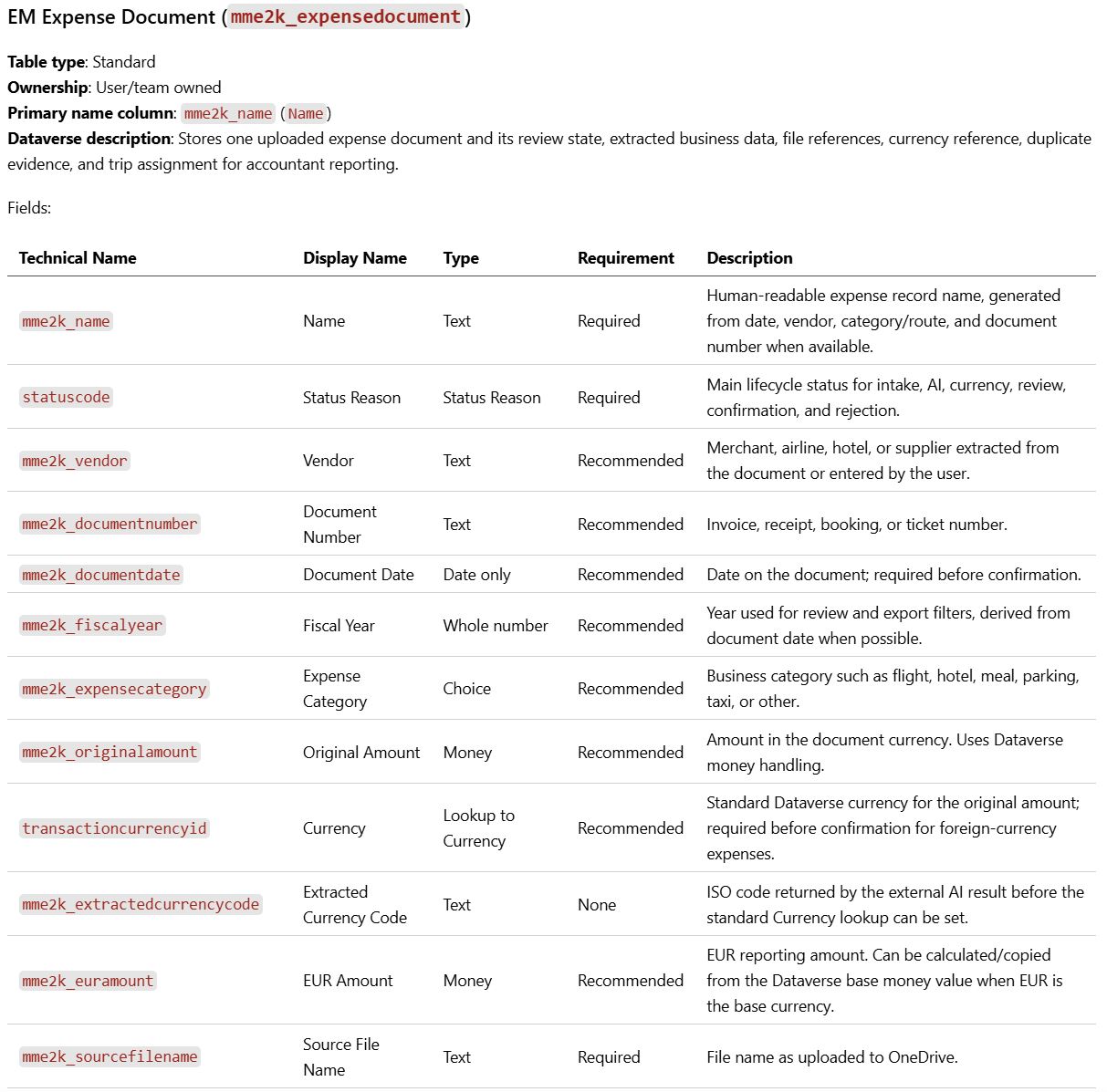
And the field definitions? Those were in the plan too. Here is what GitHub 🌱 SpecKit outlined per example for my EM Expense Document Table:
Six tables were immediately obvious. Expense Documents, Business Trips, Accountant Exports. Clear jobs, clear owners. Duplicate Reviews, Trip Evidence, and Calendar Trip Candidates covered the remaining edge cases.
But one table was different. If you read my previous post, you know the whole restart was about getting the Dataverse structure right first. That one table is the reason it mattered.
The Table That Kept Appearing
When I read through the spec, one table kept showing up where I didn’t expect it.
Processing a document with a missing currency? Create an Ensure Currency agent task. Suggesting a business trip? Run it as an agent task. Preparing the accountant export? That’s a Prepare Export task too.
Three different user stories. Three different workflows. All of them ending up at the same table.
The EM Agent Task table wasn’t an upfront architectural decision. It emerged. Every time the spec needed to hand off work to an outside process, the same pattern appeared: create a task, let someone else react to it.
That’s how you recognize a center of gravity. Not by designing it. By noticing that everything keeps pointing to it.
The Lifecycle Behind It
The EM Agent Task table has a simple lifecycle. Draft → Ready → Claimed → Running → Succeeded or Failed. A failed task returns to Ready for retry.

Each task stores everything an external agent needs to do its job: task type, instruction, target table name, record ID, a direct link to the related record in the model-driven app, input parameters, and result JSON.
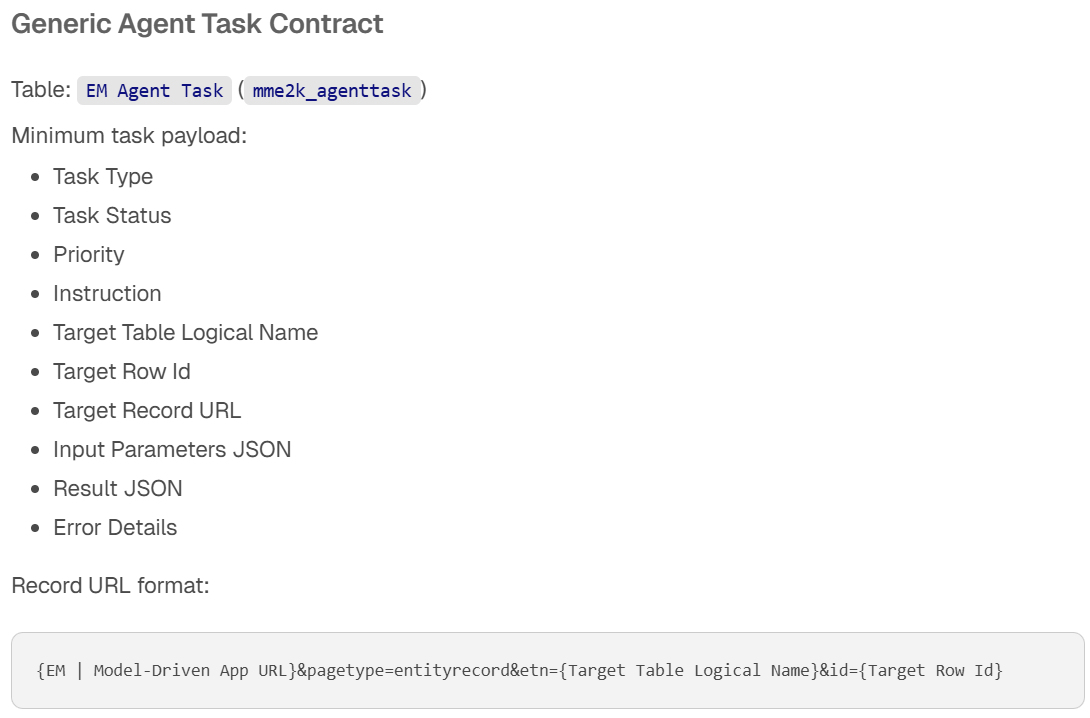
The solution doesn’t care who picks up the task. An AI agent, an Azure function, or a Power Automate flow. All of them read the same record and write back to the same fields.
The AI is the engine. But this table is the chassis. It decouples the solution from everything it depends on. State stays here. Execution happens elsewhere. Neither side needs to know how the other works. The full JSON contract and agent integration details come in a future Post.
The Reframe: Dataverse-First Design on Power Platform
Dataverse-first didn’t just mean building the data layer first.
It meant designing how a person works with their data before designing how AI works on it.
That’s the shift. And it’s visible in the output.
My first spec was thin. One sentence for an entire app. The Dataverse-first restart changed that. Here /speckit.specify produced four detailed user stories, each grounded in my actual workflow. Interaction flows, decision points, validation scenarios. When a human needed to step in, the spec said so.
The post also walked through the GitHub 🌱 SpecKit workflow in practice. With /speckit.clarify, I filled the gaps the initial prompt left open. Design decisions I hadn’t considered until SpecKit asked the right questions.
Then /speckit.plan turned the spec into a complete blueprint. The first run needed adjustments. I pushed back, refined the scope, and the result was a full navigation structure, form sketches, and a complete data model. All grounded in the spec. Not invented. That’s the traceability the plan step is supposed to produce.
This applies beyond expense management. Whenever you’re building AI-assisted systems on Dataverse, start with how a human will interact with the data. That order matters. The spec knows it. The plan reflects it. And finally, the architecture confirms it.
The restart was one decision. What came next zooms out from this single restart to the full divide-and-conquer approach. I’m splitting the entire system into smaller projects. See you there.