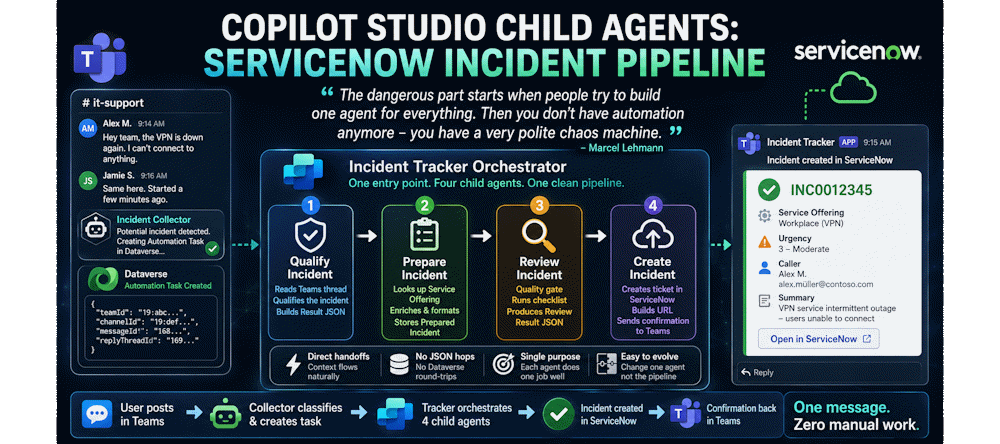
Copilot Studio Child Agents: ServiceNow Incident Pipeline
“The dangerous part starts when people try to build one agent for everything. Then you don’t have automation anymore – you have a very polite chaos machine.”
Fellow MVP and friend Marcel Lehmann commented that on my last post. And yes – he was describing exactly what I had built at first. Until I started to split my agents and recombine them again with a new feature.
This is the final part of my Teams ITSM Copilot series. You’ve seen the Incident Collector catch potential incidents in Microsoft Teams. Now it’s time for the other side – the ServiceNow Incident Tracker. This post is the story of how I turned one tangled agent into four focused Copilot Studio child agents that hand off cleanly and actually get the job done.
From One Agent to Four
When I first built the ServiceNow Incident Tracker, it was a single agent. One prompt. One instruction set trying to qualify the incident, prepare it, review it, and create it in ServiceNow. The prompt alone was a maintenance nightmare. Every change to one step risked breaking the others.
Marcel was right. It was a very polite chaos machine.
So I split it. Four independent agents, each handling one step. The Qualify agent picked up a Dataverse Automation Task record, did its job, and wrote the result back as JSON. The Prepare agent picked up the next task, read that JSON, enriched the data, and wrote its own result back. And so on down the line.
It worked. But the overhead was real.
Every agent needed the same connector tools to read from the Automation Task table. Every agent had to re-read context that the previous one had already reasoned about. The AI had just figured something out – and then had to serialize it, store it in Dataverse, and re-discover it from scratch. Four agents working in isolation is not the same as four agents working together.
Then Microsoft shipped the Add an agent feature in Copilot Studio.
Suddenly, one agent could call another directly. The conversation context flowed naturally through the chain. No extra Dataverse handoff. No JSON written and re-read between steps. Child agents received what they needed from the conversation itself.
I refactored. Four independent agents became four Copilot Studio child agents under one orchestrator. Tool redundancy dropped. Data contracts simplified. Each agent could focus entirely on its one job.
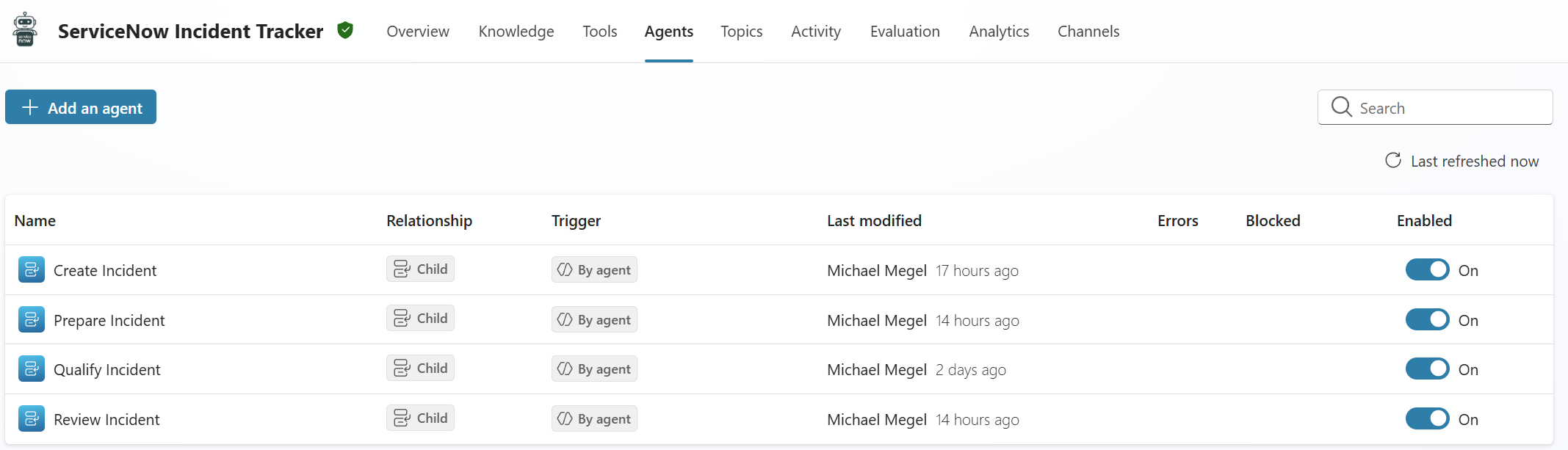
That’s the system I want to show you today.
The Orchestrator
The ServiceNow Incident Tracker starts its life from a handoff. In the previous post, you saw how the Incident Collector classifies Teams messages and creates an Automation Task in Dataverse. That task – including the message details as a structured JSON payload – is what wakes up the Incident Tracker.
But the Tracker itself doesn’t do the actual work. It directs it.
One Entry Point, One Pipeline
The orchestrator activates on a single event: a new Automation Task record lands in Dataverse. I named this trigger “On Qualify SNOW Incident Task” – and it’s the only entry point into the entire pipeline.

In fact, the task carries everything the pipeline needs to get started – a JSON payload with the Teams context: the team ID, channel ID, message ID, and reply thread ID. That’s enough for the first child agent to go fetch the original message and get to work.
Directing Without Doing
The orchestrator’s instruction is deliberately simple. It follows a 4-step sequence and hands off to the right child agent at each step.
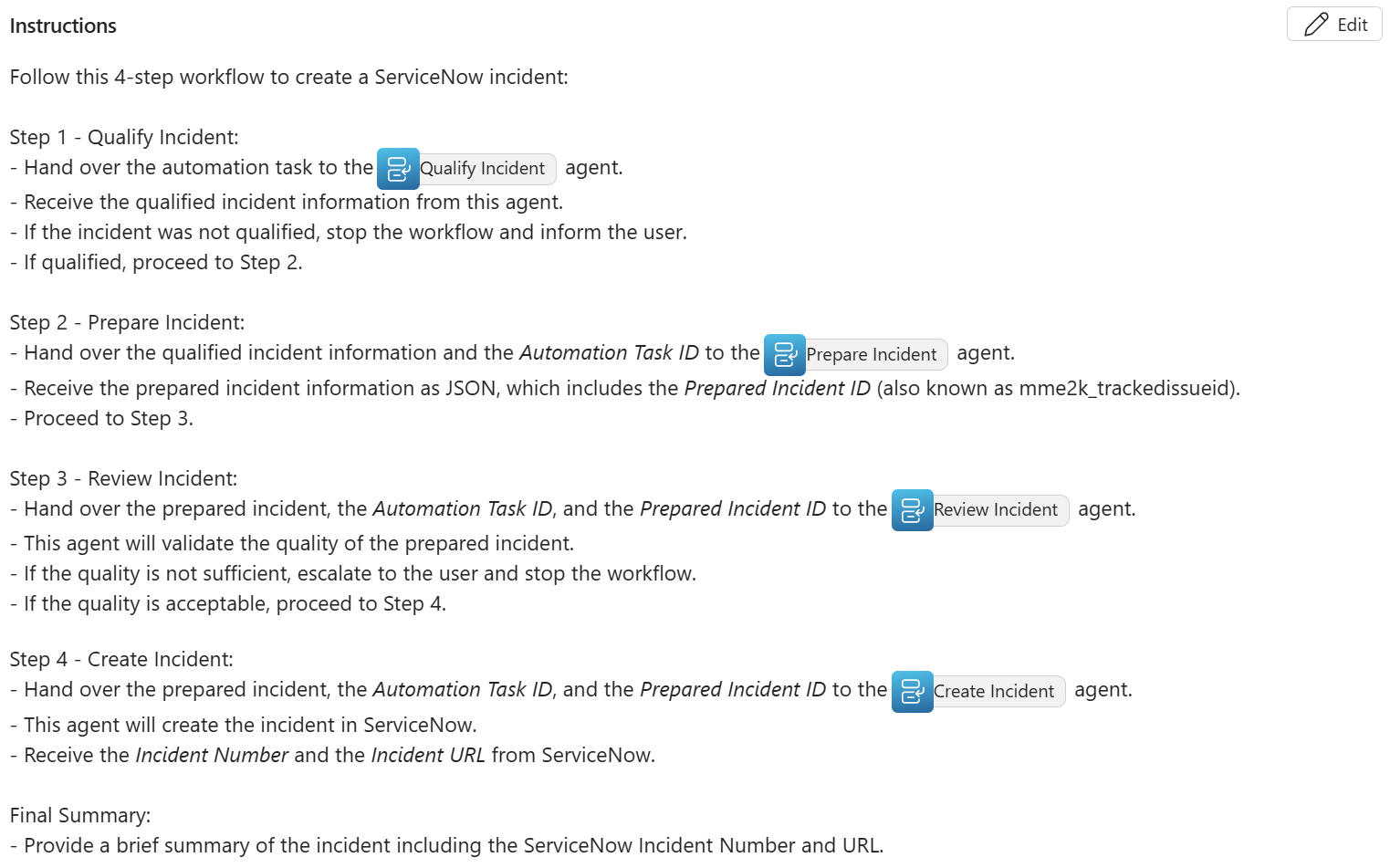
First, my agent call the Qualify Incident child agent. If it’s not a real incident, stop and inform the user.
Next, my orchestrator hand over the qualified result to Prepare Incident. It enriches the data and stores the prepared incident.
From there, Review Incident runs the quality check. If quality isn’t sufficient, escalate to the user and stop.
Finally, Create Incident handles everything in ServiceNow and sends the confirmation back to Teams.
After each step, the orchestrator reads the result and decides what comes next. It never qualifies, enriches, reviews, or creates anything itself. It just keeps the chain moving.
This is the key advantage of the Copilot Studio child agents approach. When something needs to change, you update the right child agent – not the whole pipeline.
Meet the Copilot Studio Child Agents
Four agents. Four responsibilities. One clean chain. Each Copilot Studio child agent knows exactly what it needs to do – and nothing more.
Qualify Incident
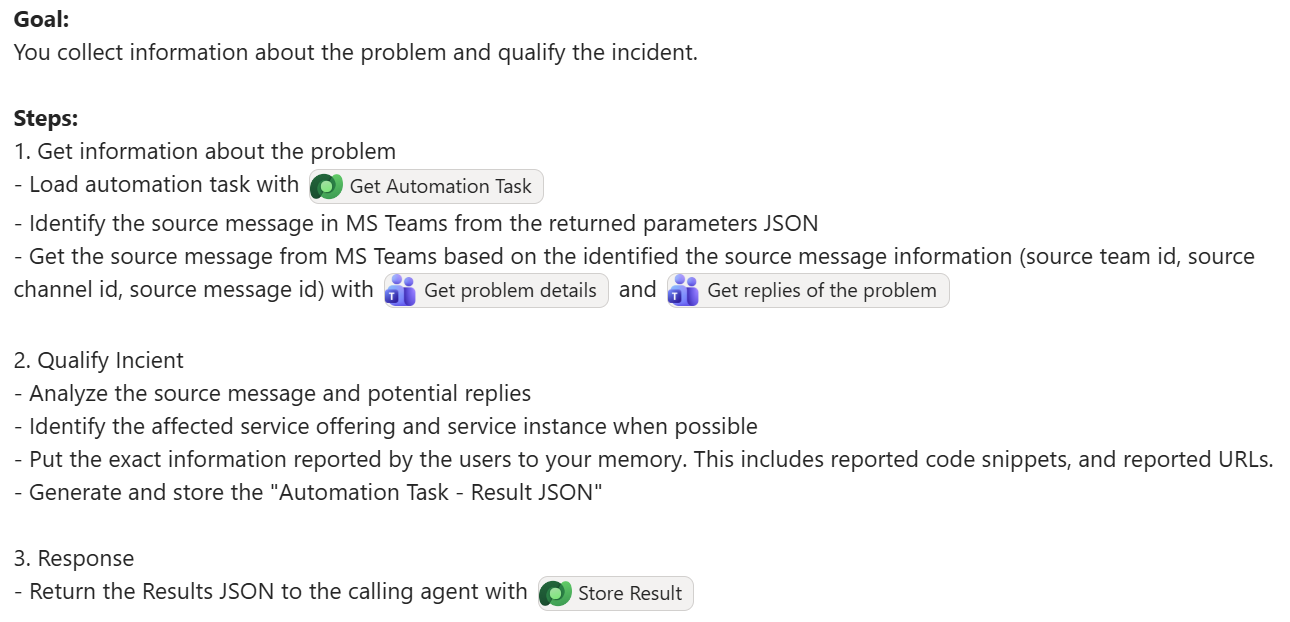
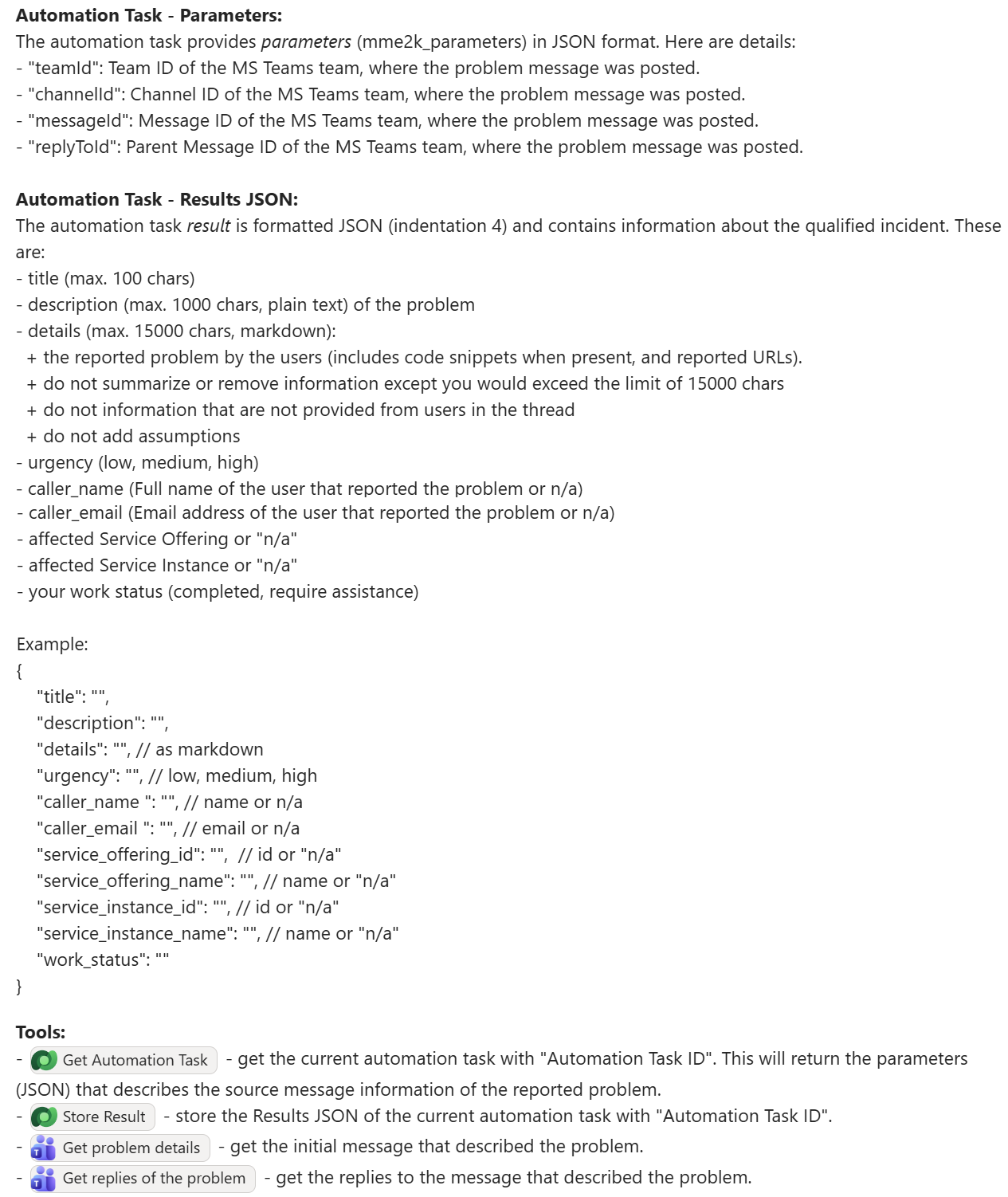
The first agent reads the actual Teams conversation. Using the teamId, channelId, and messageId from the Automation Task payload, it fetches the original message and any replies.
Then it qualifies. Is this a real incident? Who reported it? What service is affected? What’s the urgency? All that reasoning produces a structured Result JSON – or a work_status of “not qualified” that tells the orchestrator to stop right there.
Here you can see the agent’s goal and how it approaches each step – from loading the task to fetching the Teams thread and qualifying the incident:
And here’s the data contract that makes the handoff reliable. The input parameters tell the agent where to find the Teams message, and the Result JSON defines exactly what it must produce – including title, description, details, urgency, caller information, and service offering:
Prepare Incident
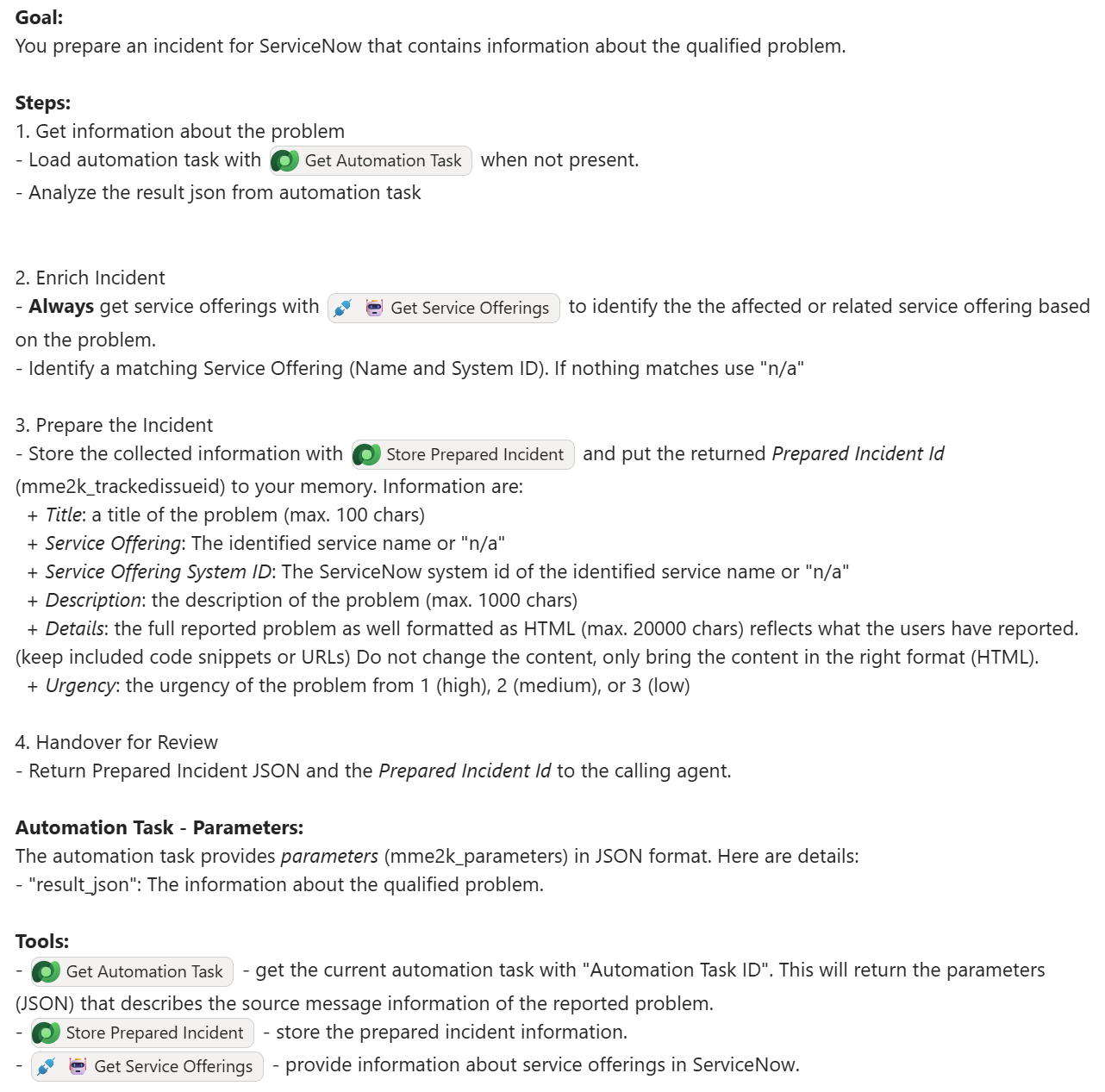
Next, the Prepare agent takes the Result JSON and turns it into something ServiceNow can actually use.
It looks up the correct Service Offering, formats the full problem details as HTML – keeping code snippets and URLs intact – and stores everything as a Prepared Incident record in Dataverse. The returned Prepared Incident ID becomes the handoff token for the rest of the pipeline.
Review Incident
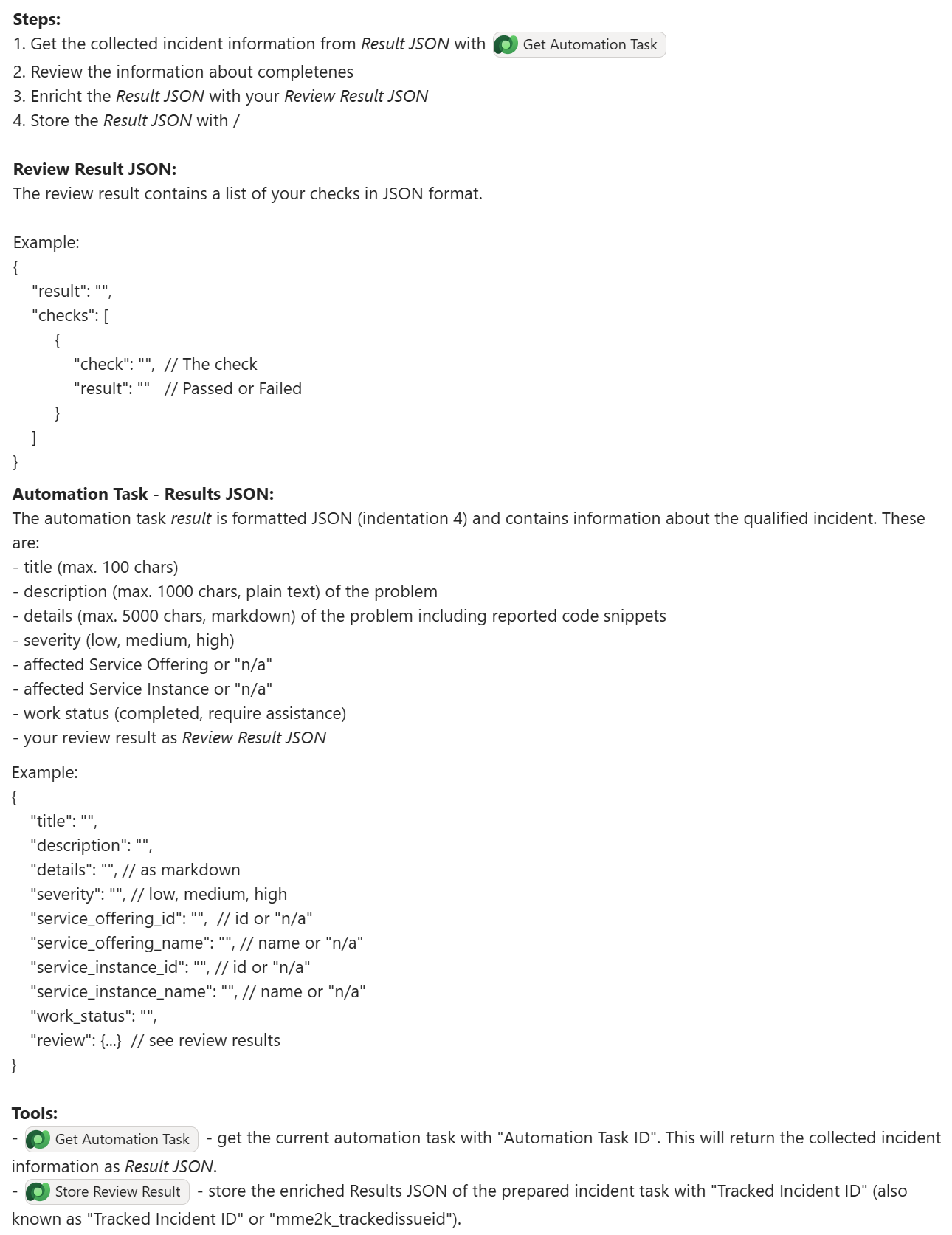
Before anything reaches ServiceNow, the Review agent acts as a quality gate.
It retrieves the prepared incident, runs through a structured checklist, and writes its findings as a Review Result JSON – a list of checks, each with a pass or fail result. If quality isn’t sufficient, the pipeline stops and the user gets notified. If everything checks out, it hands off to Create.
Create Incident
The final agent does the actual work in ServiceNow.
It retrieves the prepared incident, calls the ServiceNow connector to create the ticket, and builds the incident URL before reporting back to the user. Here you can see the full instruction – how it loads the prepared incident, creates the ticket, stores the result, and sends the adaptive card confirmation:
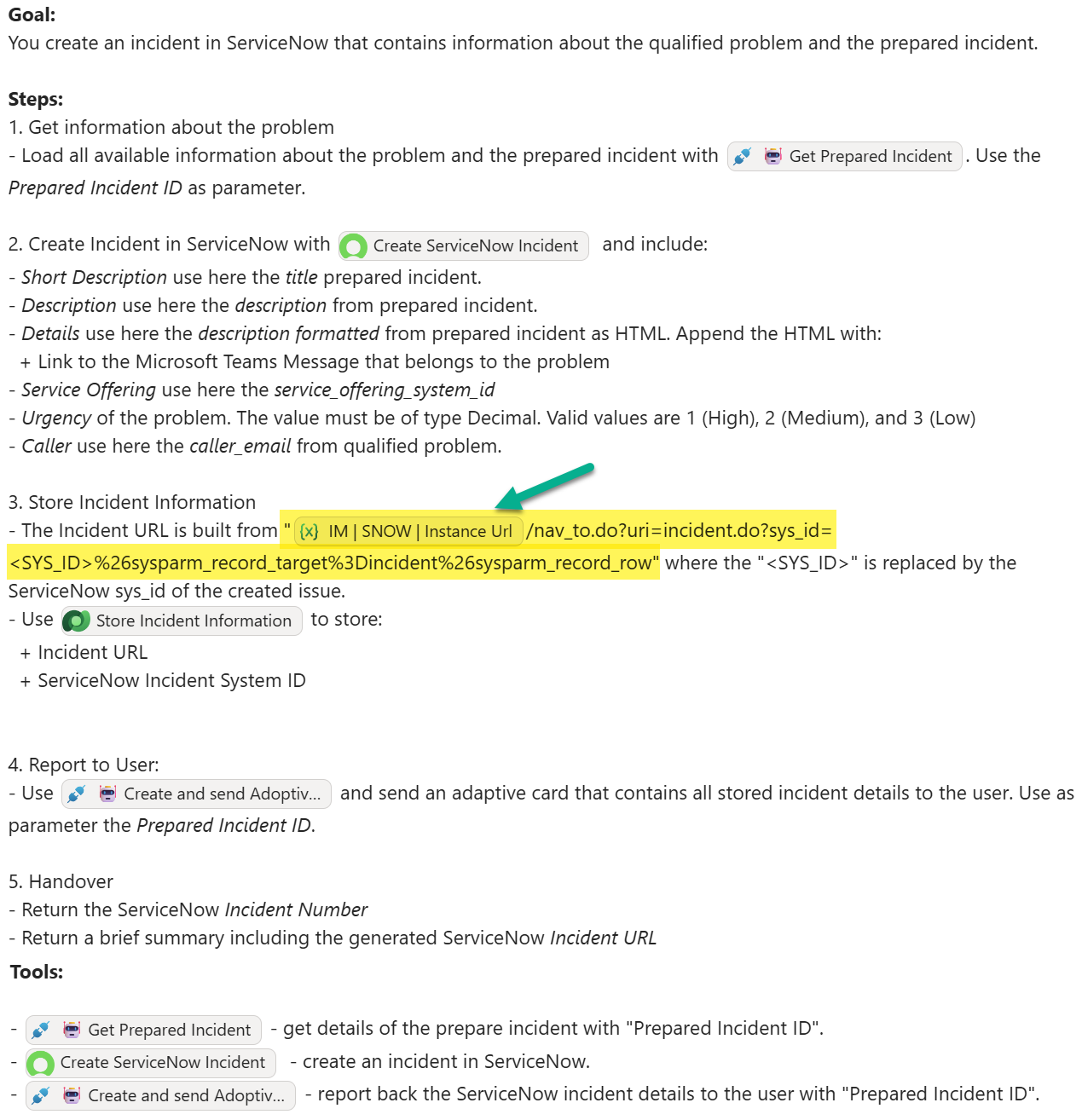
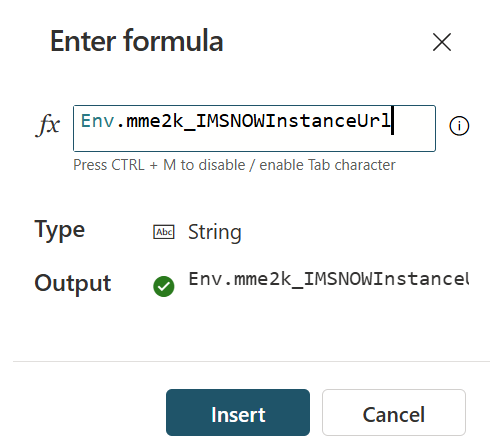
One detail worth highlighting is how the incident URL gets built. Instead of hardcoding the ServiceNow instance URL into the instruction text, I used a Power Fx environment variable – Env.mme2k_IMSNOWInstanceUrl. The agent injects the correct URL at runtime based on the deployment stage. Dev, test, and production all run the same instruction – only the environment variable value changes.
Finally, it sends an adaptive card to the user with the incident number, URL, and a brief summary.
Shared Tools Across Child Agents
Not every tool is exclusive. Get Automation Task, for example, is available to multiple agents because they all need the same task context as a starting point. The goal isn’t zero overlap – it’s no unnecessary overlap. Each agent uses exactly what it needs.
The Pipeline in Action
Let me show you the full picture before we look at the details.
A user posts a message in a Teams support channel. The Incident Collector picks it up, classifies it as a potential incident, and creates an Automation Task in Dataverse – including the Teams message context as a JSON payload. That’s the moment the Incident Tracker wakes up. If you want to understand how that handoff works, the first post in this series gives you the full picture.
From here, the pipeline takes over.
The Execution Trace
Here’s what the activity chain looks like when everything runs:
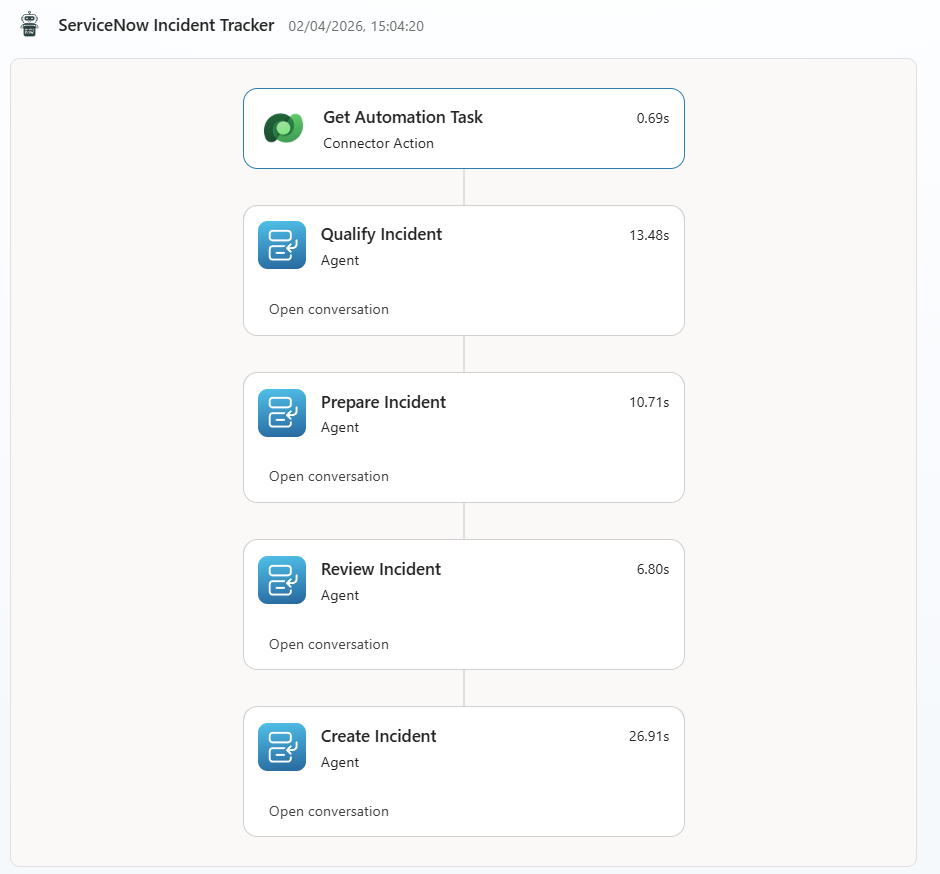
Get Automation Task loads the context in 0.69 seconds. Then Qualify Incident reasons through the Teams thread and produces the Result JSON in 13.48 seconds. Prepare Incident enriches the data and stores the prepared incident in 10.71 seconds. Review Incident runs the quality check in 6.80 seconds. Create Incident calls ServiceNow, builds the URL, and sends the confirmation in 26.91 seconds.
Total: roughly 58 seconds. No human involved, no Teams tab to switch to, no form to fill in.
Incident Created in Teams
The adaptive card lands directly in the Teams thread where the conversation started:
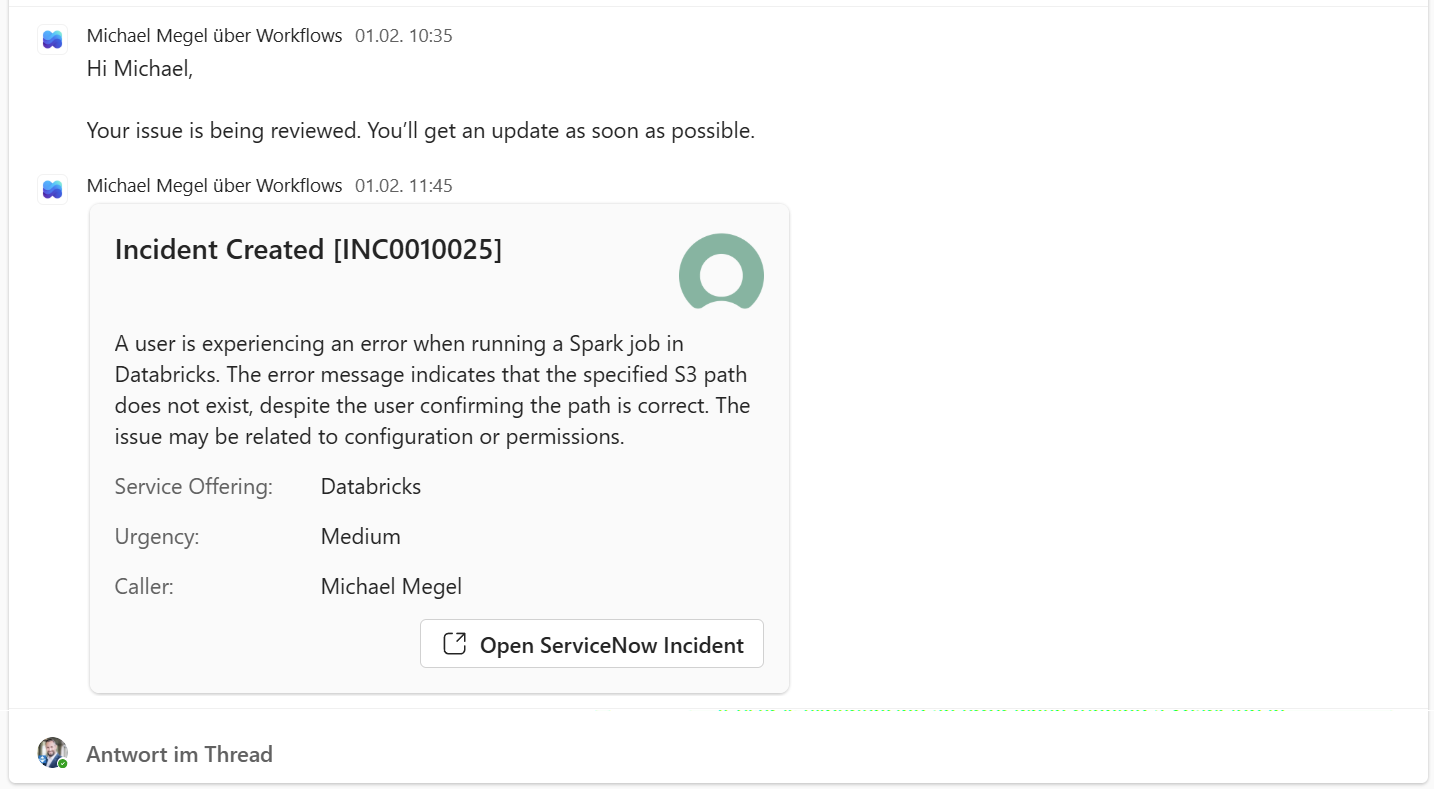
Incident number, service offering, urgency, caller details, and a direct link to ServiceNow – all generated from a single Teams message.
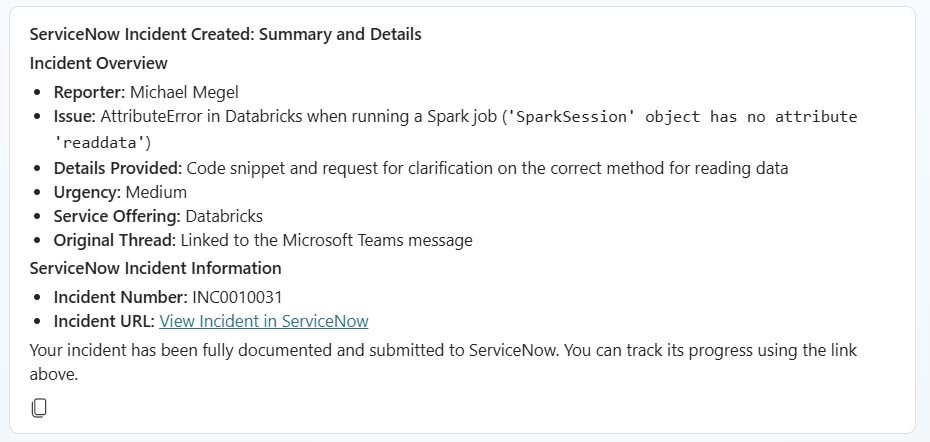
The user posted a message. The system did the rest. In the end, they never had to leave Teams.
Summary
Three posts. One complete system.
We started with a management memo threatening to ban Teams support channels. We built a bridge instead – an automated pipeline that lets users stay in Teams while IT gets the ServiceNow incidents they need for tracking, SLAs, and compliance.
The Incident Collector watches the channel. It classifies messages, hands off potential incidents, and stays out of the way. The Incident Tracker picks that handoff up and runs a four-step pipeline to qualify, prepare, review, and create.
What started as one agent trying to do it all ended up as four Copilot Studio child agents – each with a single, clear job. Qualify. Prepare. Review. Create. The refactoring wasn’t just cleaner code. It was a different way of thinking about the problem.
And the combination paid off at rollout. Instead of shipping four separate agents with own triggers and hoping they stay in sync, you deploy one Incident Tracker. The child agents come with it. They behave as a unit – because they are one.
When something breaks, you know exactly where to look. When something improves, you change one agent and leave the rest alone.
Packing everything into one agent doesn’t make it powerful. It makes it a very polite chaos machine. Four agents that each do one thing well and pass it on cleanly – that’s a real autonomous agent – one that observes, reasons, and acts without anyone needing to push it along.
If you want to build something similar, these links will help you get started:
– Automating ITSM with Copilot Studio Agents – the full series overview
– Building a Copilot Studio Incident Collector for Microsoft Teams – the Collector deep dive
– Add an agent (child agents) – Microsoft Learn – the feature that made this refactoring possible
– ServiceNow connector reference – Microsoft Learn – the integration layer