My Son Built an App with No IT Background
“Dad, can we build an app with AI?” That question started a spec-driven development experiment I’ll never forget.
He was seventeen. No coding background, no CS classes. Just frustration with the school carpool situation: thirty parents in a WhatsApp thread, nobody knowing who was driving, every morning a small disaster.
I said yes. But on one condition: we use GitHub 🌱 SpecKit.
He looked puzzled. Fair enough. So I explained: it’s a framework for Spec-Driven Development. Describe the problem the way you’d talk about it. The framework turns that into a buildable specification. Then GitHub Copilot writes the code. You don’t need to know how to code. You just need to know the problem.
He could do that.
To spoiler a bit, a few weekends later he stood in front of his teacher and walked her through this:
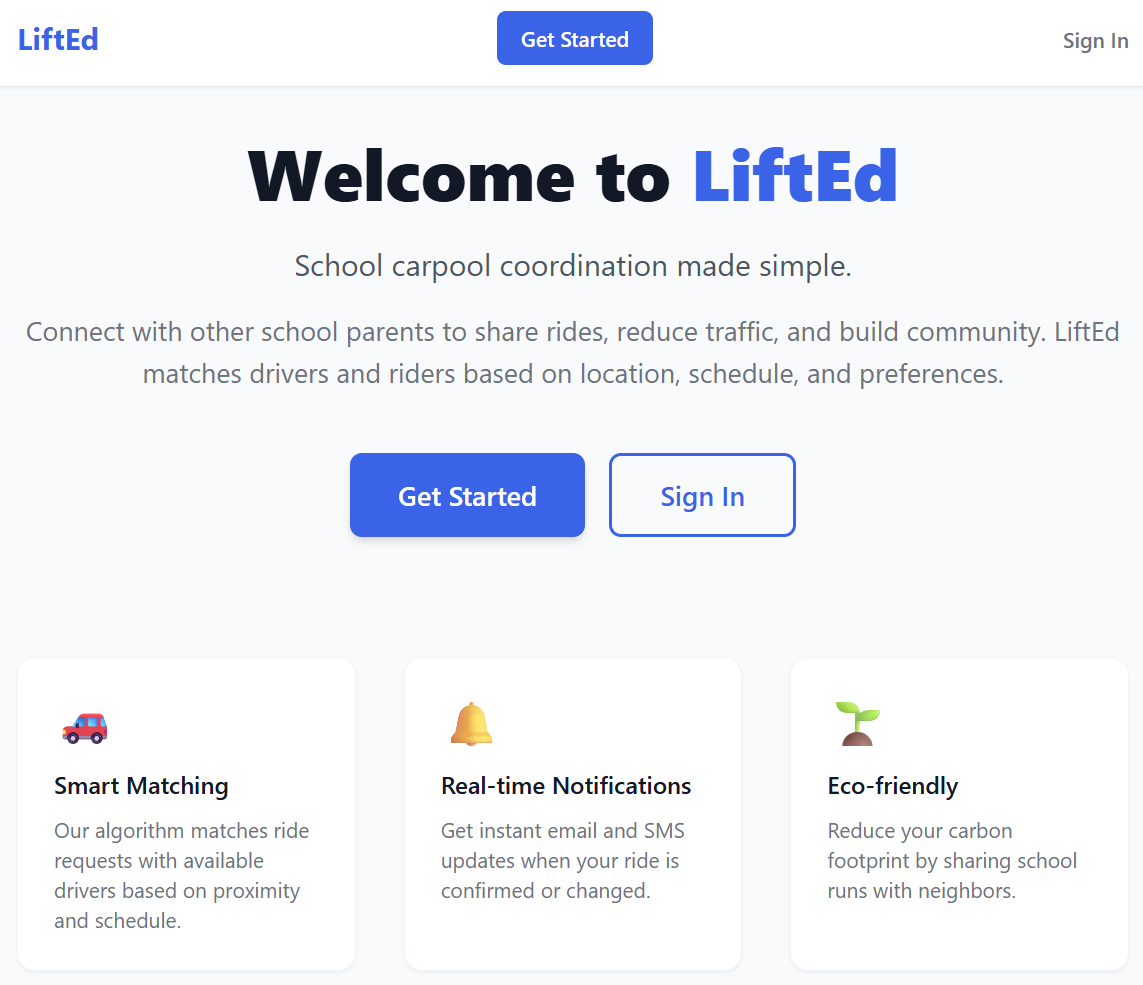
A fully functional app. Route planning with live maps. A matchmaking backend. Real-time notifications. He’d written sixteen specs and over a hundred acceptance scenarios. Filed every bug. Never run a deployment command once.
GitHub Copilot wrote the code. My son built the product.
I had a hypothesis: a non-technical person with real domain knowledge, the right framework, and an AI coding partner can ship something real. This is how we tested it.
The Idea
Every morning, the same chaos.
Thirty parents in a WhatsApp group, but group chats weren’t built for logistics. Someone confirms at 8:04, after the car already left. Someone else cancels but tags the wrong parent. A driver asks “anyone need a pickup tomorrow?” at 11 PM and wakes up to seventeen replies. By the time kids needed to leave, the thread was unreadable.
My son had been living with this for three years. Not reading about it. Living it.
I had one question for him: what does this app need to do, and for whom?
He didn’t hesitate.
Drivers post the days they’re driving. Riders request a seat. The system matches based on route. On the day, the driver gets a confirmed pickup list. Anyone can cancel last-minute, because kids get sick and the driver needs to know before leaving the house.
Ten minutes. No coaching. No prompting.
I’ve run requirements workshops that lasted three days and produced less clarity than that conversation. He wasn’t just answering my question. He was doing the hardest part of product development: knowing, precisely, what needed to be built. You can’t coach that into someone. Either you live the problem, or you don’t.
That’s where his edge was. Not in code. In context comparable to a business analyst or product owner. He had lived the problem, and he knew the solution.
SDD in Practice
The first session was a Saturday morning. He had his laptop open. I had mine. Between us: a problem description he’d essentially dictated from memory, and a framework I’d been wanting to test on a real project.
GitHub Copilot was his implementation engine. Free through GitHub Education for verified students. That means professional-grade access to the same tooling developers use day-to-day, at no cost.
The workflow
GitHub 🌱 SpecKit runs through a sequence of slash commands. Each one covered in depth in The Methodology Behind the Magic. Here’s the short version:
/speckit.specifydescribe what to build in plain language. No tech stack, no architecture. Just requirements and user stories./speckit.clarifysurface ambiguities before they get baked into the architecture. The AI asks; you answer./speckit.planturn the spec into a technical implementation plan. This is where the stack gets chosen./speckit.tasksbreak the plan into ordered, parallelizable tasks./speckit.analyzeexamine the tasks for gaps, risks, and unstated assumptions. A pre-flight before implementation starts./speckit.implementhand the tasks to GitHub Copilot and let it build.
Here you can see the workflow that GitHub 🌱 SpecKit enables:
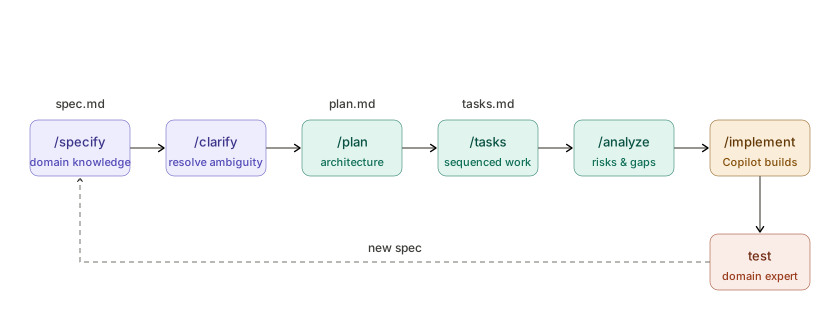
Some steps produce files, some others ensure correctness. Every decision documented, every assumption made explicit.
Shame on me, at this point I wasn’t aware of the importance of /speckit.clarify and /speckit.analyze. So my son and I skipped them at the beginning. We were excited, the setup was working, and two extra steps felt like friction. We went straight from specify to plan.
That was a mistake. /speckit.clarify is where ambiguities surface before they become wrong architecture. /speckit.analyze is where gaps get flagged before they become missing features. Both problems showed up anyway — just later, as bugs, rework, and new specs. We paid for the shortcuts. The section below is largely the bill.
Who brought what
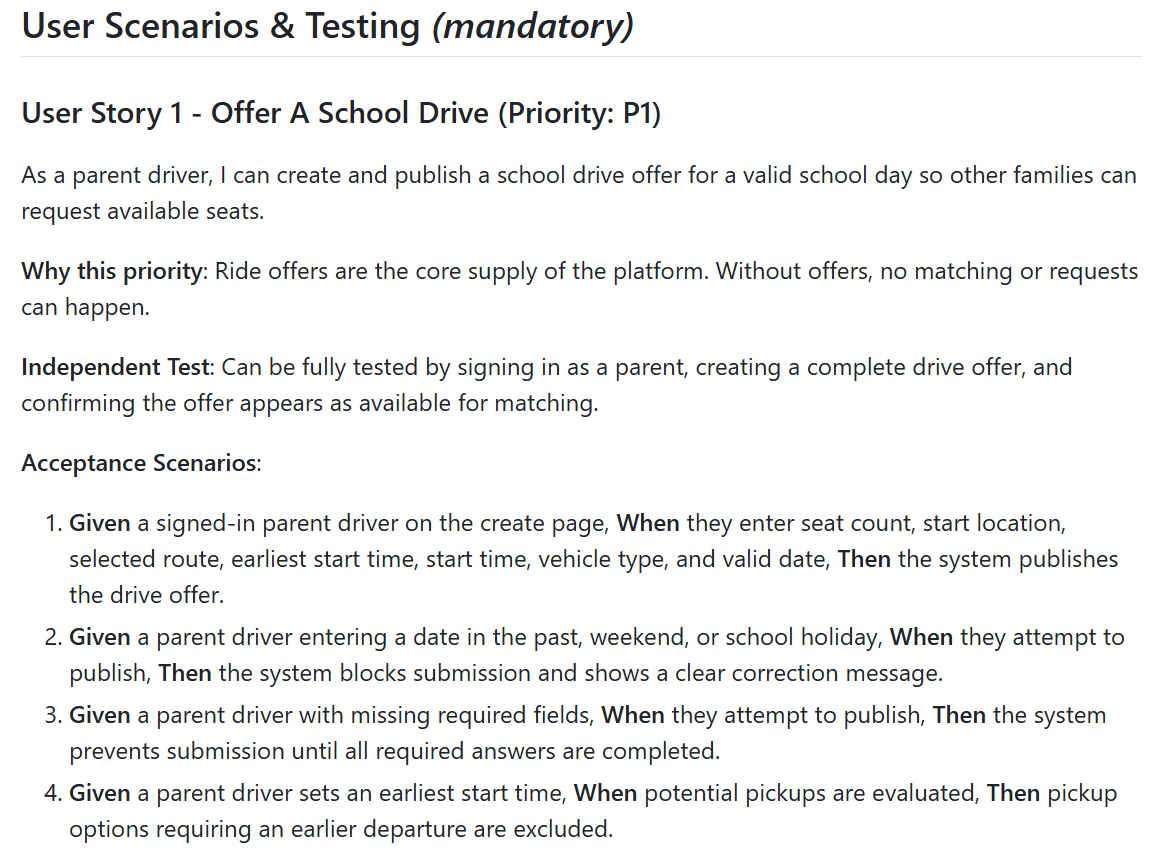
My son owned /speckit.specify. He described the problem, the users, the edge cases. AI wrote every acceptance scenario in GIVEN/WHEN/THEN format from his own description. Not code. Just: here’s the situation, here’s what happens, here’s what I expect.
The result was: Given a rider cancels on the morning of the pickup, when the cancellation is confirmed, then the driver is notified immediately.
He specified in his own language and AI translated into IT terms. Here is one example of a user story he authored:
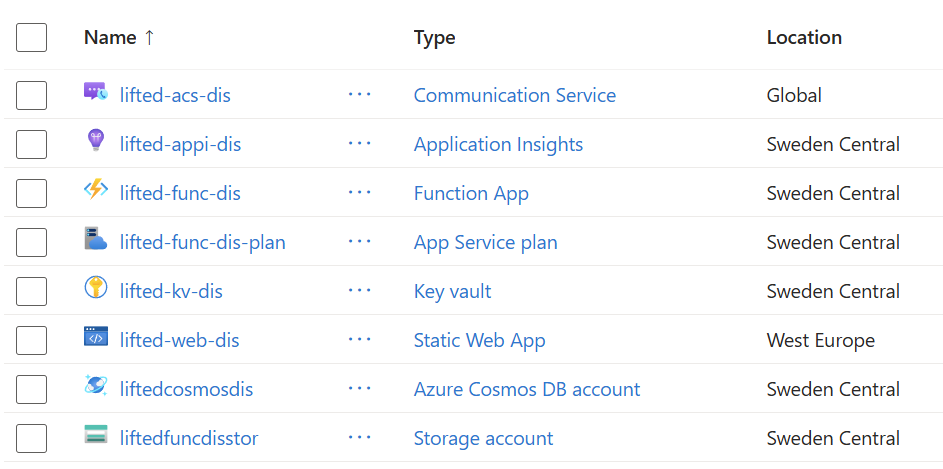
I owned /speckit.plan. That’s where the Azure architecture came in. Static Web Apps, Azure Functions, Cosmos DB, Azure Maps. My constraint: keep it cost-efficient. This was a proof of concept, not a production system. Serverless hosting, consumption-based functions, a NoSQL database that costs nothing at low volume. He didn’t need to know any of that. He trusted that I’d pick the right frame for what he’d described. I trusted that he’d described it correctly.
That division held throughout the whole project.
The honest part
Spec 001 was too big. Ten user stories crammed into one spec, some underspecified, some assuming things neither of us had thought through. The first working app reflected that: no navigation menu, no user management, no mobile layout. I’ve written a whole post about this exact symptom: When the Spec Is Too Big.
Every gap became a spec. A missing feature: new spec. An edge case he hadn’t considered: new spec. A flow that worked in isolation but broke when two users hit it at the same time: new spec. That’s how Spec 001 became sixteen, not through planning, but through honest testing.
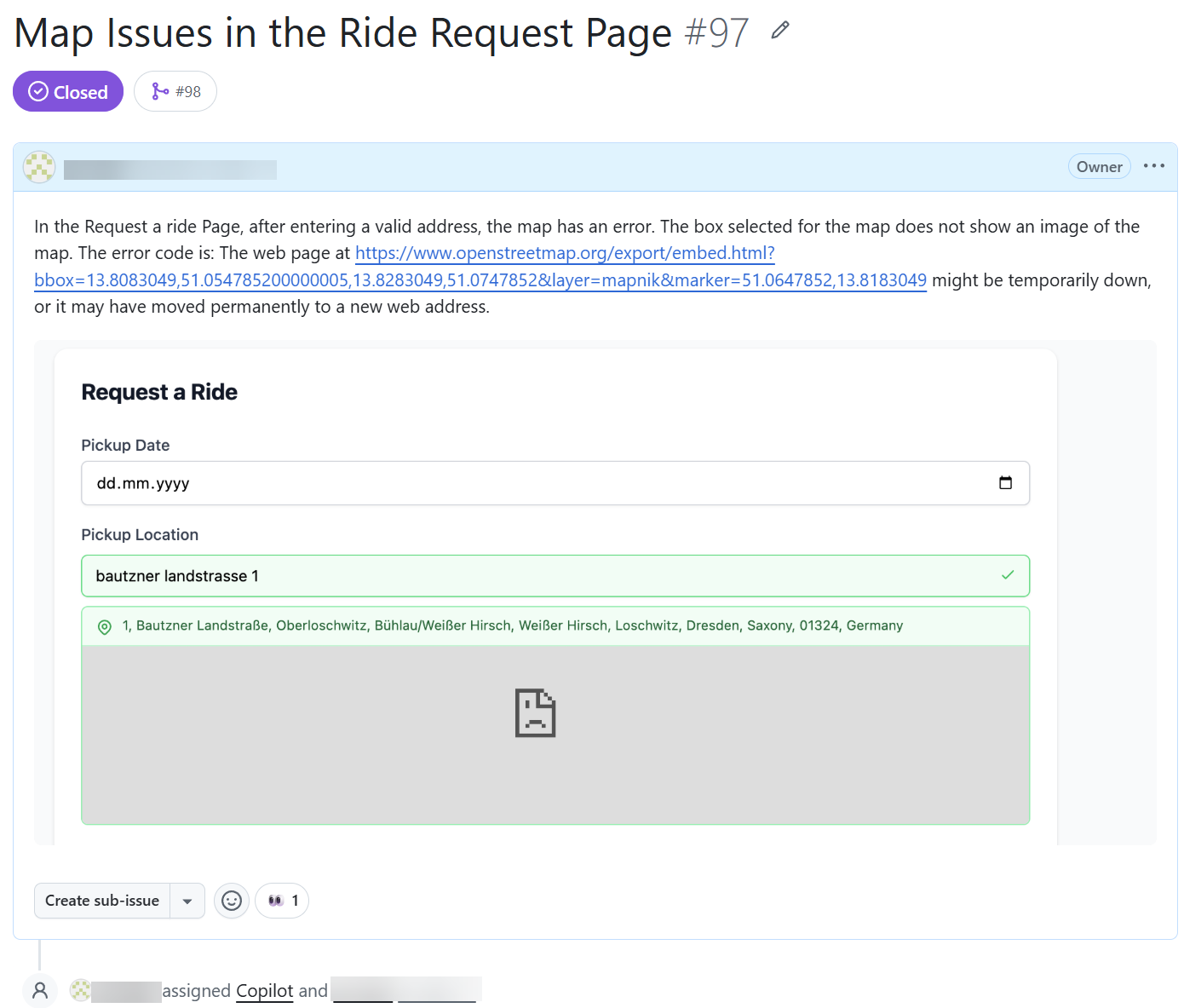
My son filed every one as a GitHub issue and assigned it straight to Copilot for analysis.
The setup that held it together
Process discipline came the hard way. Running multiple specs in parallel felt productive until the merge conflicts arrived. We also experimented with letting Copilot write specs directly in GitHub’s agent mode, which at the time didn’t yet have the conversational flow you get in VS Code. Early preview, rough edges, entirely irresistible. That’s the MVP in me.
We landed on a mode that held up: non-overlapping specs, merged early into main for visibility, never start an implementation while another is open. One spec in flight at a time. GitHub 🌱 SpecKit 0.12.x makes this smoother today, but we earned the discipline on 0.1.x.
Two things I set up early that paid back far more than they cost. First: CI and PR validation from the very first iteration with linting, unit tests, automated checks. This was before we had sixteen specs, before we had Playwright. When Playwright arrived it was painful to configure. Once running, it caught regressions in seconds that would have taken an afternoon to track down. Second: Application Insights. When something broke in the deployed backend, we had no idea what had happened. After adding it, my son would file a bug as a user. I’d pull the trace and hand it straight to Copilot: here’s the request, here’s the error, here’s what the user did. Full context. Fixes got faster.
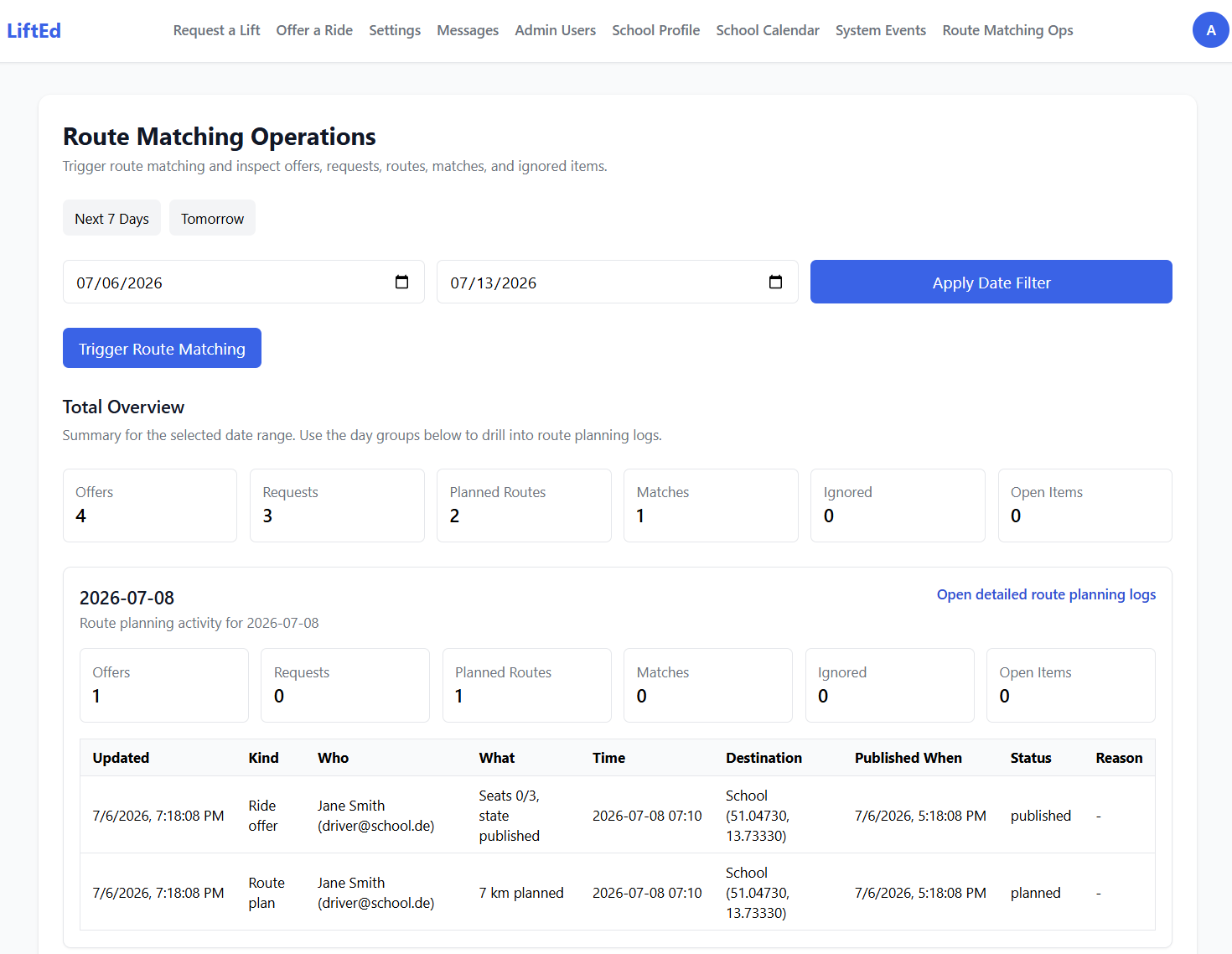
By the end: sixteen specs. Over a hundred acceptance scenarios. All authored by a teenager who’d never touched a compiler. We just happened to have those conversations about acceptance criteria across a kitchen table.
From Spec to Shipped
By spec three or four, we had a rhythm. Copilot wrote the code. My son decided if it was right.
The division of labour
It was a more effective QA cycle than most professional projects I’ve worked on. He wasn’t testing against a checklist someone else wrote. He was testing against his own mental model of how the app should behave. Every mismatch became a bug report, or a whole new spec.
That’s domain expertise as quality assurance. It’s the most honest form of testing I know.
The stack
The specs drove most of the stack. But one choice was mine to make as the architect.
His original spec had drivers entering a pickup address. Just a text field, because that was the extent of what he knew was possible.
I suggested Azure Maps. Showed him what it could do: visual routes, pickup markers, real navigation for the day of the ride. He went quiet for a moment. Then he started rewriting the spec.
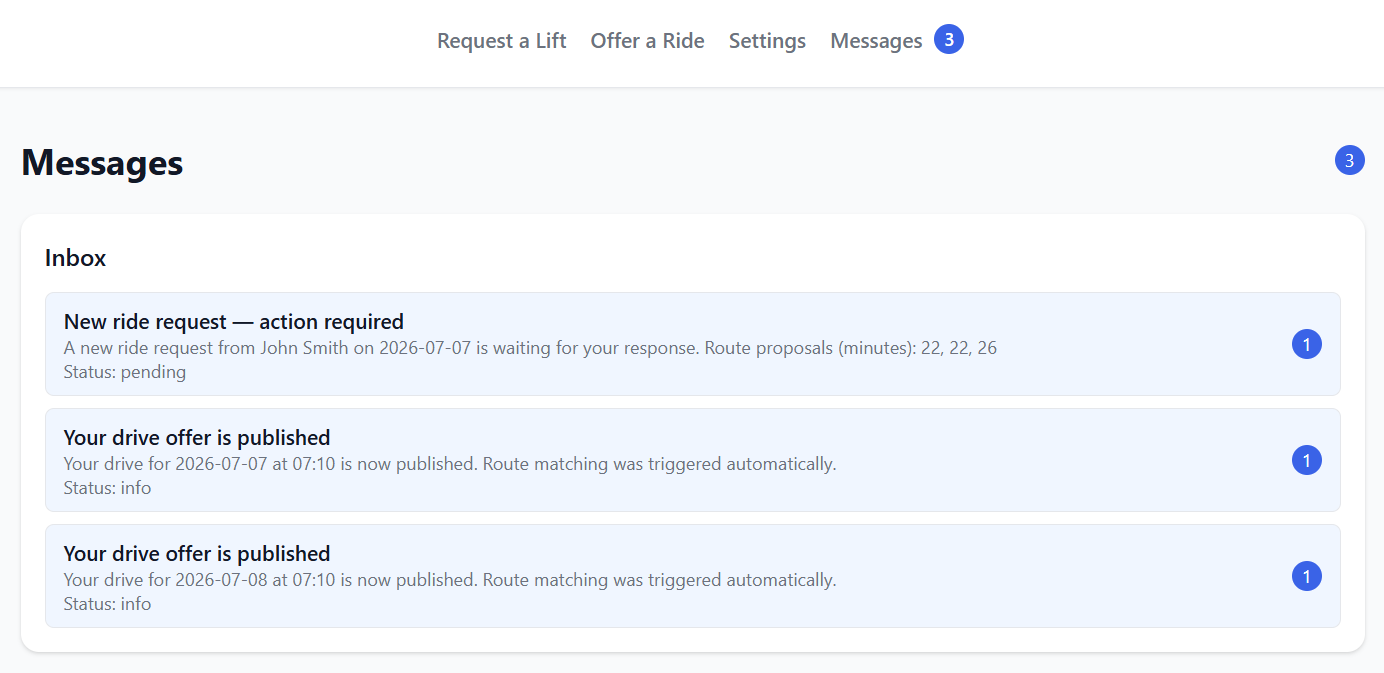
Later, it became this feature. This means a driver adjusting their route based on traffic, with the system recalculating pickup times for all riders. He hadn’t known to ask for it until he saw it:
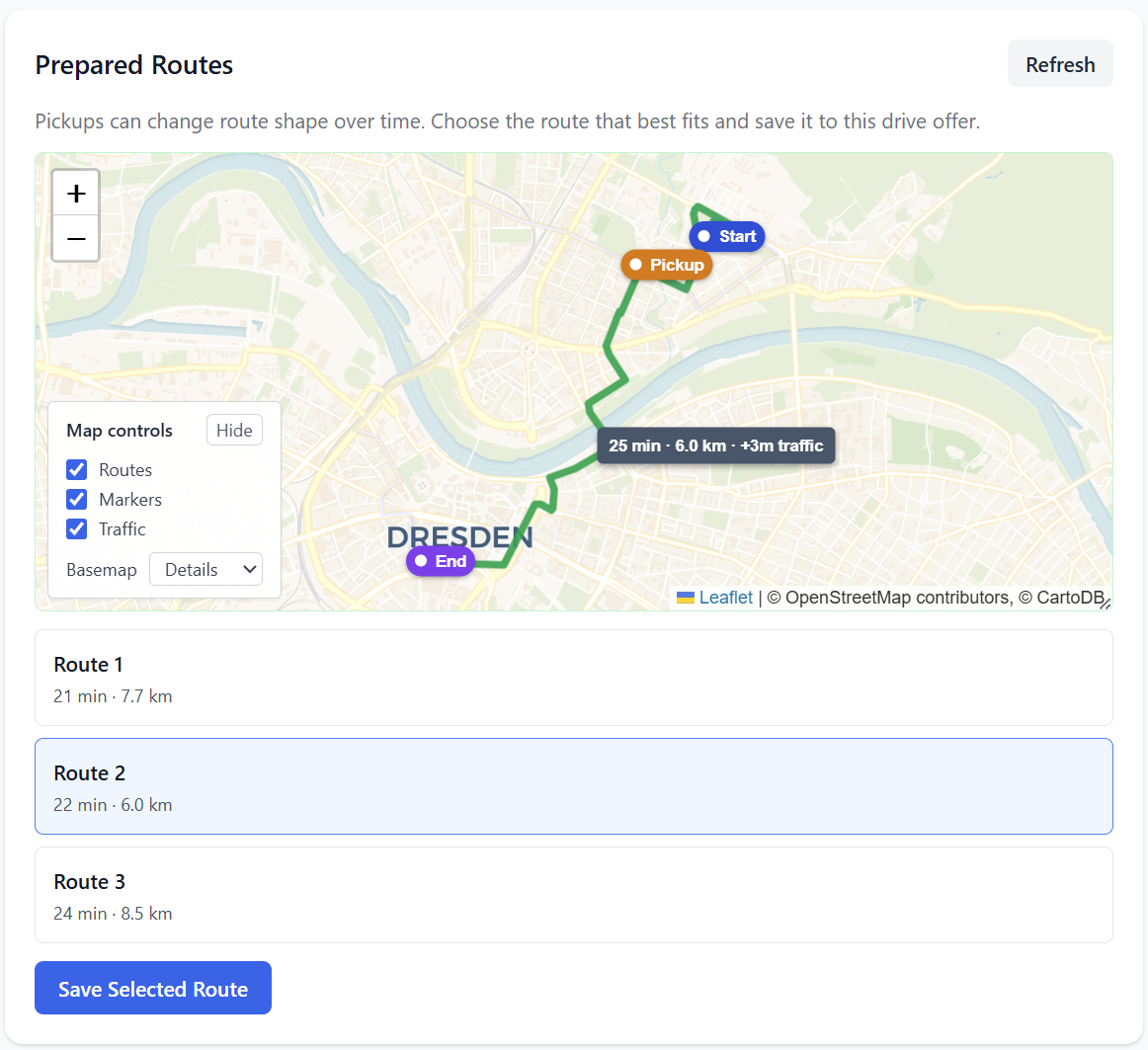
That’s what an architect brings that AI doesn’t. Not the technology knowledge itself. No, knowing which technology opens a door your user didn’t know existed. He had the domain. I had seen what was possible. Between the two of us, the specs got sharper.
The rest followed the same cost-first logic: Static Web Apps for the frontend, serverless Functions for the backend, Cosmos DB for storage. Every service on the free or consumption tier.
One spec, traced to code
Here’s what the loop looked like in practice. One requirement: FR-033, the rider cancellation, was written by my son, implemented by Copilot, tested by him, fed back into the spec.
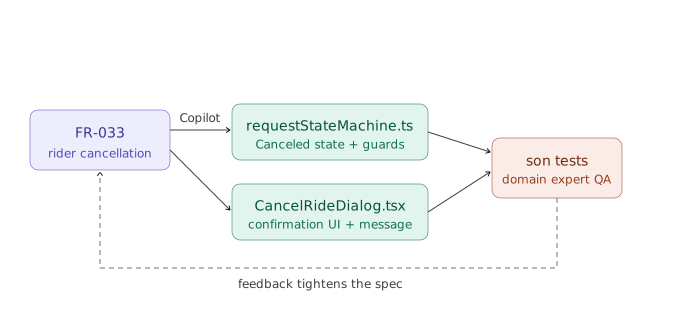
Requirement, implementation, test, feedback, spec. Every time.
He never ran a deployment
One detail that still impresses me: my son never ran a single deploy command during the entire project.
Azure Static Web Apps deploys on every push to main. The CI pipeline validated linting, executed unit tests. The PR validation ran on every pull request. By the time a spec branch merged, it had already been validated.
He’d test the live deployment, file feedback, and we’d open a new spec. The infrastructure was invisible to him. His attention stayed where it belonged: on whether the app solved the problem.
From Spec 016, pickup confirmation UX, to a live demo in front of his teacher.
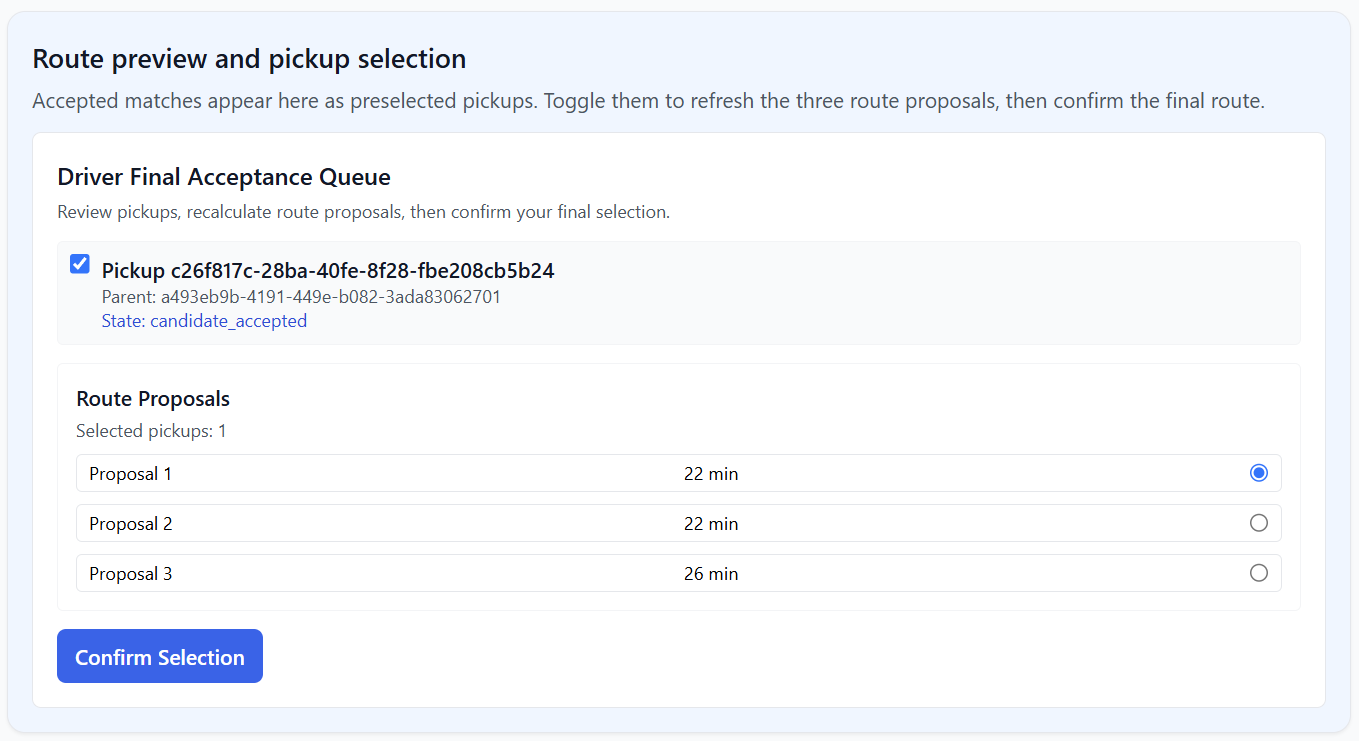
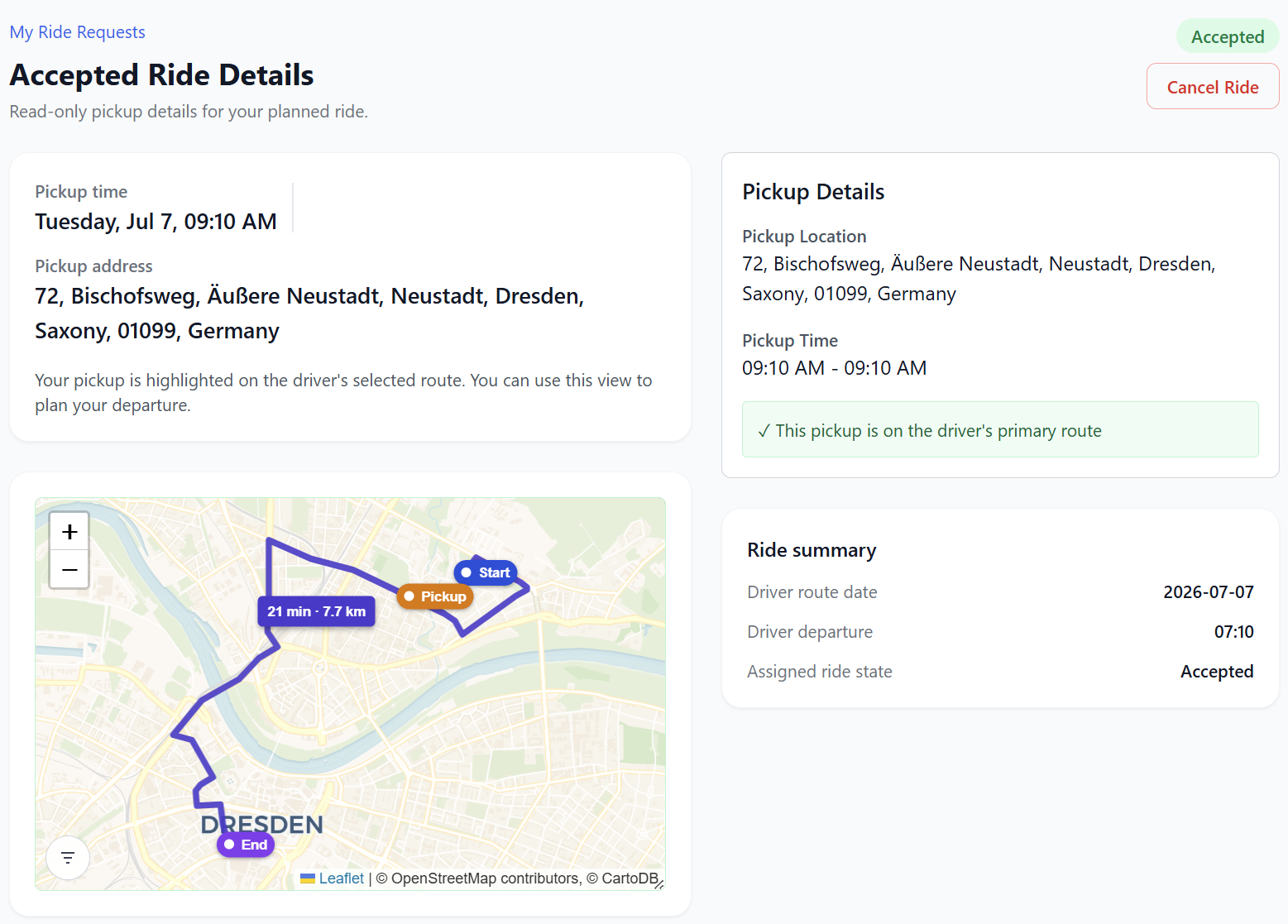
An end-to-end loop: requesting a ride, confirming pickups, adjusting routes based on real-time traffic. Here’s what the ride requestor sees: pickup details, chosen route, and ride summary.
What We Both Learned
What surprised me most wasn’t the app. It was how naturally he took to the whole process. Writing requirements, describing edge cases, testing against his own expectations, none of it felt foreign to him. It felt obvious. Because it was his problem, and he’d been living with it for years.
My job was never to build it for him. It was to walk in, point at something he hadn’t seen yet, and trust him to take it from there.
The hypothesis going in: a non-technical person with real domain knowledge, the right framework, and an AI coding partner can ship something real. After sixteen specs, over a hundred acceptance scenarios, and a live demo in front of his teacher, the answer is yes.
He didn’t need to learn to code. He needed a framework that turned what he already knew into something buildable. What he brought: the problem knowledge, the edge cases, the judgment about whether something actually works. That was finally the hard part. That’s what made the whole thing go.
If you have domain experts, business analysts, or product owners who know their problem inside out, then you can onboard them to GitHub 🌱 SpecKit. Let them specify. You bring the architecture. Copilot brings the implementation. You might be surprised what ships.
💡 For students: GitHub Copilot is free for verified students via GitHub Education. This means, Copilot Pro, Codespaces, and the full Student Developer Pack. Everything we used in this project was available at no cost.