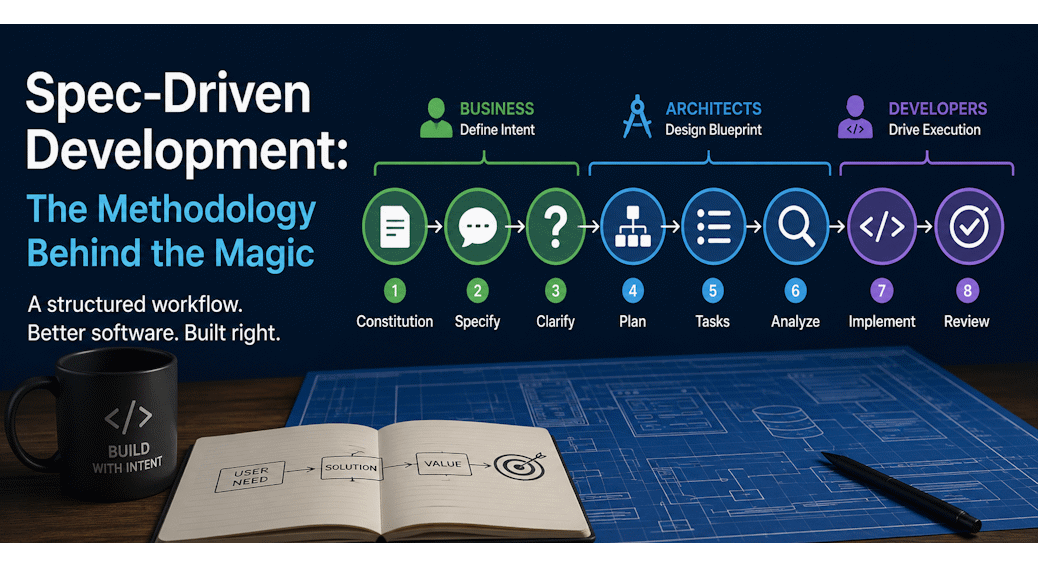
Spec-Driven Development: The Methodology Behind the Magic
Most developers I know have been here. They type a detailed prompt into their AI agent. The output looks right. They run it, tweak a detail, run it again – and somewhere around the third attempt, the whole thing has quietly shifted into something else.
The problem is not the AI. The problem is the approach.
Spec-driven development changes that. Before a single file gets created, you define intent. You build a shared understanding for your business stakeholders, your architect, and your AI agent. Then the AI works inside that frame instead of guessing outside it.
The first post in this series covered why that shift matters. This one goes deeper. I walk you through every phase, why the order is not optional, and what happens when you skip a step.
Here is the full picture:
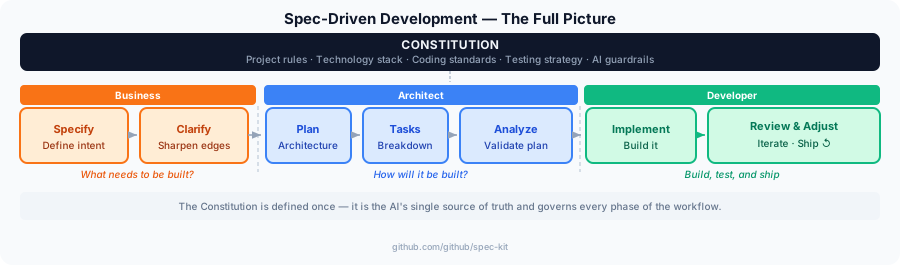
Three distinct groups move through this workflow. Business stakeholders own the intent – they define what the software should do and for whom. Architects own the blueprint – they translate that intent into a technical plan the AI can follow. Developers own execution – they drive the AI phase by phase and validate the output.
Each group hands off to the next and supports with their unique expertise. Nothing jumps ahead.
But before that first business conversation can happen, something needs to be in place. The constitution.
The Constitution

There is one thing that needs to exist before any of this works. It is not a plan. No, it is also not a requirement. And not even a conversation. It’s the 🌱 Spec Kit constitution for the project repository.
In 🌱 Spec Kit, it lives at .specify/memory/constitution.md – a single Markdown file. You write down everything the AI must never forget: your tech stack, your coding standards, your testing strategy, the constraints your project cannot compromise on.
Every phase that follows reads this file. Specify uses it to frame the right questions. Plan uses it to constrain the architecture. Implement uses it to write code that actually fits your project. Without a constitution, each prompt resets. The AI does fine work – but none of it connects.
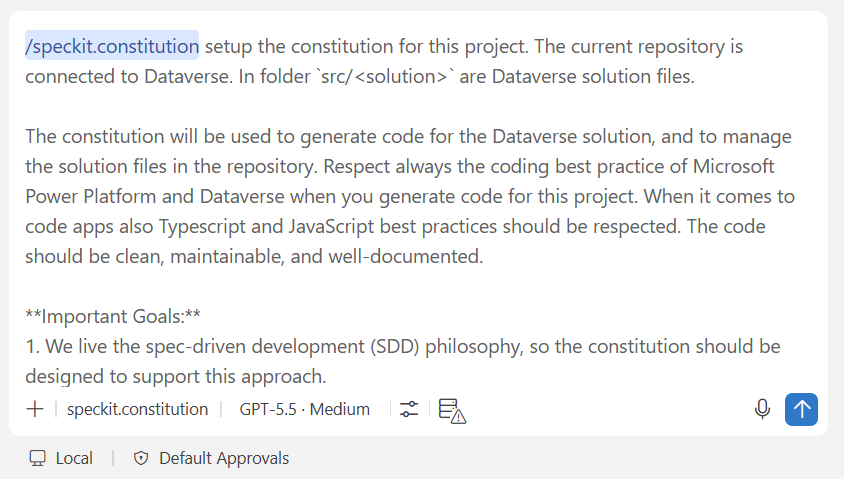
Here is a slice of the Expenses Manager constitution:
## Tech Stack
- Platform: Microsoft Power Platform
- Data layer: Dataverse
- UI: Model-driven app with custom forms
- Automation: Power Automate cloud flows

## Coding Standards
- All flow names follow the pattern: [Entity] - [Trigger] - [Action]
- No hardcoded environment URLs - use environment variables
- Every automation must have error handling and a notification step

## Testing
- Each feature gets a manual test checklist before it is marked done
- Dataverse changes are validated in a dev environment before merging
Writing one takes about twenty minutes. That time comes back fast – usually in the first Plan phase, when the architecture comes out already shaped to your stack with no corrections needed.
Run /speckit.constitution to generate yours. Read what comes out, adjust anything that doesn't match your reality, and leave it alone.
With that in place, the first real conversation can begin.
Defining Intent
The constitution is your guardrail. But it says nothing about what you are actually building. That conversation starts here.
Specify

Specify is the business conversation. You run /speckit.specify and describe what you want to build – not the tech stack, that comes later. You talk about who uses this, what they need to do, what success looks like.
For the Expenses Manager: an employee submits an expense report, a manager approves or rejects it, finance exports approved reports at month end. Nothing technical. Just the intended experience.
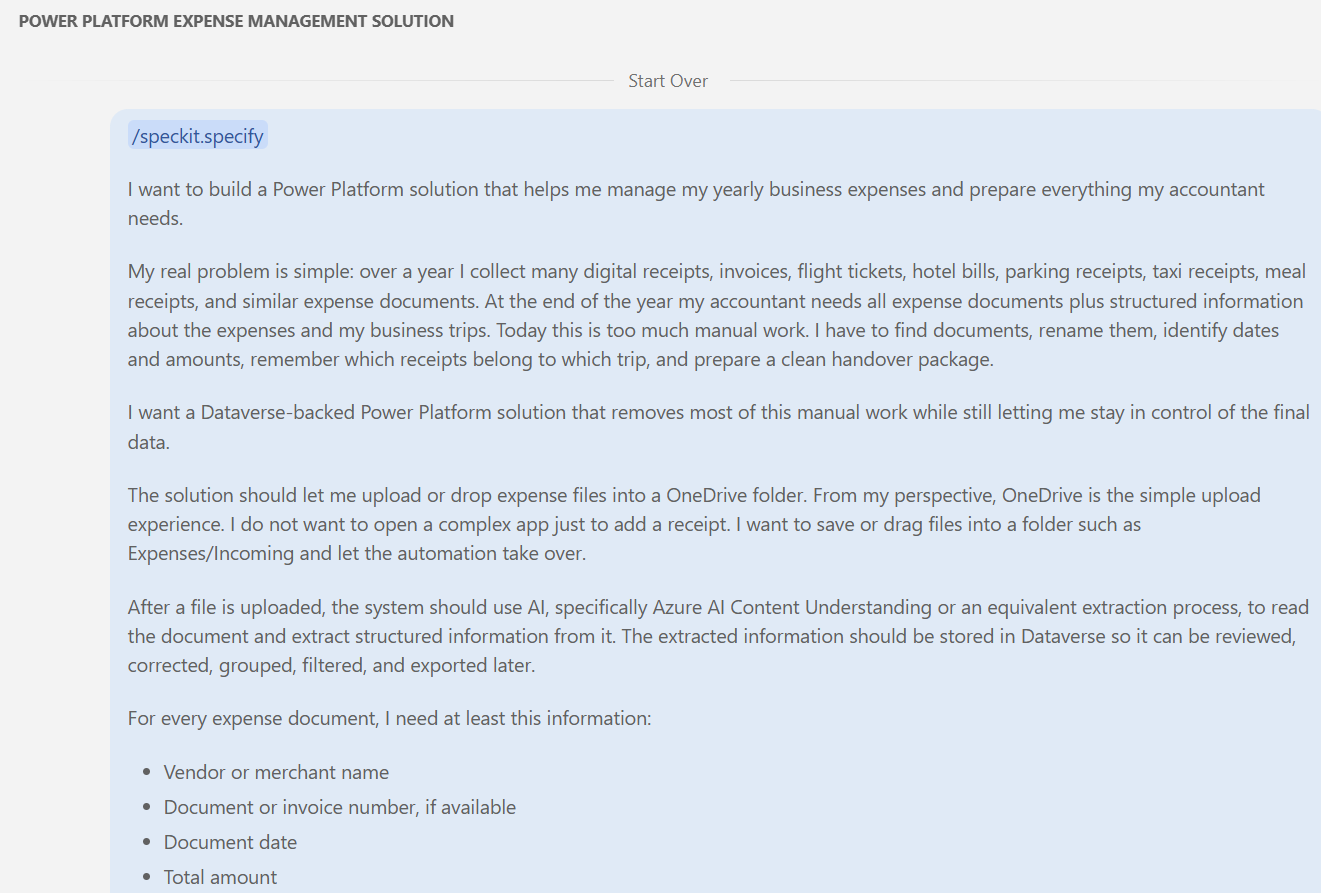
The output is a spec document in Markdown in my repository. This document contains every use case, every role, every requirement captured from that conversation. Read it carefully. Edit it. This is now the reference point for every phase that follows in spec-driven development. If something is missing here, you will find out mid-implementation.
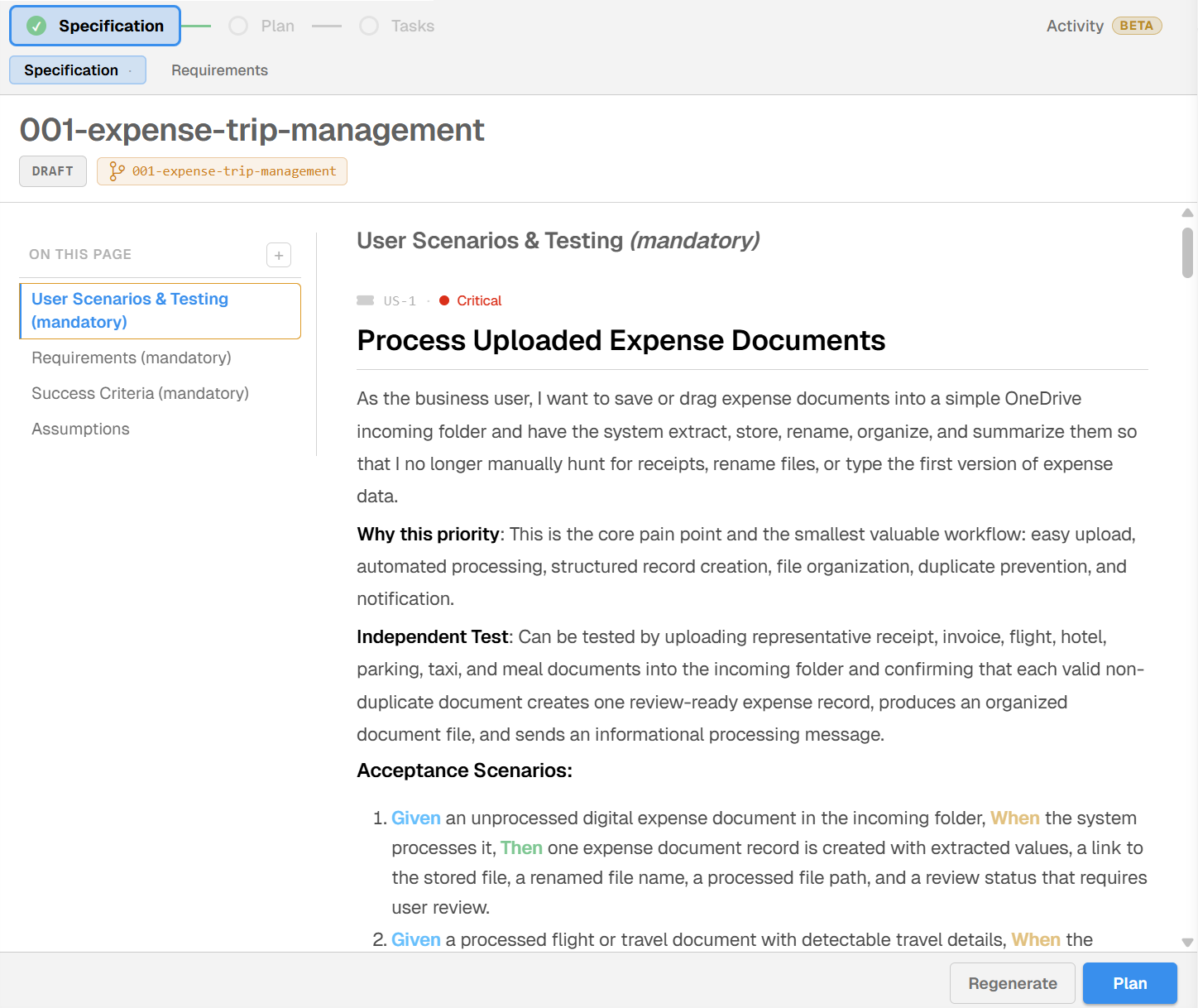
This document becomes the shared source of truth for the entire project. Every later phase references it. Leave a gap here, and you will find it mid-implementation.
Clarify

Clarify is optional in 🌱 Spec Kit. Most teams skip it. That is a mistake!
Run /speckit.clarify after Specify and the AI asks the questions a good architect would ask before committing to a plan. Here you discuss edge cases, unstated constraints, requirements that sound clear until someone actually builds them.
For the Expenses Manager, Clarify surfaced things like: what happens when a manager is on leave? Can an employee edit a submitted report? What currencies need to be supported? None of that was in the original spec.
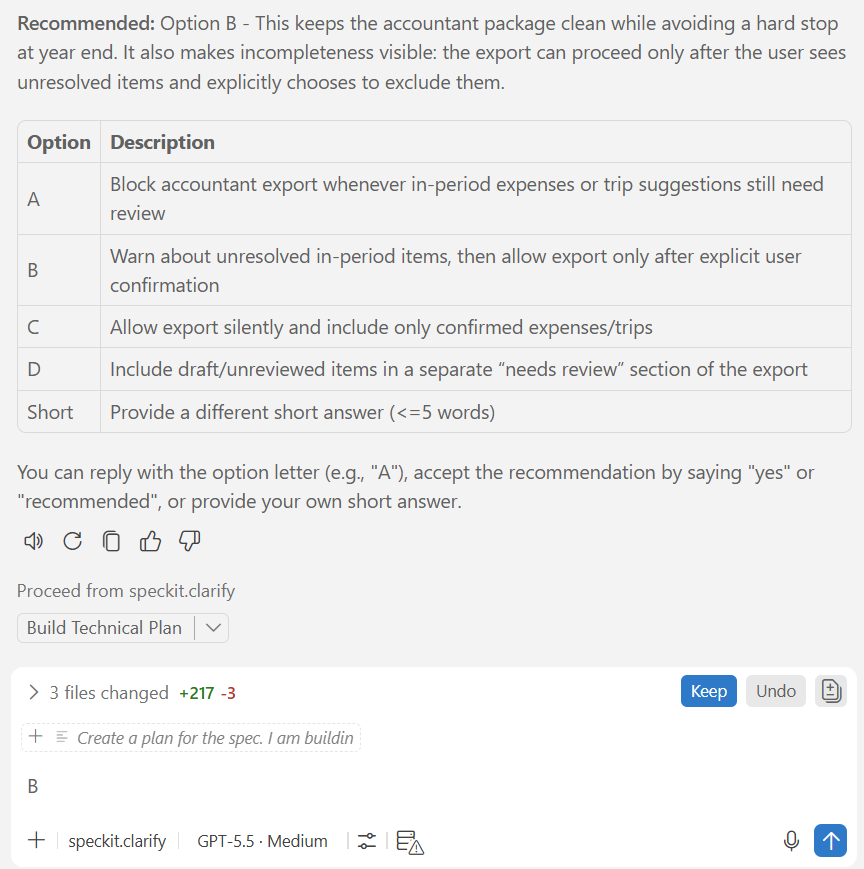
You answer each question. The AI folds those answers back into the spec.
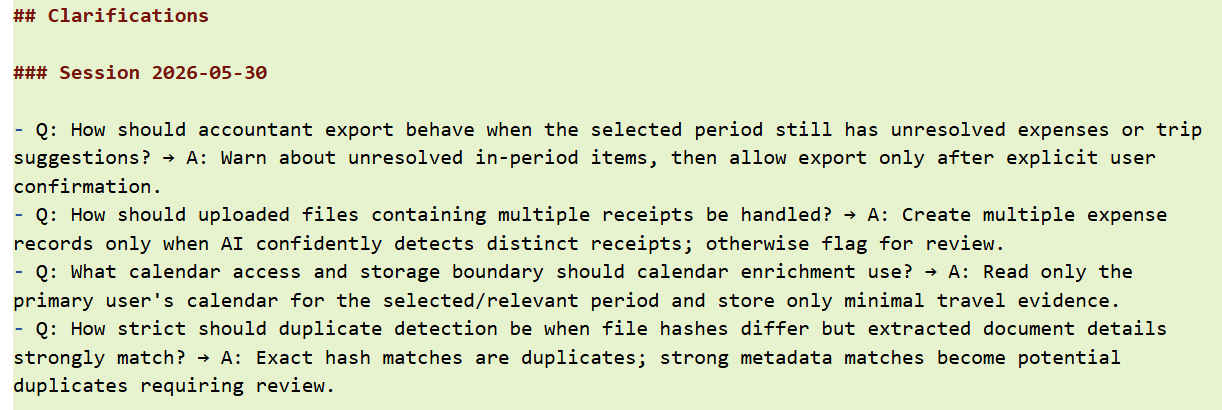
The result is a tighter document. Fewer assumptions baked in, less room for the Plan phase to fill gaps on your behalf.
Every decision in Specify and Clarify sets the boundaries for what follows. Once intent is locked, the architecture can begin.
The Technical Blueprint
Intent is locked. The spec is sharp. Now the architect picks it up.
This is where spec-driven development changes pace. The business conversation is over. The technical side starts building – but not code yet. First, a blueprint.
Plan

Run /speckit.plan and the AI reads your spec and your constitution, then produces an architecture. Components. Data model. Integrations. Dependencies. Everything the implementation will need, before a single line of code is written.
For the Expenses Manager, the Plan phase produced a full Dataverse schema – tables, columns, relationships – along with a Power Automate flow structure and the model-driven app layout. I did not write any of that. I reviewed it, made a few adjustments, and approved it.
That review step matters. The plan is a proposal. You own the architecture. If something does not fit your context, change it now. Changing it later costs more.
Tasks
A plan on its own is too big for an AI agent to execute reliably. /speckit.tasks breaks it into small, independently buildable pieces – each one scoped to a single implementation step, each one reviewable before you move on.
Let me show you an example of the outcome:
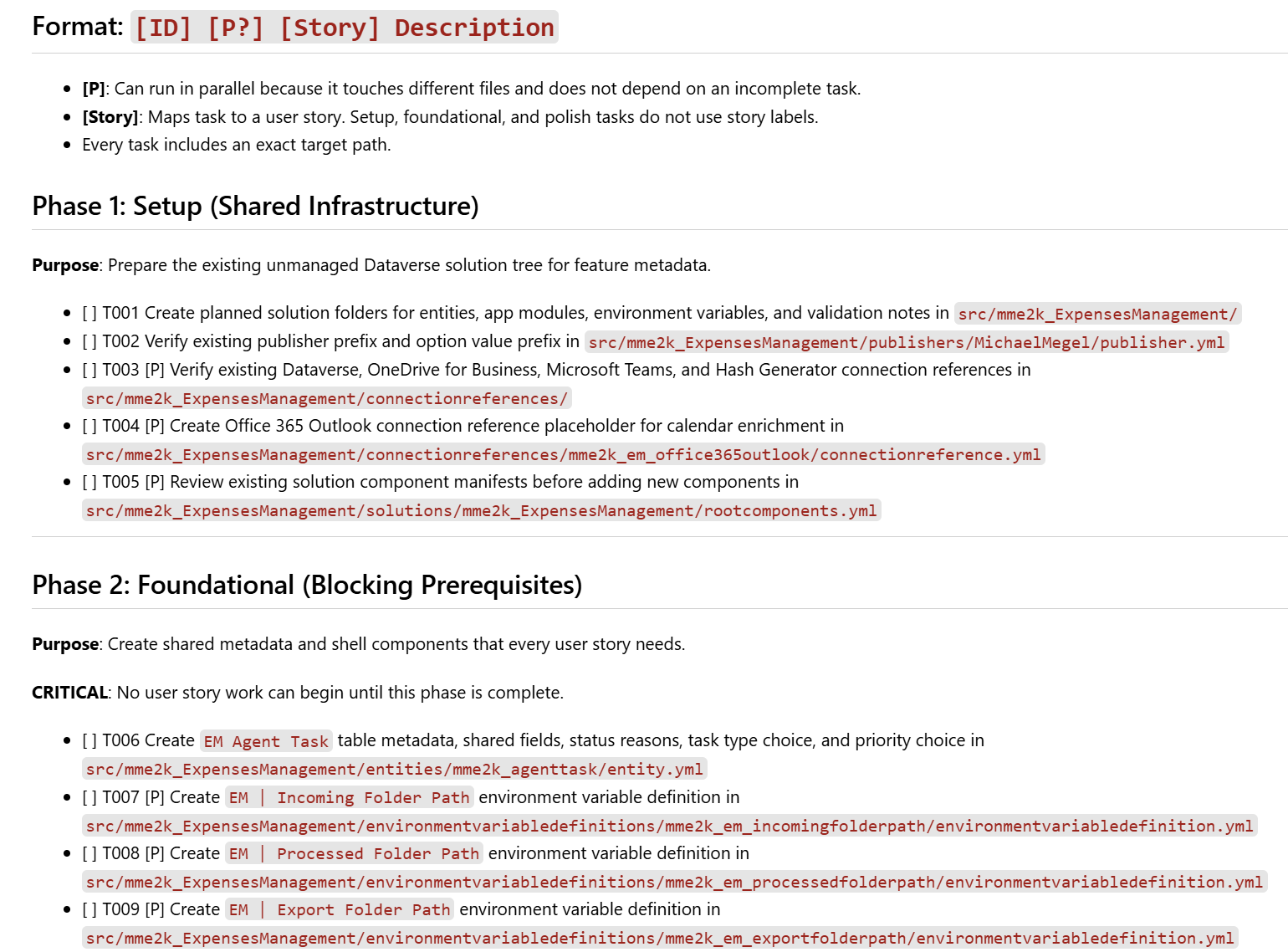
Think of tasks as AI-readable tickets. Each one is specific enough that the agent has no room to guess. The Expenses Manager ended up with around twenty tasks: one for each table, one for each automation flow, a few for the UI forms. Bite-sized, sequential, unambiguous.
This is what makes the Implement phase manageable. You are not handing the AI a 200-page spec and hoping for the best. You are handing it one task at a time.
Analyze
Like Clarify, Analyze is optional. Like Clarify, skipping it is a bad idea.
Run /speckit.analyze after Tasks and the AI checks for conflicts across the whole task list. Does task 7 assume something that task 3 never established? Does task 12 reference a column that the data model does not include? These contradictions are easy to miss when you are looking at tasks one by one.
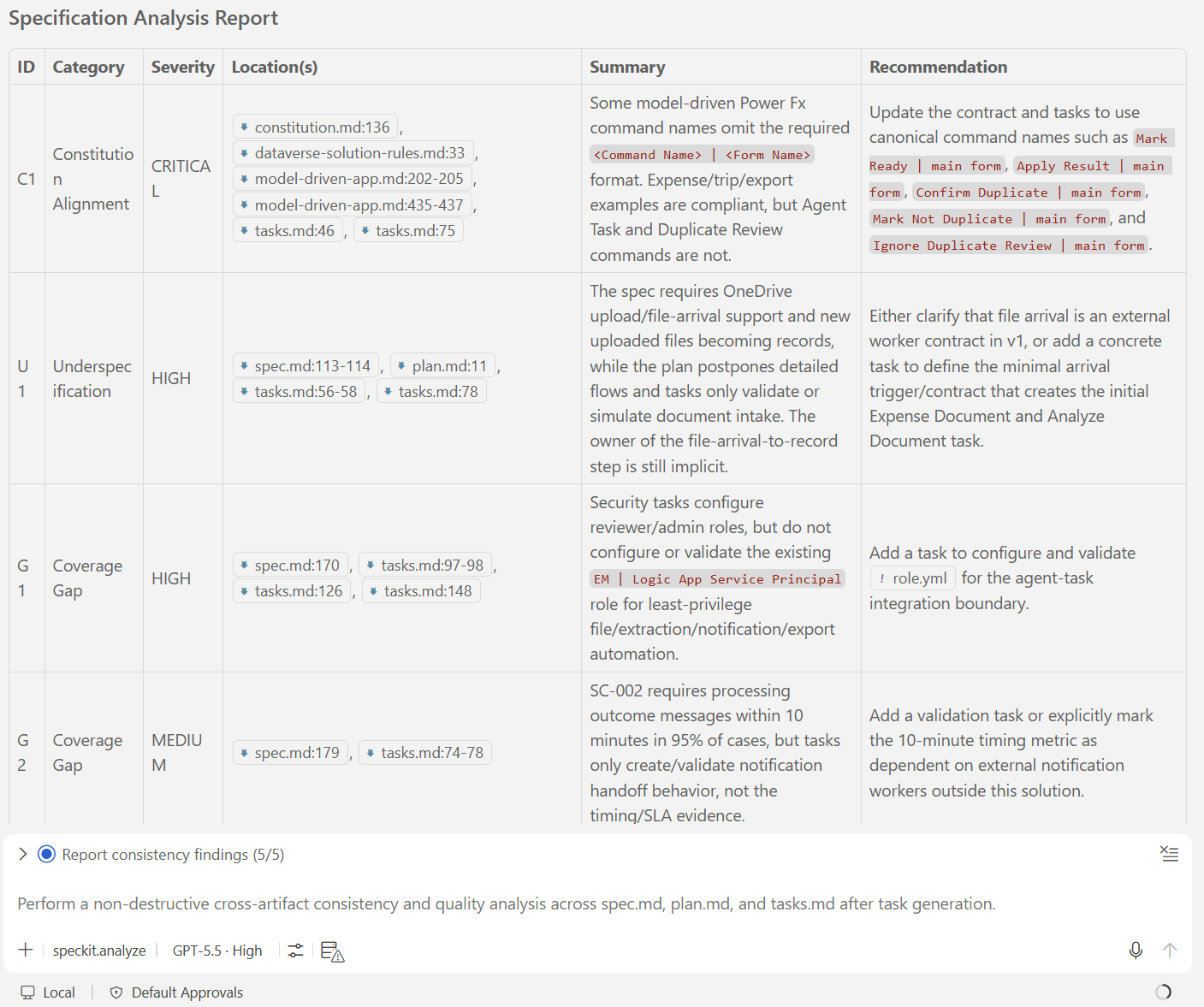
Catching those issues here is cheap. Finding one mid-implementation, after you have already built half the system around a bad assumption, costs you days.
The blueprint is ready. Now the AI can start building.
The AI Phase
The blueprint is ready. The tasks are defined. This is the part where the AI finally writes code.
Implement
Run /speckit.implement and point the AI at a single task. It reads that task, your constitution, your spec, and your plan – then builds exactly that. One task at a time.
This is what makes the Implement phase different from just prompting an AI. There is no “build me the whole app.” There is no room to freestyle. The AI works inside the frame you built in every phase before this one. The output is scoped, predictable, and reviewable.
The next posts in this series go deep on what that looks like in practice – real tasks, real output, real decisions. For now, the point is the shape of it: focused changes, one task at a time, nothing unexpected.
Review, Test, and Adjust
After each task, you review. Does the output match what the task asked for? Really? Does it satisfy the spec? Or does it violate anything in the constitution?
This is your checkpoint. Not a formality – a real gate. You are in charge!
When something is off, you do not start over. You adjust – and this is where your role matters most.
The AI cannot see your screen. It does not know an error appeared, or that the form layout looks nothing like what you had in mind when you wrote the spec. It does not notice that the approval flow technically works but creates an awkward experience for the user. You do. You see the output, compare it against your intent, and describe the gap. An error message. A behavior that does not match. A UX idea that came to you the moment you saw the result running.
That feedback is what you feed back to the AI. It corrects the specific task and reruns. The spec and constitution stay in place, so nothing drifts – you are pointing at one concrete thing, not re-explaining the whole project.
The Implement, Review, Adjust loop repeats for every task. Across that loop, the quality of your feedback is the quality of the output.
Keeping the Spec Current
When an adjustment changes something meaningful – a workflow step, a data field, a UX decision – update the spec, the plan, or the tasks. Not as extra work. As hygiene. The artifacts are how everything stays consistent. If reality diverges from the spec and you do not update it, the next task will be built against a document that no longer describes the project you are actually building.
The spec, plan, and tasks are part of the repository. They are living documents. They are not just for the AI – they are for you, too.
The Biggest Mistakes
The workflow is sound. But there are a few ways to break it from the inside, and most of them are easy to stumble into.
Skipping the constitution. This is the one I see most often. People run /speckit.specify before writing a constitution because they want to start fast. The spec comes out fine. Then the plan drifts slightly from the project’s actual constraints. Then the tasks drift from the plan. By Implement, the AI is building something technically correct but wrong for the project. All that drift started at the first phase.
Thin specs. Specify produces what you give it. If you describe the Expenses Manager as “an expense tracking app,” the spec will be shallow, the plan will fill the gaps with assumptions, and Clarify will not fix it because you already moved on. Be specific in the Specify conversation. It is the cheapest place to add detail.
Specs that are too big. The opposite problem. You describe a system so large that you only cover part of it before you move on. The AI takes what you gave it and designs the rest. By Implement, you are building against a spec that is half yours and half invented. Pick a scope you can fully describe in one Specify session. Build that. Then extend.
During the Build
Jumping straight to Implement. Plan and Tasks exist for a reason. Skipping them means the AI has a spec but no architecture. It will invent one during Implement. You will only notice when the output does not connect with anything else. The whole point of spec-driven development is that the AI works inside a frame you built – not one it made up on the fly.
Overriding the spec mid-build. When something changes during Implement, the instinct is to tell the AI to “just do it differently.” Resist that. Go back and amend the spec or the task. The constitution and spec are the source of truth. Bypass them mid-run and one part of the system ends up built against different rules than everything else.
Tasks that are too big. If a single task covers three things, Analyze cannot check it properly and Implement has too much room to wander. When in doubt, split the task. Smaller is almost always better.
None of these are hard to avoid once you have done the workflow once. The pattern is the same every time: respect the phase order, do not skip the optional steps, and keep the spec honest.
Wrapping Up
That covers the full picture of spec-driven development.
Eight phases. Each one feeds the next.
Constitution first – the rules the AI never breaks. Specify – the business defines what success looks like. Clarify – the AI probes for gaps before any plan exists. Plan – an architecture that fits the spec and the constitution. Tasks – that architecture broken into pieces small enough to build reliably. Analyze – a consistency check before a line of code is written. Implement – the AI builds one task at a time, inside the frame. Review and Adjust – you check the output against the spec and correct anything that falls short.
Three groups move through this in sequence. Business stakeholders lock the intent. Architects build the blueprint. Developers ship inside the frame. Every phase is deliberate. Every output is reviewable.
For the Expenses Manager, all of this produced a complete SDD artifact before we touched a single table or flow. A constitution file. A spec document. An architecture. A task list. All in Markdown, all in the repository, all reviewable.
The next post goes deep on the spec-writing phase. You bring an idea – I need to manage expense receipts and group them by business trip – and you walk out with a precise requirements document the AI can build against. Real prompts, real output, and the Expenses Manager spec.md` as the live example throughout.
If you want to try this before then, install 🌱 Spec Kit and run it on something small. A single feature, a side project, a proof of concept. Get the workflow into muscle memory. The spec post will make a lot more sense if you have done the phases at least once.
You can find 🌱 Spec Kit at github.com/github/spec-kit. It installs in a few minutes and works with any AI coding agent.