Spec-Driven Development: When the Spec Is Too Big
I had a spec, I had GitHub Copilot Pro+! A new billing period with fresh credits has begun. So I started to refurbish my Expense Management system. In detail, I was building with a fresh spec that should rebuild the whole system in one run. And yes, that was the problem.
Everything looked good. Copilot credits were melting away during implementation. Some hours later I had my first results. The Azure portal showed me what was there. Content Understanding analyzers: deployed. Logic Apps: running. Foundry agents: nowhere. Yes, my spec never actually said what they should do.
Then I looked closer.
The Logic Apps were hitting Dataverse through raw HTTP — not the native connector. The tables they were supposed to write to? Not there. Copilot had skipped them.
Welcome back to Post #3 in my spec-driven development series. Post #1 covers the why and Post #2 covers the how. This one covers now what happens when you skip the thinking and just start to build.
TL/DR: The technology wasn’t the problem. The spec was.
Here’s what happened.
The Architecture on Paper
My intro already described what went wrong as I was trying to build my spec. But, lets dig a bit deeper into the whole story.
Last year I started into building my expense management system. Let’s call it version 1. Long story short, it helps me to organize my business expenses. Yes, it worked. Receipts went in, data came out, expenses got tracked. But it was built the way most side projects are built – one idea at a time, one connection at a time. No architecture. No system perspective.
With Spec-driven development I aimed to fix that. I started and wrote a constitution first. Seven principles covering Azure-first design, agent composability, infrastructure as code, security, observability, simplicity, and the Dataverse MCP integration. Then I wrote my first spec. In total, six user stories, 28 functional requirements. Everything in one document to describe the entire system.
Here you can see an overview of my original architecture design:
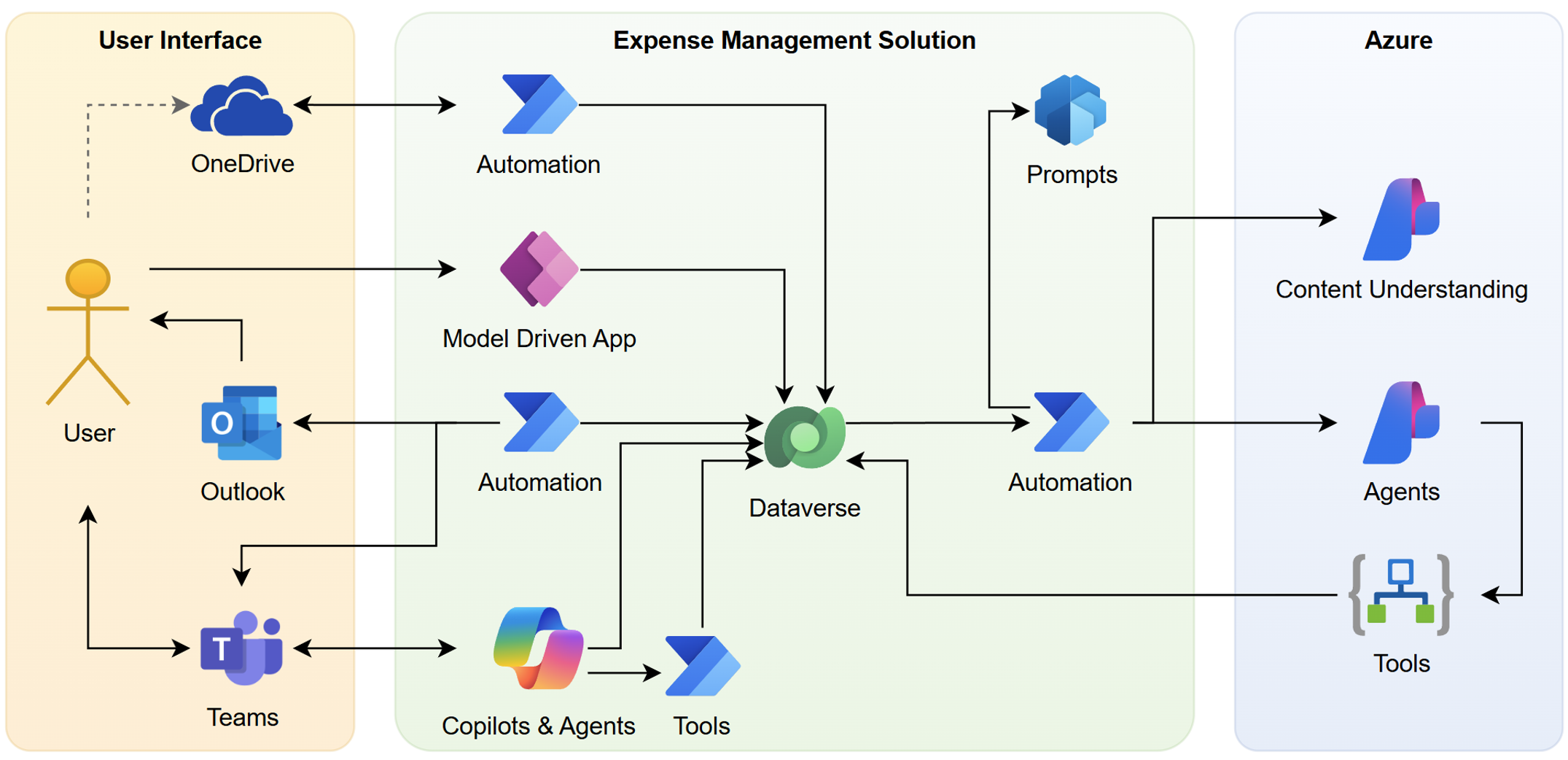
Three layers. You see on the left side my daily Business Applications such as Teams, Outlook, and OneDrive. The middle layer is the Expense Management Solution as Low Code. And on the right side you see the Por Code components in Azure such as Microsoft Foundry Content Understanding, Agents, and Logic Apps.
I describe everything in my first spec and started with the things that I expect as an end user…
Business Applications as the Starting Point
This was where I as a human do my daily work. OneDrive for dropping expense documents. Teams for communication and receiving notifications when something needed a decision.
Outlook had in this scenario another role. Here a Copilot agent could read my inbox and find travel-related emails to discover hotel confirmations, train bookings, and flight receipts. my idea was to use those document to identify a business trip automatically. No manual grouping needed. The agent would figure it out.
In detail, when an expense email arrived in my mailbox with a forwarded receipt, the agent would catch it. No manual OneDrive drop needed. The system would detect it and start processing.
It never really worked in this way in version 1. But the idea was too good to cut. So I kept it in my first spec.
Azure AI with Content Understanding
I could not resist to explain during the specification and planning what I expected the new Expenses Managements system should use under the hood. Therefore, I described how I would like to position Azure AI Content Understanding to extract structured data from PDFs and images. This worked well in version 1 to get information out of my receipts, train tickets, and boarding passes.
Here I understood, that its useful to have specialize analyzers per document. In conclusion, each document type needed its own analyzer. However, the process chain is still the same:
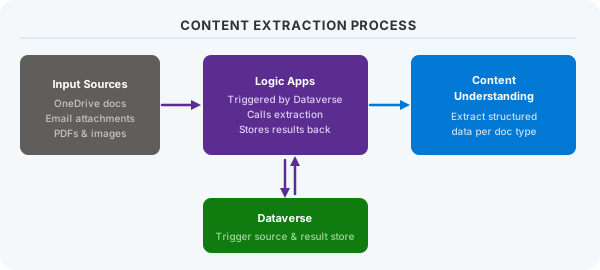
In version 1, Azure Logic Apps acted as orchestrator. Triggered by Dataverse and providing the binary stream of documents from input sources. Next, it called Azure AI Content Understanding to extract structured data from the document. Finally, results went straight back to Dataverse. It’s event-driven, serverless – and clean on paper.
Dataverse as the Foundation
In my mind I had still Dataverse as the foundation. I described this during writing the specification with GitHub 🌱 SpecKit. In addition, I explained that I wanted to manage my expense records, trip summaries, and processing status in a model-driven app. This will help me to sit on top of that data to review and confirm what the AI extracted.
Next, I positioned Copilot Studio as future automation tool in Power Platform. Thats beyond a simple chat bot. I know Power Automate flows grow complex fast. The idea was to offload some of that complexity to autonomous agents. Not hard-coded steps. Just instructions. Let the agent figure it out.
Unfortunately, I missed to describe this in detail. In addition, my future plan skipped it too.
The spec covered all six user stories. From document extraction to the accountant ZIP export – everything was there. Just not with enough detail where it counted.
That was the problem.
The Rabbit Holes
The spec, plan, and task list were written. The build ran and I supervised the AI. Thousands of GitHub Copilot credits later, I had more questions than answers.
That’s the thing about spec-driven development at scale. The spec itself can become the problem – not because it’s wrong, but because it’s too wide and too thin in the wrong places.
Look at this, my Azure resources were deployed.
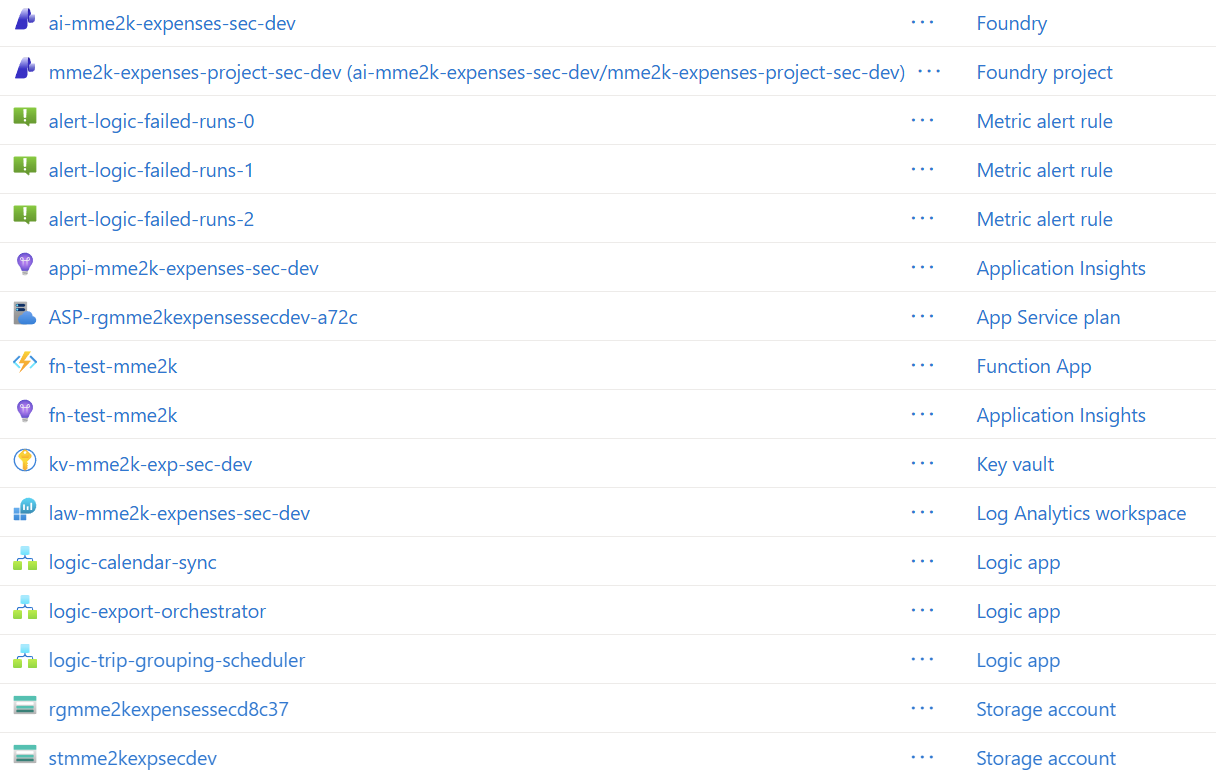
On the first look, my implementation was technically a success. But on the second closer look, I discovered there was something missing.
The Spec Was Too Big
My six user stories and lots of functional requirements were written down in my repository. The spec covered everything from dropping a receipt into OneDrive to generating an export ZIP for the accountant.
All dependencies were are correctly resolved, plan and tasks looked good. This means, something was missing from User Story 1 through User Story 6. All six were tried to implement together. So what was the problem?
The constitution I wrote had several principles. Here per example my Principle VI was “Simplicity & YAGNI”:
### VI. Simplicity & YAGNI

Start with the simplest solution that meets the requirement. Complexity MUST be justified.

- Prefer built-in Logic Apps connectors over custom HTTP calls.
- Prefer existing Foundry model deployments over new model deployments.
- No new Azure service type may be introduced without a rationale documented in the spec.
- Remove unused agents, flows, and resources at the end of each feature delivery.
Start simple, don’t over-engineer. Good advice in theory.
What it didn’t say: this spec is too large for a single build pass. No principle defined a maximum scope. No guardrail said: when you have requirements across different technologies and dependent stories, decompose before you build.
Also the definition of my technical stack was too broad for AI to make good decisions.
## Technology Stack

| Layer | Technology | Constraint |
|---|---|---|
| AI Agents | Microsoft Azure AI Foundry Agents | Consumption-aware; smallest viable model |
| Orchestration | Azure Logic Apps (Consumption) | No Standard/Premium plan |
| Data & CRM | Microsoft Dataverse (Power Platform) | Schema managed via Dataverse MCP server; environment metadata in `DATAVERSE.md`; schema reference in `docs/dataverse-solution.md` |
| Dataverse Tooling | Dataverse MCP Server (`mcp_dataverse-usd_*`) | Development environment only; CRUD on tables, records, and solution objects |
| Conversational UI | Copilot Studio | Managed externally; this repo provides agent endpoints |
| IaC | Bicep | Required for all Azure resources |
| Secrets | Azure Key Vault | No plaintext secrets in repo or environment vars |
| Observability | Azure Monitor + Application Insights | Required on all agents and Logic Apps |
As result, Copilot didn’t really added required technical details to the plan. Well, it read all my requirements and developed a plan. But the plan was lacking in several places the concrete information. In the end, AI created a large task list, and started working through them.
AI Chose the Interesting Work
I’ve seen this pattern in other builds. When a spec mixes technically complex work with simpler CRUD interactions, AI builds the complex parts first. Not because it skips the simpler parts – it reads everything. But it builds what has the clearest technical shape.
In detail, my Azure AI Content Understanding analyzers were deployed. Different analyzer chains for different document types. They worked well after some guidance during implementation from my side.

The Azure Logic Apps orchestrator instead was running. It looked as a clean event-driven flow. But here Copilot decided to grow it to over a dozen steps. Surprisingly, it was calling Dataverse through raw HTTP – not the native connector.
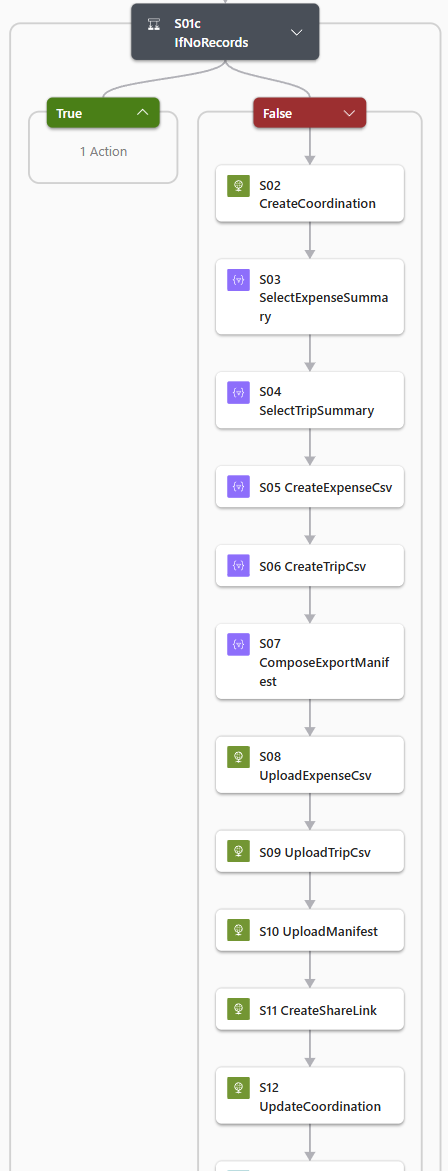
Ok, the spec never said to use raw HTTP. It also never said not to. Copilot made a choice. Whether authentication would hold in production was for me to find out later.
My implementation process began here to stuck. I discovered some specified Dataverse tables weren’t created. Some others were partially created with missing lookup fields or they had wired column names. In addition, the model-driven app for human review wasn’t built.
Copilot built the technically complex layer in Azure. This was the part with a clear shape in the spec. The Low Code part including my tables and the UI were skipped. They existed in the spec as requirements but were turned into manual tasks.
One Sentence for an Entire App
In detail, I found out, that the Dataverse MCP wasn’t able to create everything that is needed. Here Copilot assumed the human would do the rest later. In other words, I would have to build the human-facing layer myself. The spec said to build a model-driven app for review and Copilot interpreted this as a manual task.
Here is the complete functional requirement for my human-facing review experience:
**FR-006**: The system MUST provide a model-driven Power App for reviewing,
editing, confirming, and rejecting expense records.
One sentence.
When I compare that to other requirements it becomes clear to me. Per example FR-004, defined a full file renaming pattern with folder paths, fiscal year logic, fallback rules, and automatic subfolder creation:
**FR-004**: The system MUST rename the processed OneDrive file according to a
structured naming pattern that includes: abbreviated vendor, date (YYYY-MM-DD),
relevant identifiers, and the original document number, and MUST then move the
renamed file to the `Expenses/Processed/{fiscal_year}/` folder. Fiscal year is
the year component of the extracted document date; if the document date cannot be
determined, the upload year is used as fallback and the record is flagged
accordingly. The `Processed/{year}/` subfolder MUST be created automatically if
it does not yet exist.
Or FR-010, which specified SHA-256 checksum logic, exact duplicate handling, content duplicate handling, and file collision resolution:
**FR-010**: The system MUST compute the SHA-256 checksum of each uploaded file
before initiating AI extraction and check it against existing Dataverse expense
record checksums. An exact duplicate (matching checksum AND original filename)
MUST be silently discarded with only a log entry. A content duplicate (matching
checksum, different filename) MUST be moved to `Expenses/Duplicates/` without
creating a new Dataverse record.
FR-006 was one line. For an entire app. Much too vague for AI to understand what I actually wanted.
In the end, Copilot read and planned all requirements at the same level of detail. Why would it invest more thinking in FR-006 than FR-010? Nothing in the spec indicated the review app was harder or more critical. It looked like a one-line deliverable – and that’s exactly what it understood. The app should be there. But it was up to me to build it.
That’s not an AI failure. It’s a spec failure. My spec.
The question wasn’t how to fix the code. It was whether to fix it at all.
Back to the Drawing Board
I stopped building and wasting my AI credits. Not because I was stuck – because I understood that I needed to think before I touched the spec again.
Patching wasn’t the answer and supervising AI during implementation wasn’t the answer either. The Logic Apps were deployed. The analyzers were working. But the foundation was structurally wrong. My spec had treated a six-story dependent chain as a single deliverable. Adding more tasks to the same document wouldn’t fix that. The document itself needed to change. Further, the architecture needed to change.
Stop. Don’t Patch.
The temptation was real. Write a proper spec for the model-driven app. Fix the raw HTTP calls. Create the missing Dataverse tables. Keep going.
But that would mean building on top of an approach that was never designed to be delivered incrementally. The missing pieces weren’t the problem. The single-document structure was.
That’s when I understood what had gone wrong with my approach. I wasn’t acting as an architect. I was acting as a citizen developer who hoped AI would figure out the right order of things. It didn’t. That’s not what AI does.
So I scrapped my first attempt. Not the code and not the spec itself. I restructured the approach as an AI Architect.
The Architecture That Emerged
I went back to first principles. What’s the one thing everything needs? Data. Not AI agents. Not automation. The data model itself.
My new approach kept Dataverse at the center – as it was intended. As the foundation layer. In conclusion, everything else became loosely coupled components to top of it.
Three major components with similar patterns. Each independent and each with a clear integration point:
Document Information Extraction – Foundry Content Understanding analyzers process documents stored in Blob Storage, orchestrated through Azure Functions. Extracted data flows into Dataverse.
Foundry Agent Pattern – Event-driven triggers in Dataverse fire Logic Apps that run Azure AI Foundry agents. The agents process data and write results back to Dataverse.
Copilot Agent Pattern – Same event-driven structure, but using Copilot Studio agents instead of Foundry agents. Same write-back pattern.
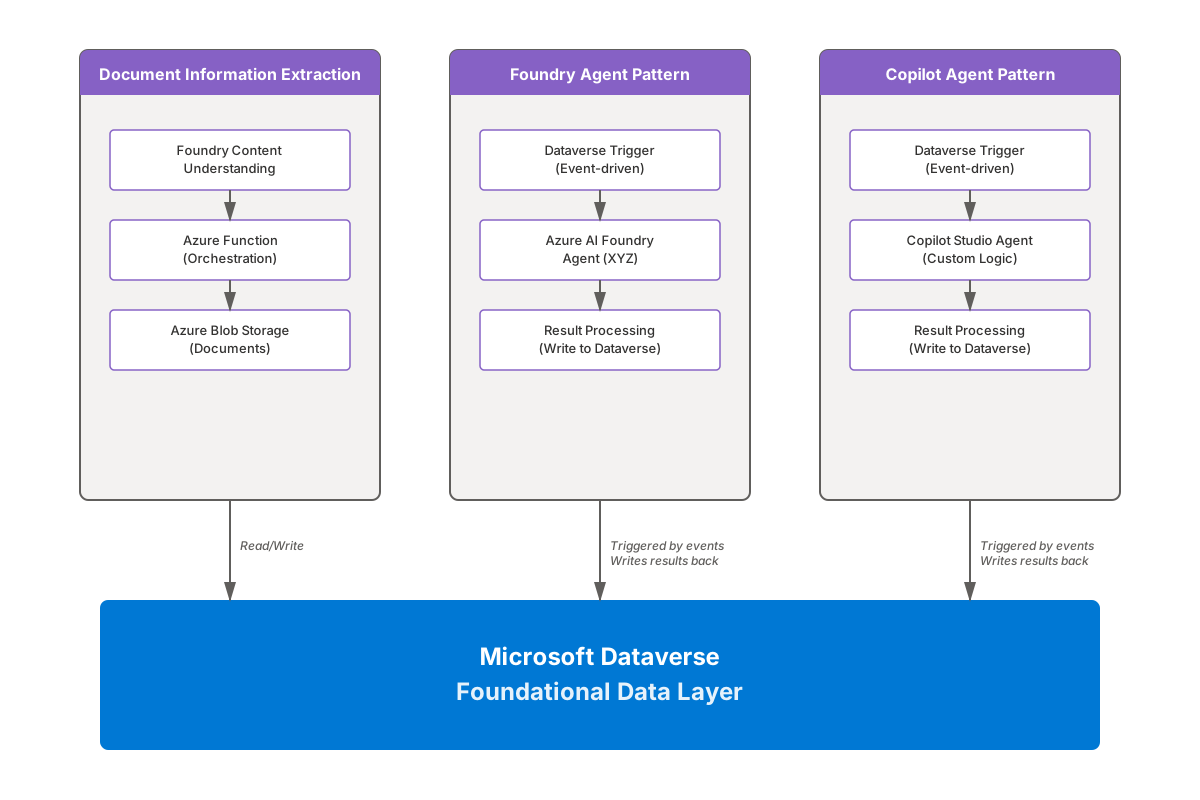
Each component is independent. All can be built and tested in isolation. They connect to Dataverse using the same foundational data model.
It’s a divide-and-conquer approach. Not parallel features of a big system. Independent and small projects, each building with a specialized technology stack.
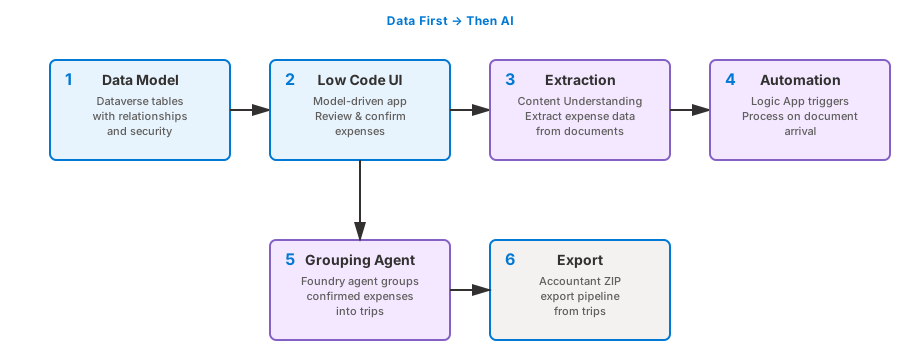
From AI-First to Data-First
Not only the sequencing was the shift. In the original spec, AI extraction and automation came first. The review UI was downstream. That’s what made it easy to skip. Now also the reduction of the scope makes it easier to realize version 2 step by step. Each component has a clear contract and can be delivered as a complete unit. No more “one sentence for an entire app” situations.
In the new structure, the main question has changed: how does a person actually work with this data?
Now Dataverse data model must be built before any automation. The model-driven app must be scoped and specified before any Agent or Logic App will be written. It is now a clear starting point for the entire system. The foundation. The first project. The first deliverable.
The Handover Contract
But separation of concern and sequencing alone doesn’t solve everything. My future components still need to talk to each other without becoming tightly coupled. That’s where I will use one table to change everything.
Expenses Management Tasks. It will become the contract between human actions and AI processing.
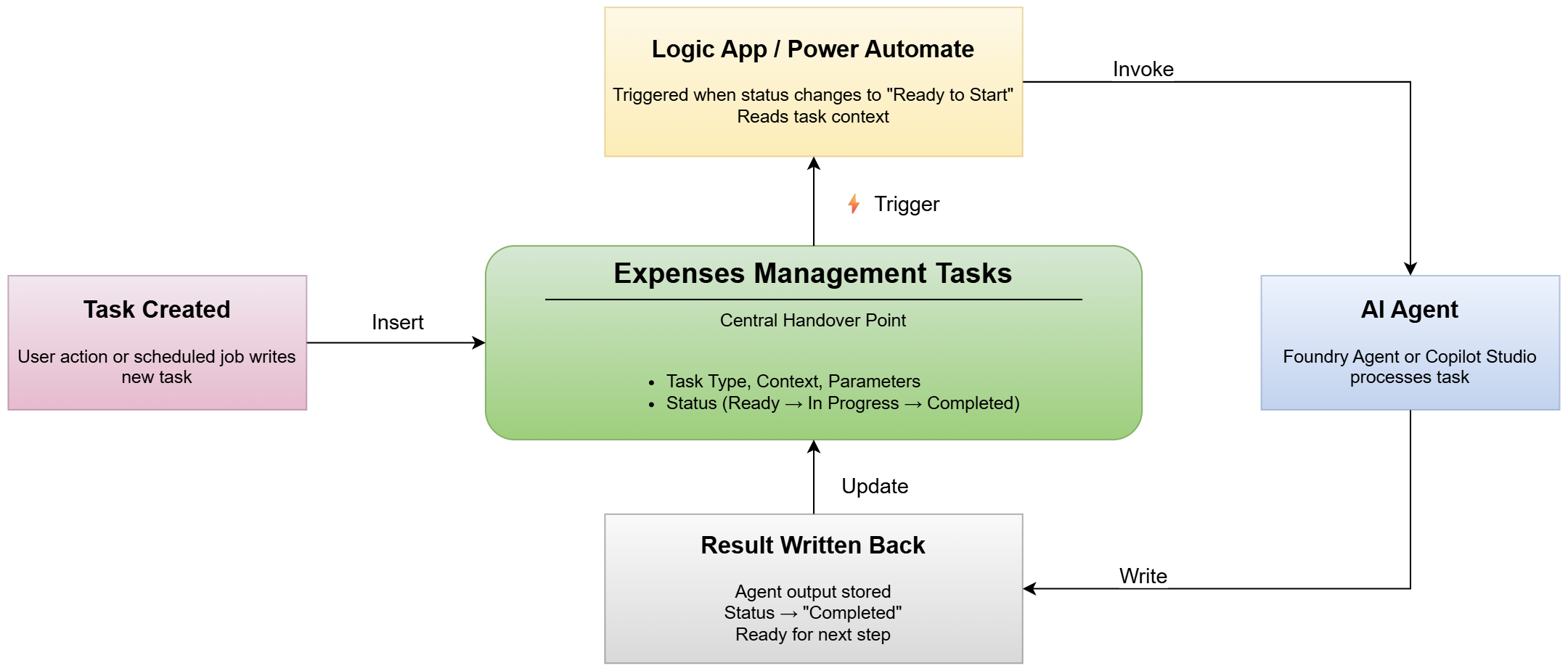
Watch the cycle. Task record created. Status flips to “Ready to Start.” Logic App triggers. Agent processes. Result writes back. Status: “Completed.”
Four steps. Every component can use this pattern.
The implementation details will come later in another post. For now, focus on the pattern itself. How triggers fire, how agents read context, how results flow back. What matters here: Dataverse isn’t just storage. It’s the orchestration layer.
This pattern solves the handover problem. I expect, those rigid workflows that broke when requirements changed will be gone. Every component will follow the same contract.
That’s what spec-driven development missed in my first attempt. Not the spec itself. The decision about splitting into smaller projects and defining clear handover points.
As promised, one of my next post covers the Dataverse-first restart.
Lessons from Spec-Driven Development
My lesson learned isn’t “write smaller specs.” It’s deeper than that.
Spec-driven development works when AI has constraints, not just goals. My constitution had enough principles. One of them said “start simple.”, but it never defined what simple meant in scope terms. No maximum functional requirements. No guardrails on when to decompose a spec or a system. Here I’m in charge as the architect to split, devide, and conquer.
As result of those missing guardrails, AI filled the gaps with what was interesting. In my case, Content Understanding analyzers and Logic Apps orchestration were built. Other parts like my expected Model-driven app was not. Here AI encountered a wall and decided to stop due to incompatible tools and no way to confirm results.
That’s not an AI failure. It’s my design failure.
Three things will change when I rebuild. First, scope became a hard constraint. Not advice. A rule. Second, Dataverse became the foundation. This means, I will define the data model and the human layer in a separate project before any agent will be built. In addition, I will establish a clear contract for my components to work together. Here I will use one table as the handover point to decouple human actions and AI processing.
This aren’t patches. This are architecture decisions.
My next post covers what happens when I restart with Dataverse-first. Stay tuned.
Read the full Spec-Driven Development series to see how this story continues.