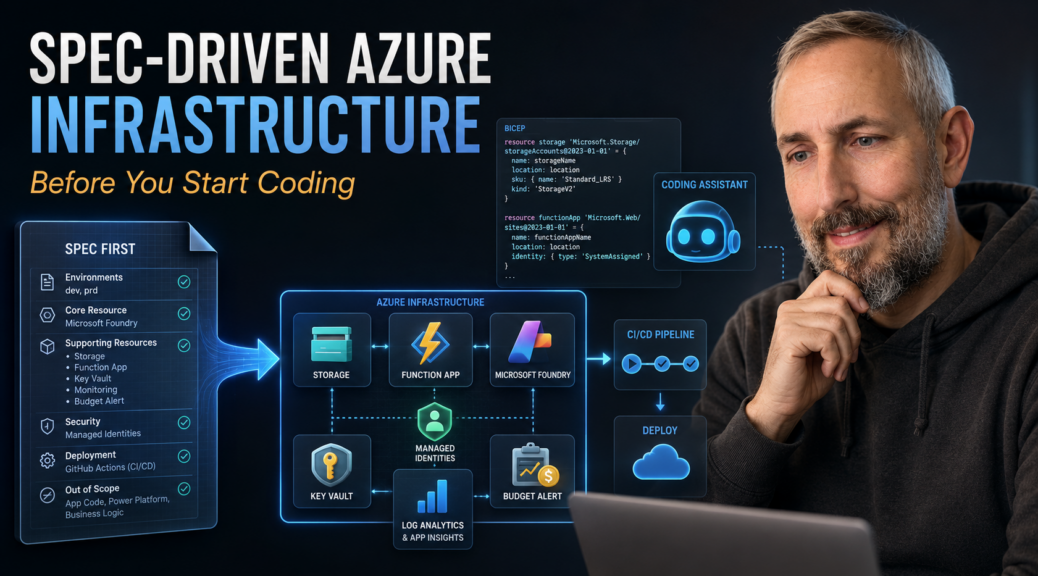
Spec-Driven Azure Infrastructure Before You Start Coding
What if you could describe your Azure environment in plain words and get it deployed – secure, cost-controlled, and repeatable? That is spec-driven Azure infrastructure. And you don’t need to be a cloud architect to try it.
I restarted my Expenses Manager in June with one ambition: rebuild it without click ops. No portal wizards, no manual setup. That is why I use spec-driven development and rely on GitHub Copilot to assist me.
In one of my previous posts, I had already split the system into smaller projects to make each part independently deployable. Now the focus shifts from Power Platform to the Azure AI backend. I’ll walk you through spec-driven Azure infrastructure step by step. Whether you build apps in Power Platform or write code for a living, you can follow the same approach.
This post covers why Azure blocks so many makers and the spec that replaces the portal. It also shows which questions Copilot asked about budget and cleanup, and what deploying first taught me. No Azure expertise required – just curiosity about GitHub Copilot as a developer tool.
What do you need to follow along? An Azure subscription. Don’t have one yet? Create a free Azure account. If your company already has Azure, ask your admin for a sandbox subscription. Note that the deployment creates role assignments, so you need an Owner-level role on that subscription.
But there is one catch, and it comes before any code.
Why Does Azure Stop So Many Power Platform Makers?
The Expenses Manager has one big job. It must read receipts, invoices, and tickets and turn them into structured data. That takes an AI backend.
I showed this idea at M365 Con DACH, in a session about automating documents with Power Platform and Content Understanding (German audio). Then, shortly before the talk, my demo environment fell apart. GitHub Copilot rebuilt it for me in minutes. It worked, but a rescue is not a plan.
This time, I want a solid foundation first. However, that is exactly where many Power Platform makers get stuck. In Power Platform, a new environment is a few clicks away. Azure is different. You need a subscription, resource groups, identities, secrets, regions, quotas – and a bill at the end of the month.
I’ve been there. Clicked through portal wizards. Forgot one setting. Never managed to repeat the result for production.
So I follow one rule: Azure foundation first, development second. Two goals guide me. First, keep it cost efficient: serverless resources, small AI models, and budget alerts. Second, keep it secure: managed identities instead of keys, and a safe place for secrets.
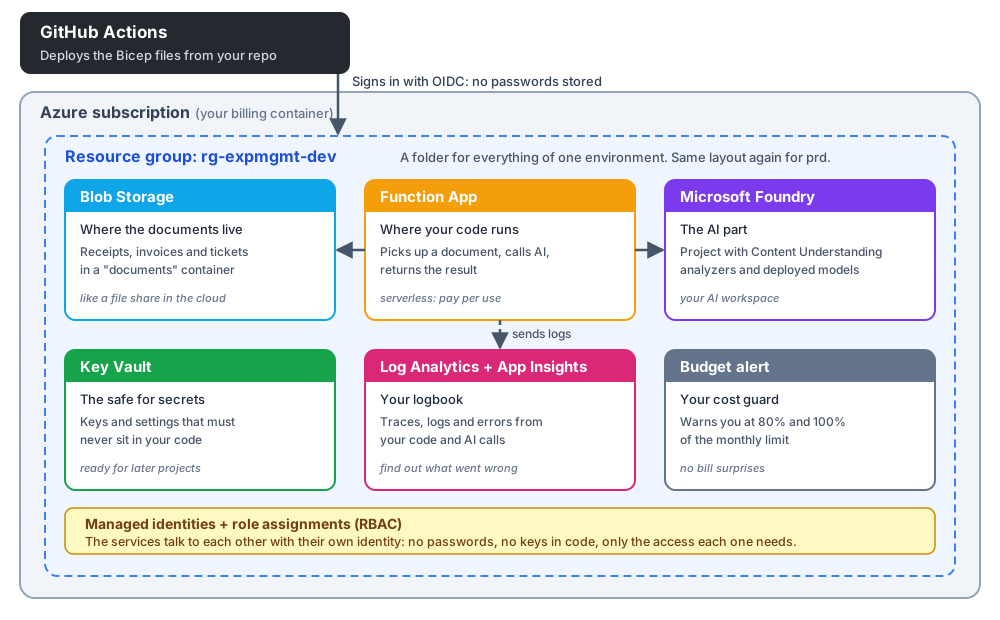
So how do you get there without a single click? You write it down first. I describe the Azure stack in a spec with GitHub 🌱 SpecKit. Then GitHub Copilot asks clarifying questions, plans the resources, writes the Bicep files, and deploys them. That is spec-driven Azure infrastructure in a nutshell.
Let me show you what that looks like.
Spec and Clarify
Writing Spec-Driven Azure Infrastructure
My first prompt was long. It reads like a briefing for an architect, not a ticket for a developer.
I opened GitHub Copilot Chat, ran /speckit.specify, and described the outcome. Two environments, dev and prd. Microsoft Foundry as the core. Managed identities instead of keys. Monitoring. Deployment through GitHub Actions. No Bicep, no resource sizes, no role names.
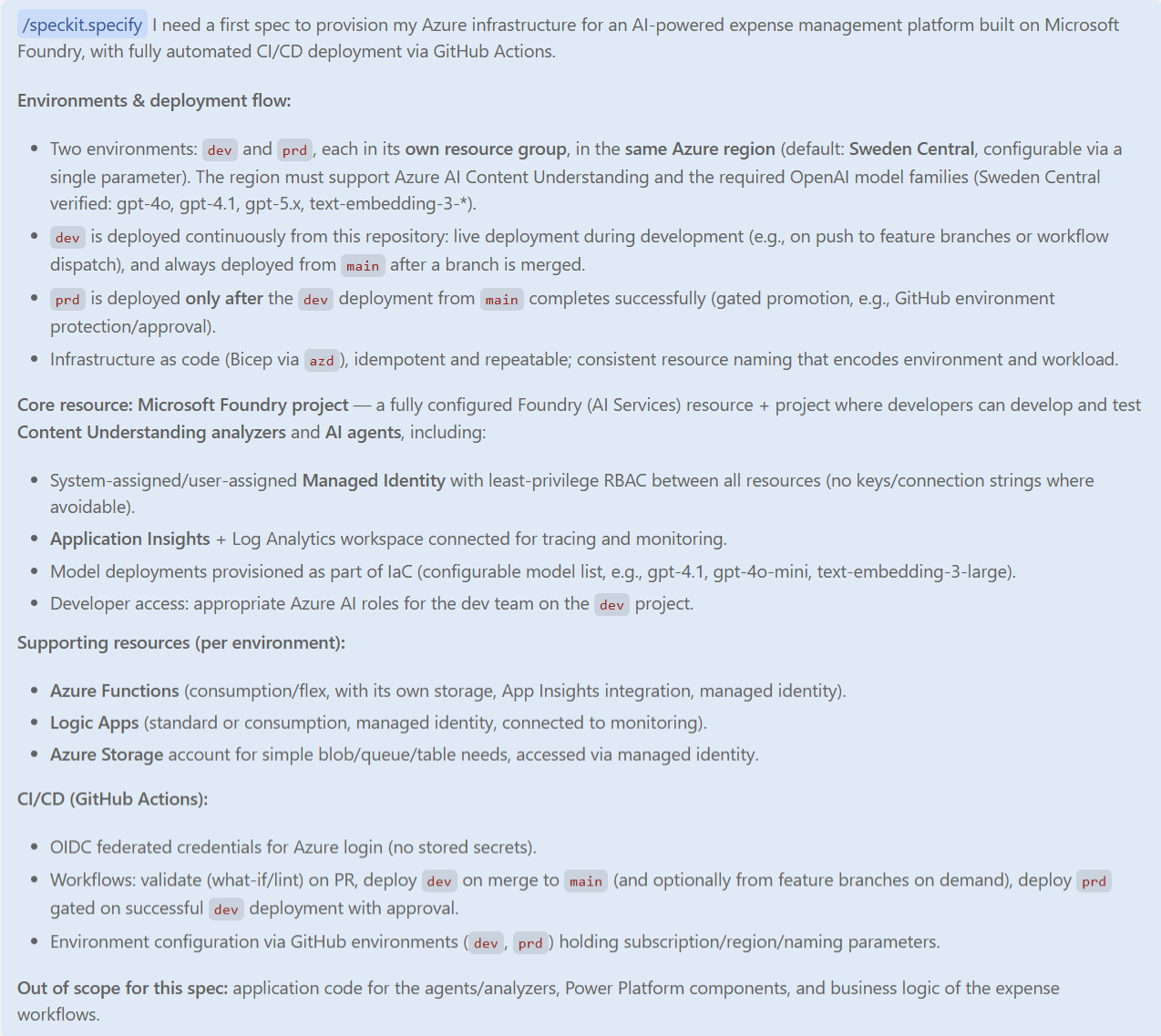
One line at the very end matters more than it looks:
> Out of scope for this spec: application code for the agents/analyzers, Power Platform components, and business logic of the expense workflows.
That is spec-driven Azure infrastructure in practice. You describe the what and the why. Copilot works out the how. In addition, you tell it where to stop. With that line, I keep Copilot focused on the Azure resources. No analyzers, no Power Platform, no business logic – those come later, in their own specs.
Who Decides the Budget? You Do.
A first spec is never complete. So I ran /speckit.clarify, and Copilot asked questions I had not thought about yet.
The first one was about money. What monthly budget should trigger the cost alerts? Copilot recommended about €200 for dev and €500 for prd, “a common starting point”.
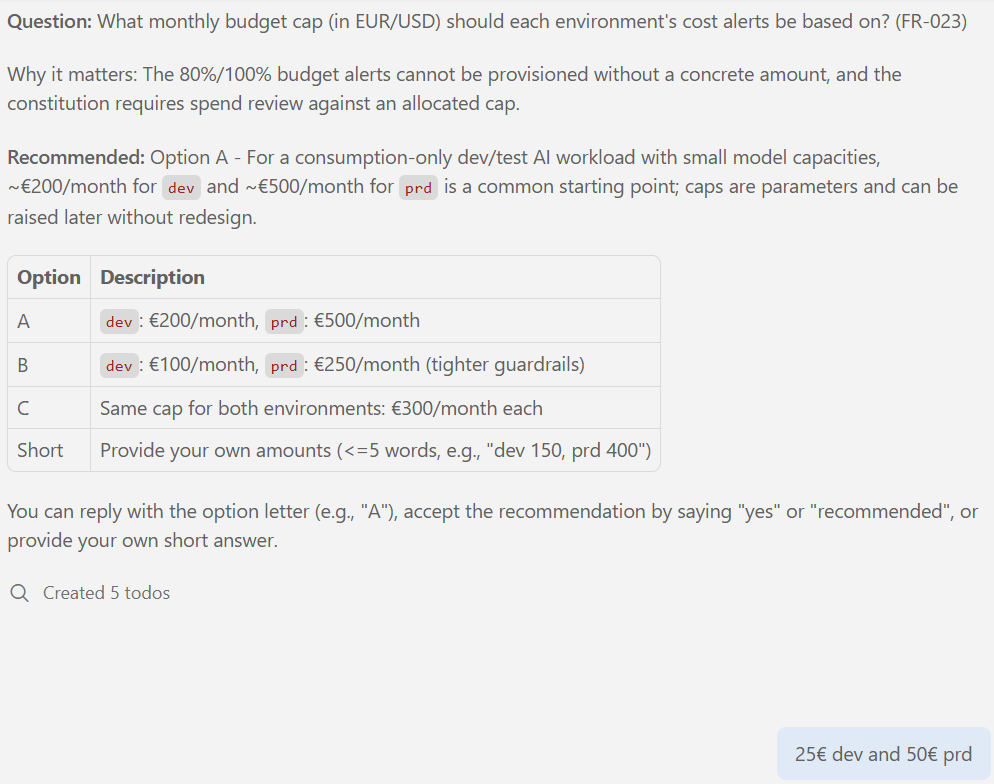
For a small serverless workload, that felt far too generous. My answer took one line: €25 for dev and €50 for prd. Cost efficient means setting the guardrail before the first deployment, not after the first bill. Copilot recommends. You decide.
Three more questions shaped my spec-driven Azure infrastructure. What happens when I remove a resource from the definition? I chose auto-delete. With deployment stacks, every deployment converges the environment to exactly what the spec declares. Next, where may the AI models process my data? EU data zone first, global only as a fallback. Finally, Copilot asked for a short workload name. I picked expmgmt, so rg-expmgmt-dev tells you workload and environment at a glance.
From Spec to Plan
Next, /speckit.plan turned the answers into a technical plan. It chose Bicep for the infrastructure code and the Azure Developer CLI (azd) for the deployment. Everything runs on serverless, pay-per-use tiers. If you want to try Bicep with Foundry on your own, Microsoft has a short quickstart.
The plan even sketches the repository. Think of it as the floor plan before the house is built:
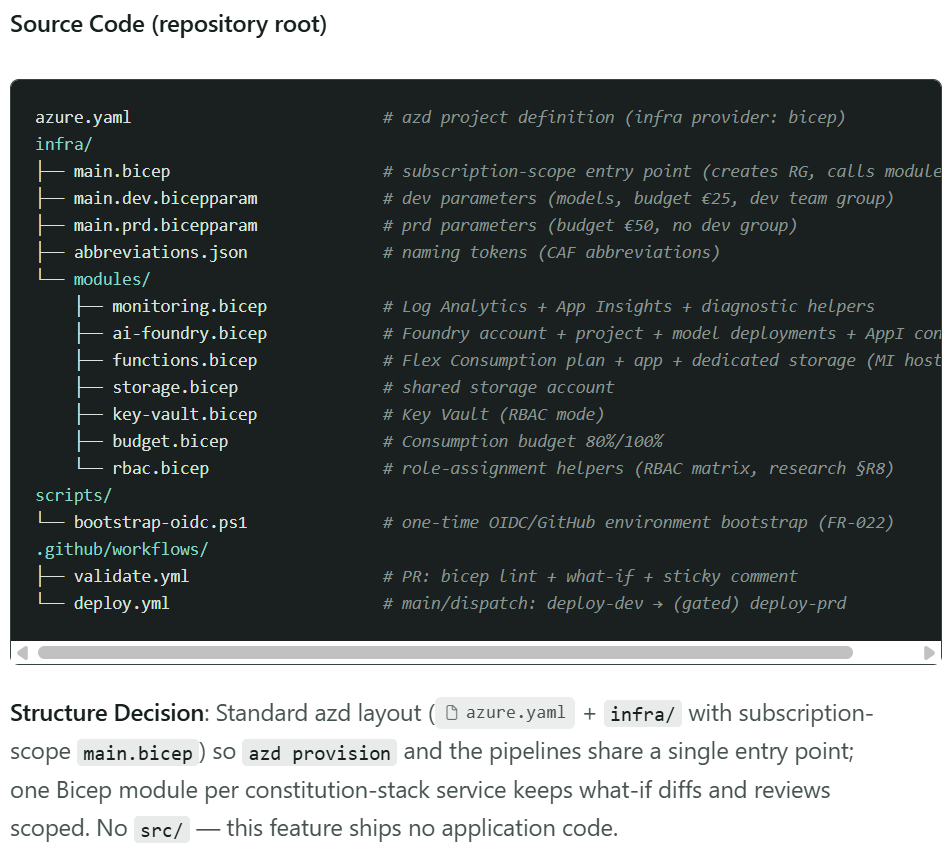
Notice three things. First, there is one Bicep module per service: monitoring, Foundry, functions, storage, Key Vault, budget, and role assignments. That keeps every change small and easy to review. Second, dev and prd share the same modules and differ only in their parameter files. That is where my €25 and €50 budgets landed. Finally, the plan states it in one line: “No src/ – this feature ships no application code.” The out-of-scope rule worked.
One detail made me smile. My prompt asked for Logic Apps. The plan left them out until I have a concrete need. Less to run, less to pay.
The plan also covers the pipeline. The two workflow files at the bottom of that tree do the work. GitHub Actions deploys dev after every merge to main, and prd waits for my approval.
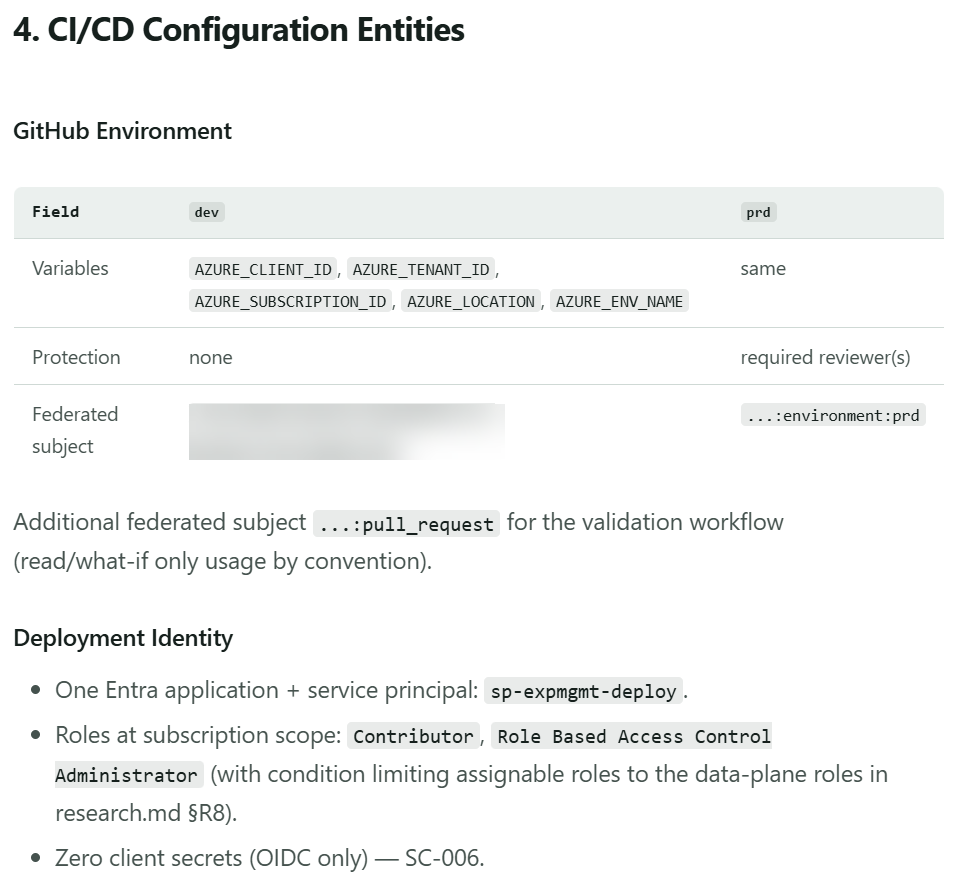
The table shows how that works. Each GitHub environment holds variables only, never secrets. In addition, prd has required reviewers, so nothing reaches production without my approval. The pipeline signs in to Azure through OIDC with a dedicated service principal. One line matters most: “Zero client secrets”. I’ll cover that part in a separate short post.
With the plan in place, Copilot could start deploying. Let’s look at what landed in Azure.
Two Failed Deployments, Zero Portal Clicks
The spec is written and the plan is approved. Then GitHub Copilot wrote the Bicep files and started the deployment with az stack sub create. This is what my dev resource group looked like afterwards:
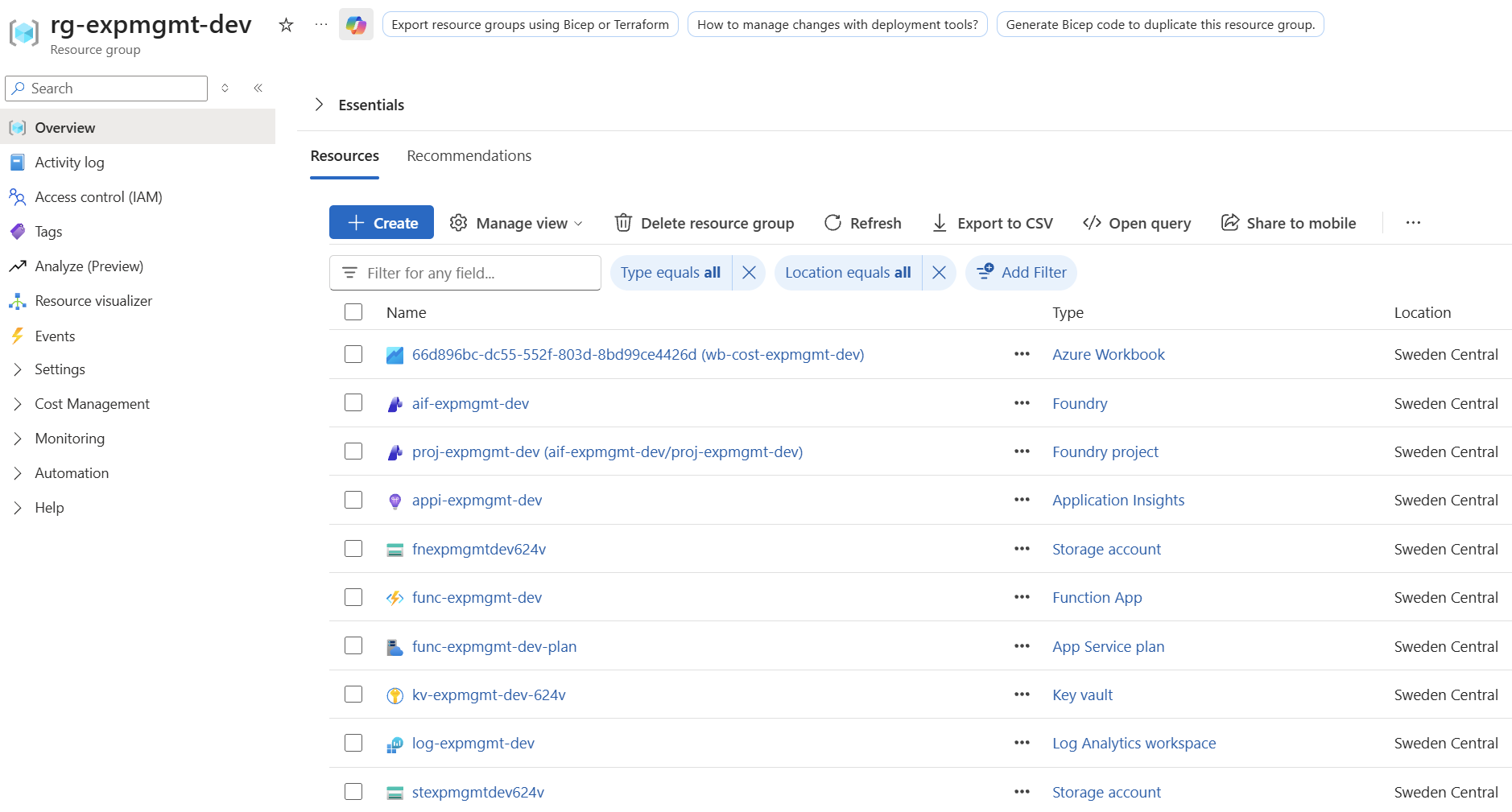
Remember the overview diagram from the start? My spec-driven Azure infrastructure now exists for real. And I did not create a single resource in the portal. The same definition builds prd. Only the parameter files differ, for example the €50 budget.
But the first deployment did not work. Twice.
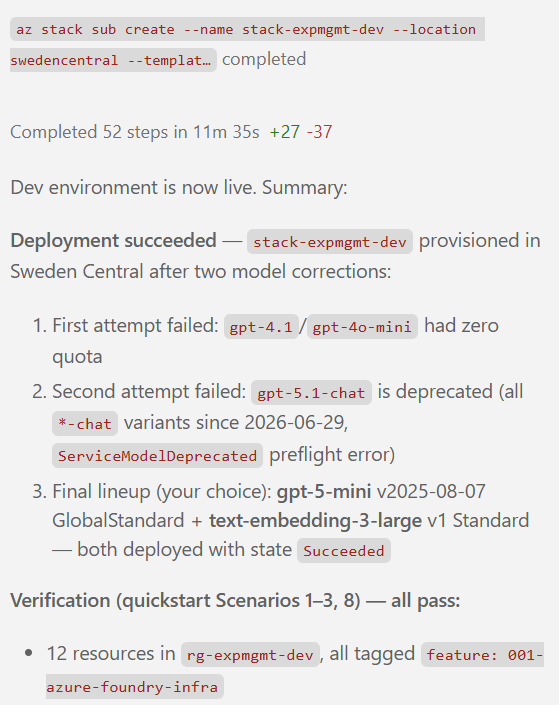
My prompt had named models that did not work for me. The first attempt failed, because gpt-4.1 and gpt-4o-mini had zero quota. The second failed, because gpt-5.1-chat is deprecated, together with all -chat variants. Copilot read the errors, explained them, and let me choose. I went with gpt-5-mini and text-embedding-3-large. The third attempt succeeded.
This is why I deploy my infrastructure stack first. Imagine finding that out after building the analyzers. Instead, one spec change fixed it in minutes.
And that was not the only lesson.
The Cheapest Place to Fail
Two failed deployments. And a prd environment that found no quota left. Let me be honest: my model quota is tiny. For an MVP, that is a shame. But it is a sponsored demo subscription, so I work with what I have. Model quota belongs to the subscription, not to the environment. The model-router shows it best: its limit of 10 is shared, so each environment takes 5. And I’m glad all of this happened before the first analyzer existed. Infrastructure is the cheapest place to fail.
What did I do, and why? My Expenses Manager needs an AI backend that extracts data from receipts, invoices, and tickets. That backend needs a home, and I wanted to build it without click ops. So I described the Azure stack in a spec with GitHub 🌱 SpecKit. Copilot asked the right questions, planned the resources, wrote the Bicep, and deployed it. I made the decisions: €25 and €50 as budgets, auto-delete, EU data zone first, and which models to use. The result is spec-driven Azure infrastructure: cost efficient, secure, and repeatable for dev and prd.
The foundation is live, and the Foundry project is waiting. Now I’m ready to build my analyzers in the next spec.